

Anker PowerExpand 8-in-1 USB-C PD Media Hub (Dual 4K HDMI) for Laptop Docking
Reviews
Price
Product description
What it is and what problem it solves
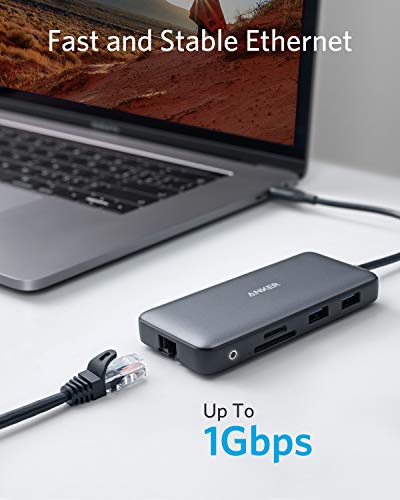
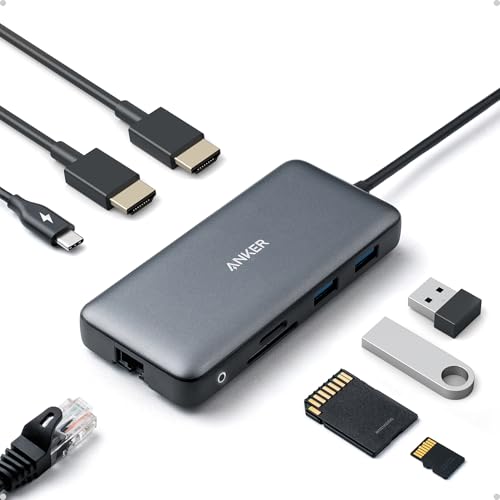
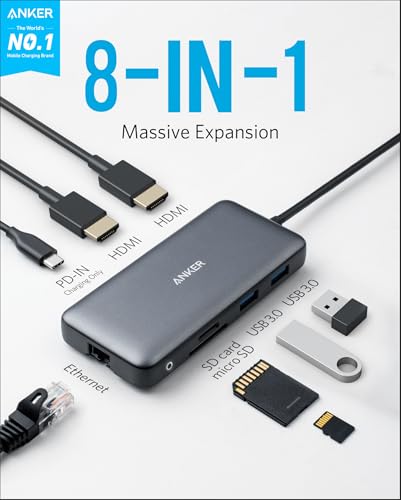
The Anker PowerExpand 8-in-1 USB-C PD Media Hub is a compact docking station that plugs into a single USB-C port to expand a laptop’s connectivity. It targets users who want a cleaner desk setup or a single gadget to connect multiple peripherals without juggling cables. On paper, it adds two HDMI outputs, USB-A data ports, an Ethernet jack, SD/microSD readers, and a USB-C PD input that supports pass-through charging. Practically, that means you can drive two external displays or mirror to two screens, move data quickly, and keep a laptop charged through a single connection. If your workflow includes video conferencing, light file transfers, and occasional gaming or media streaming, it aims to simplify the layout while preserving performance.
How it fits into everyday use
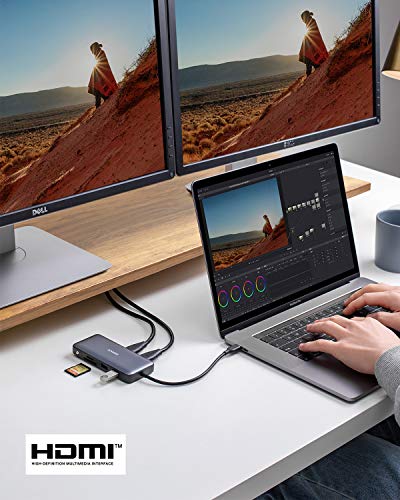
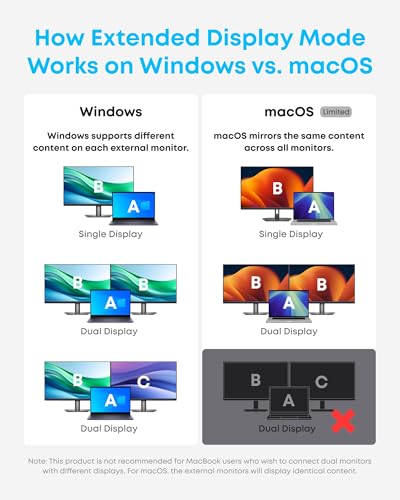
If you’re working with a modern laptop that supports USB-C PD, USB-C/Thunderbolt, or DP Alt Mode, this hub can become the central hub for your desk: one cable to your laptop, two external displays, wired network, and fast data access from SD cards. For macOS users, note that both external displays will mirror when using the two HDMI outputs. This is a helpful reminder if you rely on dual independent displays, since you may need to pick one display path instead.
What stands out — the strengths on paper
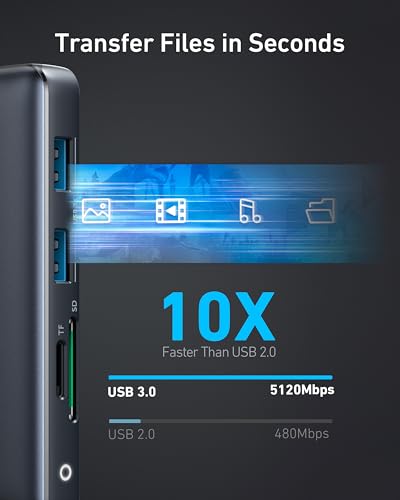
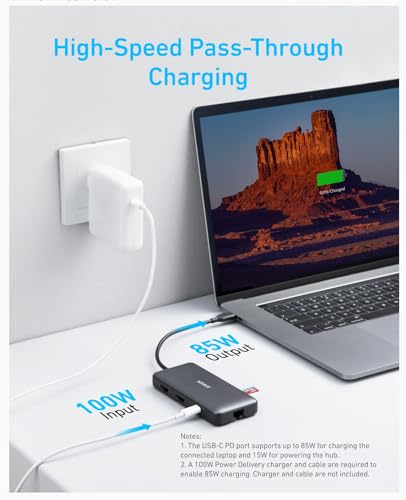
The standout elements are the dual HDMI outputs for 4K at 30Hz (or 4K@60Hz on a single display) and the 85W Power Delivery pass-through, provided you have the compatible charger and cable. The inclusion of both USB-A ports and a microSD/SD reader adds everyday convenience for file transfers and quick media access. Compatibility with USB-C, USB4, and Thunderbolt broadens device support beyond just standard USB-C laptops.
What may give you pause — the limitations
While the dual 4K capability is appealing, the 4K@60Hz option is only available when using a single HDMI output. When driving two displays, you’re looking at 4K@30Hz per monitor, which may be noticeable if you depend on high-refresh content. Also, macOS users should plan for identical displays when using both HDMI outputs. Linux compatibility is not stated, so if your setup runs Linux, this isn’t the safest bet. Finally, to take full advantage of the 85W PD pass-through, you’ll need a 100W PD wall charger and a matching USB-C to USB-C cable.
Who it’s for
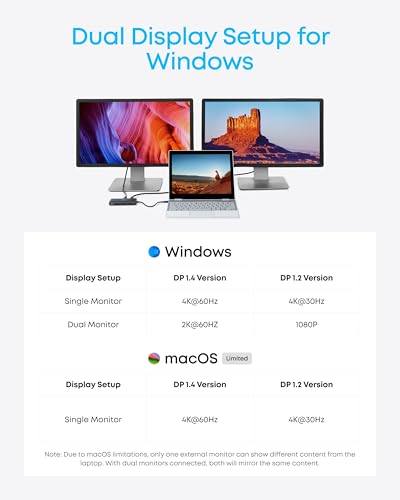
If you prioritize desk space and want a versatile hub that covers video, data, and charging through one cable, this dock fits you. It’s suitable for professionals with a Windows laptop, ChromeOS device, or a computer that supports DP Alt Mode and Power Delivery. Creatives or engineers needing quick SD card access and reliable wired networking will also find value here.
Who it might not be the best fit
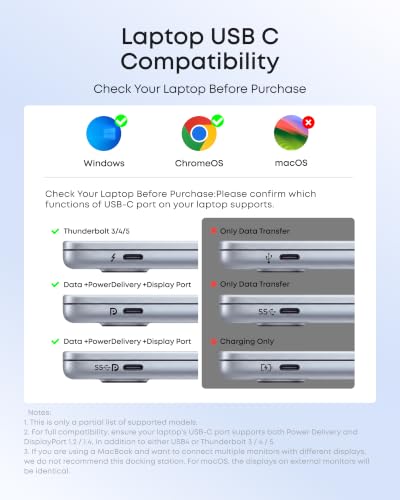
If you rely on two independent 4K displays at 60Hz each, or you’re on Linux, you may want to consider alternatives. If your laptop’s USB-C port doesn’t support DP Alt Mode or Power Delivery, some features won’t function as expected. Additionally, if your work requires high-refresh rates for gaming or fast-paced design workflows, it might feel limiting when both HDMI ports are active at 4K.
What to check before buying
Confirm your laptop supports DP Alt Mode and Power Delivery over USB-C. Plan your charging setup: you’ll need a 100W PD charger and a USB-C to USB-C cable to enable true pass-through charging up to 85W. Consider whether you need two independent 4K monitors or mirrored displays, and check whether your operating system will mirror or extend as you expect.
Practical usage example
Imagine a daily workflow where you’re coding on a laptop, streaming a video on one external monitor, and reviewing a design reference on another. You can keep editing on the laptop while the two HDMI outputs feed separate screens. SD card transfers from a camera take place via the microSD reader, and a stable wired connection keeps video calls crisp through Ethernet. If you prioritize a neat desk without swapping cables, this setup makes a real difference.
Tech specs
- Name: PowerExpand 8-in-1 USB-C PD Media Hub
- Type: USB-C docking station with dual HDMI outputs
- Format: USB-C hub with multiple ports
- Size: Compact form factor suitable for desk setups
- Capacity: 8-in-1 configuration including network, SD card, and multiple USB ports
- Dimensions: Not specified in available data
- Weight: Not specified in available data
- Material: Not specified in available data
- Color: Not specified in available data
- Display: Dual HDMI outputs (4K@30Hz when two displays, 4K@60Hz on a single display)
- Resolution: 4K@60Hz single display, 4K@30Hz per display when using both HDMI ports
- Refresh rate: 60Hz (single HDMI), 30Hz per display (dual HDMI)
- Processor: Not specified
- Memory: Not specified
What to know before you buy
It’s important to understand the trade-off between single-display 4K@60Hz and dual-display 4K@30Hz. If your work benefits from high-detail single-monitor work, this is a big plus. If you need constant dual 4K at 60Hz for video editing or fast motion, you may feel the limitation. Also, macOS users should plan for display mirroring on both external monitors when using the dual HDMI setup.
FAQ (brief)
- Does it charge and power the laptop at the same time? Yes, via USB-C Power Delivery pass-through up to 85W, with a compatible 100W charger and USB-C to USB-C cable.
- Can I connect two displays with different content? On macOS, both displays mirror, on Windows/ChromeOS, you can extend to two independent displays at 4K@30Hz each.
- Is it compatible with Linux? Not specified, likely not supported based on provided notes.
Is it worth it?
Final verdict: Worth considering if you want a compact, all-in-one hub to simplify a multi-monitor desk setup, particularly when you value wired networking, SD card access, and charging through one cable. It’s a sensible pick for Windows or ChromeOS users who can leverage the dual HDMI outputs at 4K@30Hz and want a clean, minimal cable footprint. If you need true dual 4K@60Hz or Linux compatibility, you may want to explore other options or verify compatibility with your exact setup.