

14-in-1 USB-C Docking Station (Dual HDMI + Triple Display) for Dell/HP/Lenovo Laptops
Reviews
Price
Product description
What this docking station is built to do
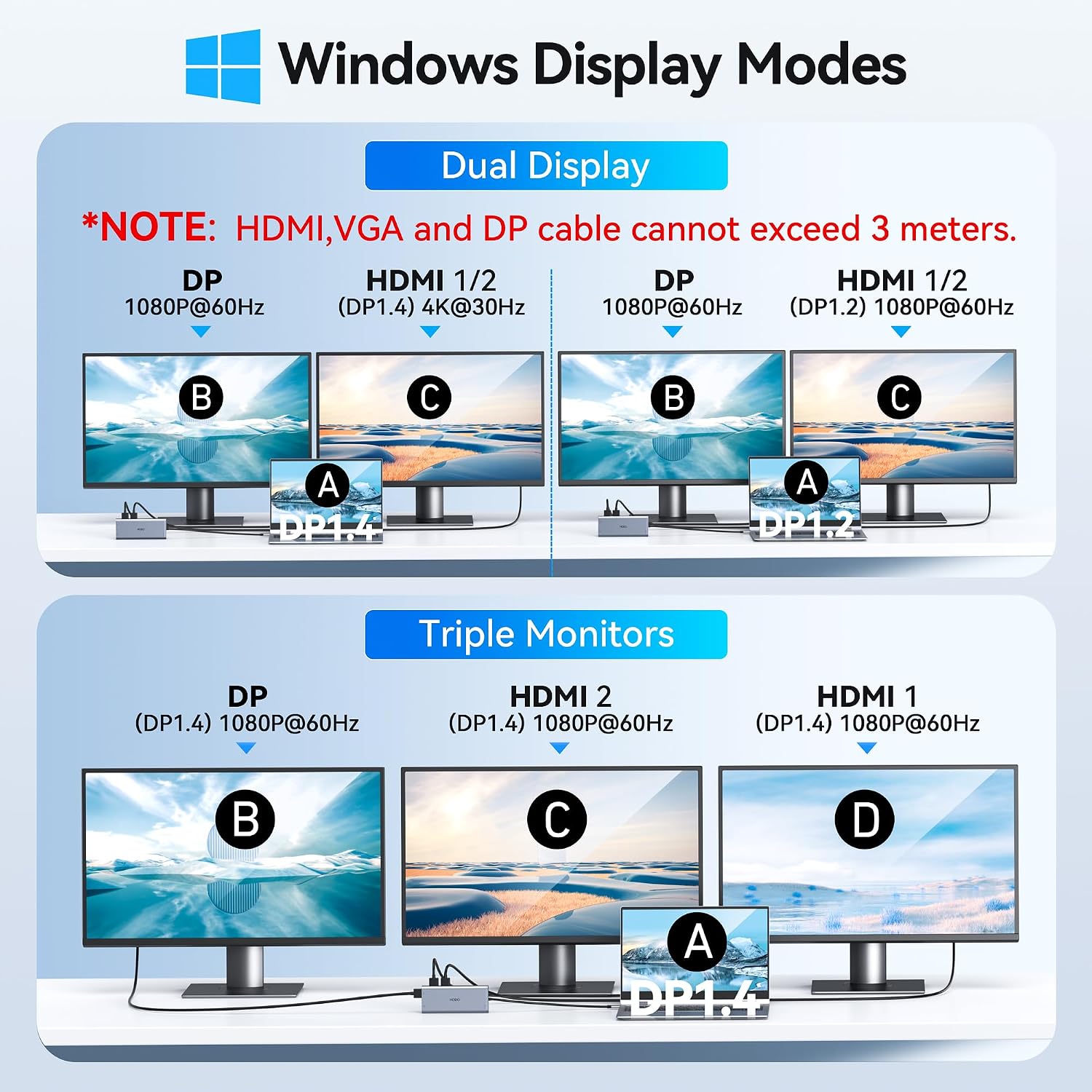
This 14-in-1 USB-C docking station is designed to turn one USB-C port into a full daily-work setup, with a focus on multi-monitor output, wired Ethernet, and a bundle of common peripherals. The headline promise is dual-monitor support over HDMI plus additional display options via DisplayPort—so your laptop can run a more “desktop-like” workspace without constantly swapping cables.
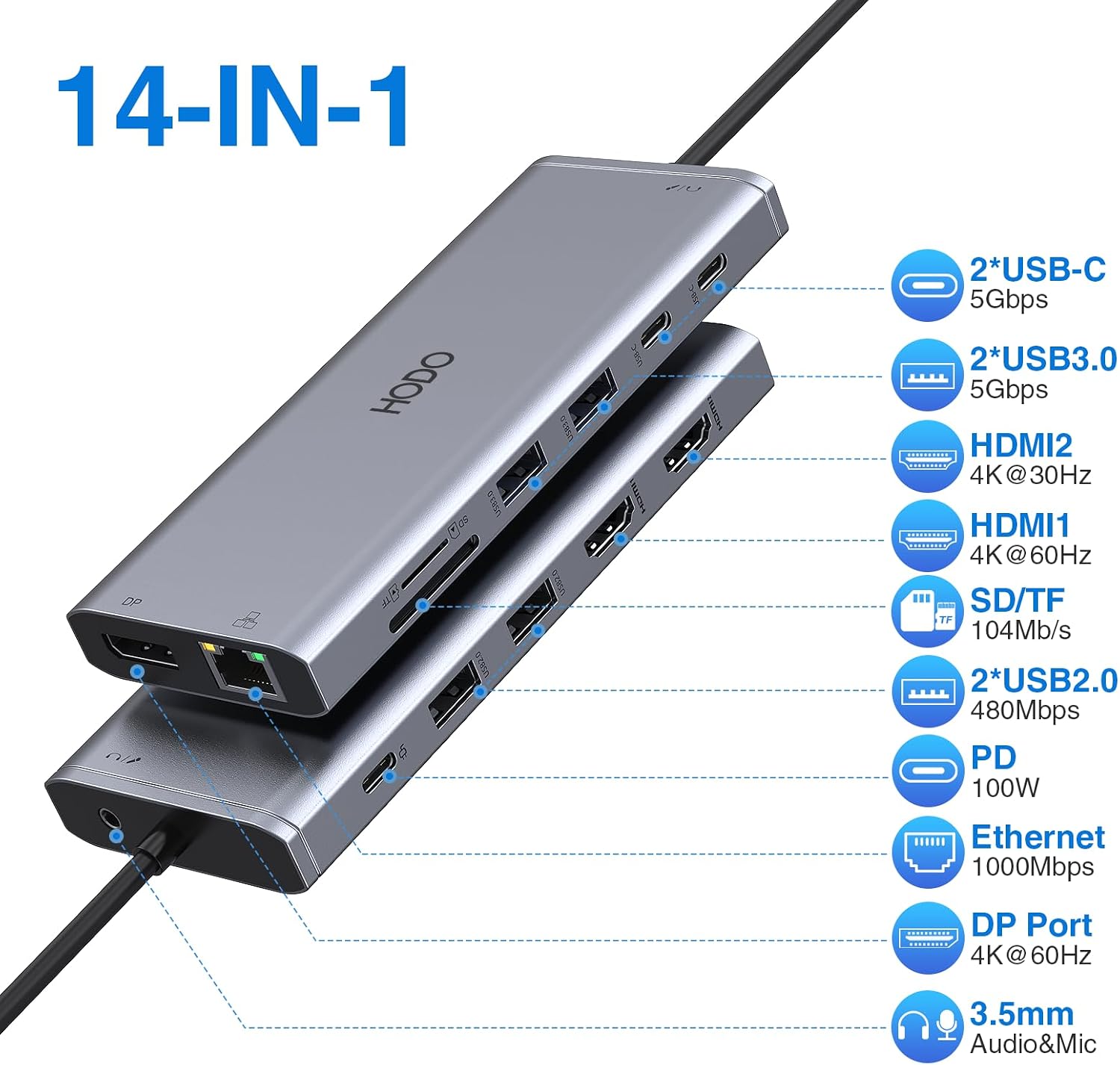
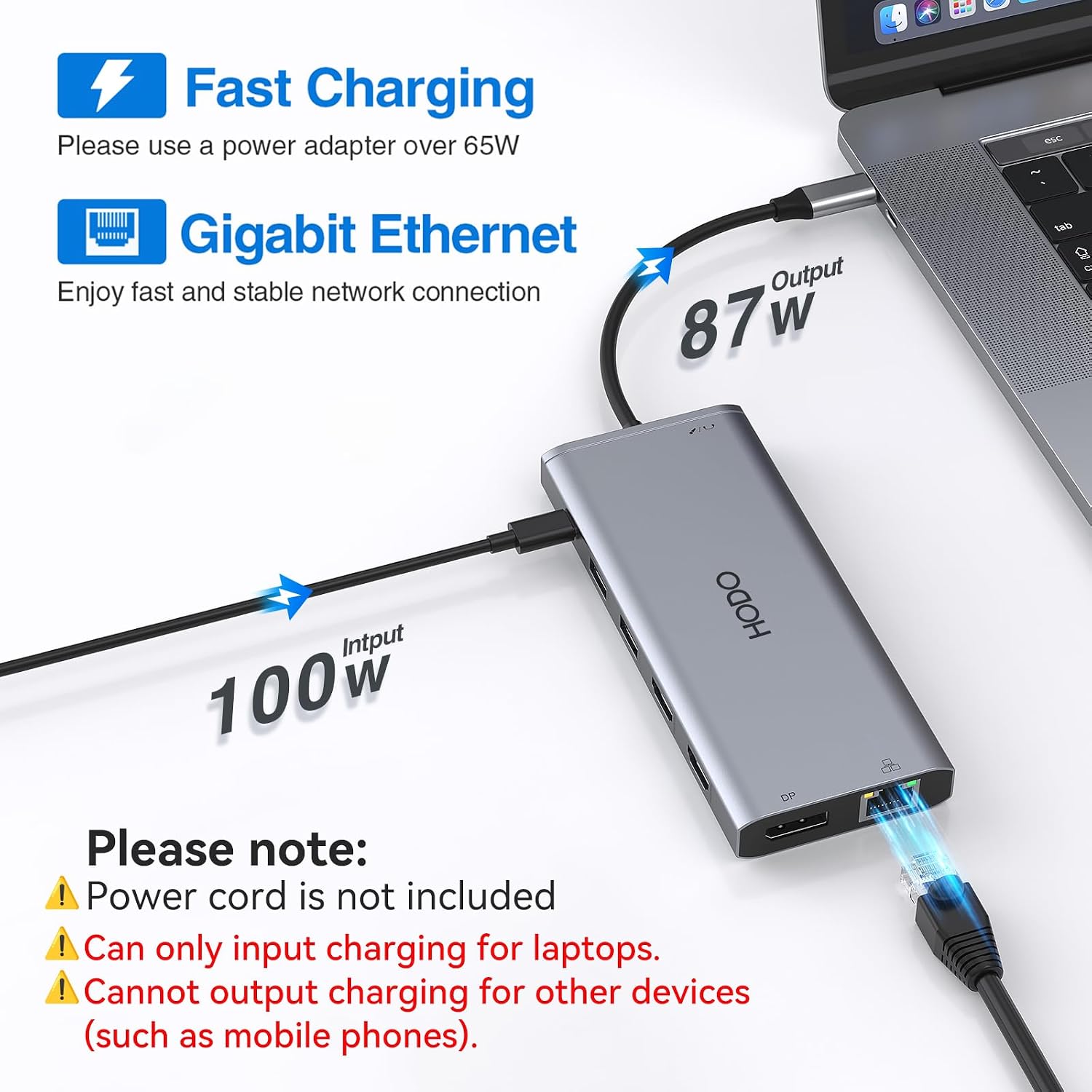
On paper, it covers a lot: dual monitor video (via HDMI and DP), gigabit Ethernet, multiple USB ports (USB 3.0 and USB 2.0), SD/microSD card readers, an audio + mic 3.5mm jack, and a USB-C power delivery charging port rated up to 100W. If you’re the type who uses a laptop for work and wants fewer compromises—this is the sort of dock that can make that easier.
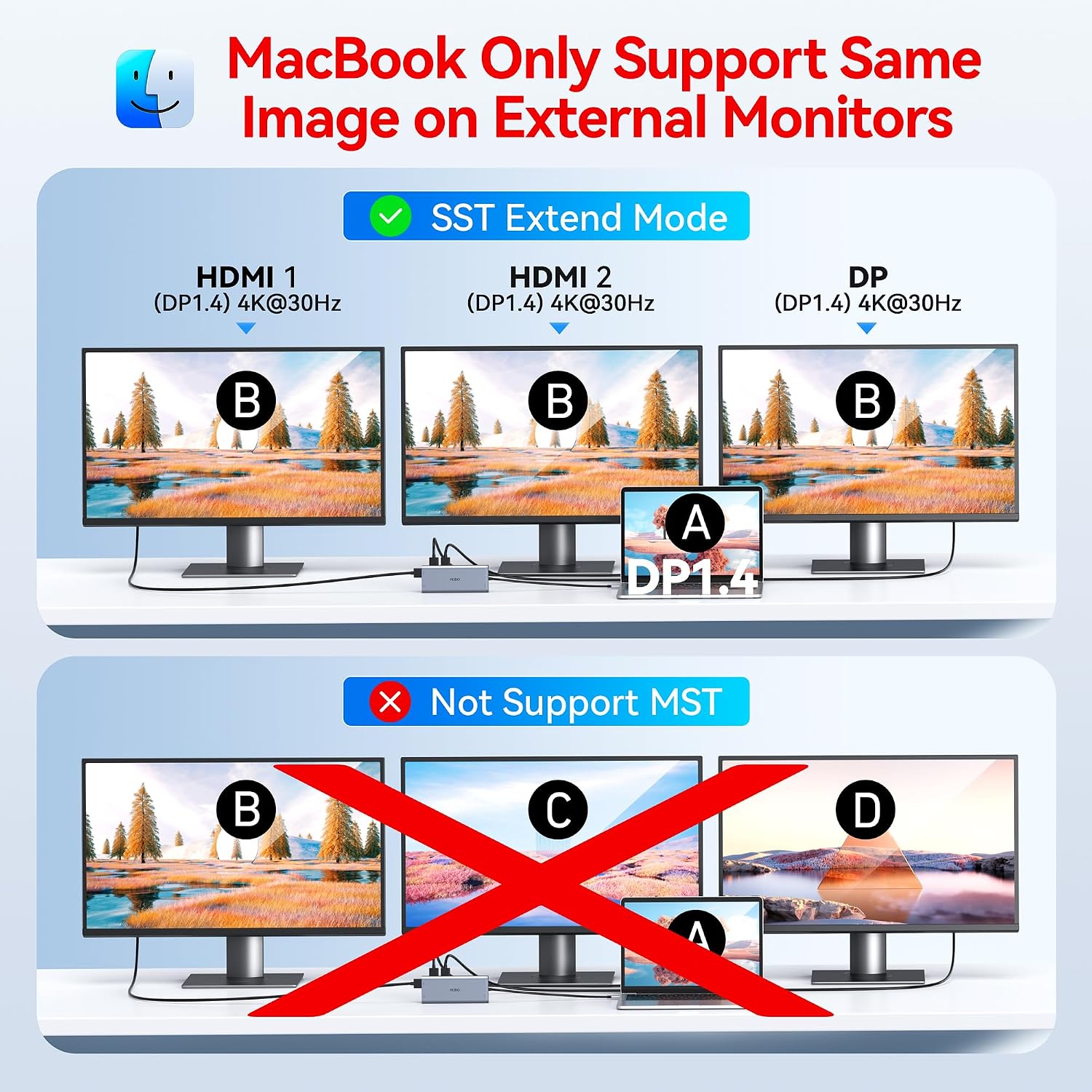
Still, it’s not perfect for every situation. The brand notes that on macOS the monitors may mirror instead of extending, and it also includes a compatibility warning: only the laptop’s built-in USB-C port is the fully functional one for the multi-monitor feature. If your setup isn’t sure, you’ll want to verify compatibility before committing.
Where it really shines in everyday use
The most practical wins here are the “desk wiring” improvements. Instead of plugging in power, Ethernet, card readers, audio, keyboard, and storage one by one, the dock consolidates them.
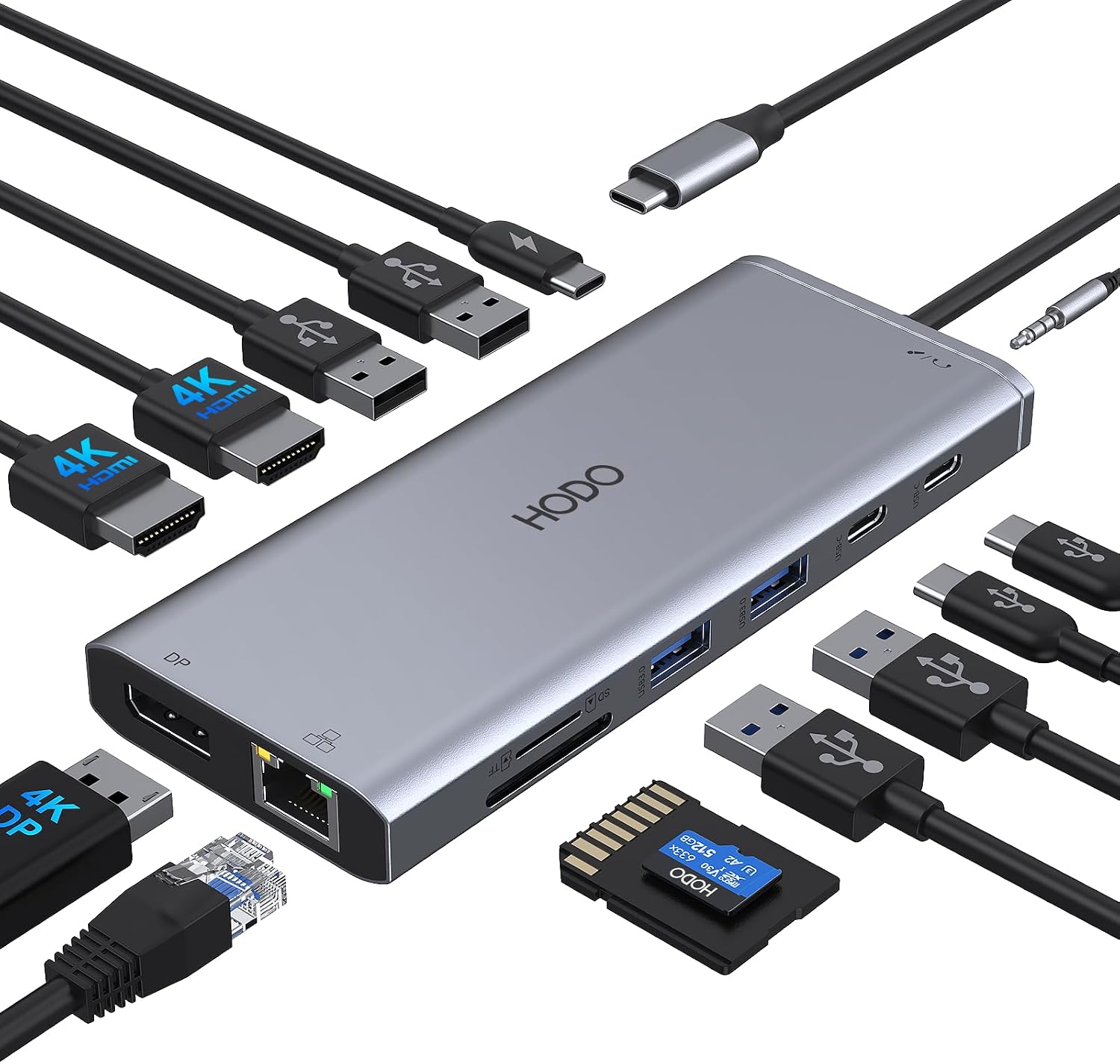
A realistic example: you arrive at your desk, connect the laptop to the dock with one USB-C cable, then plug in your dual monitors (HDMI) and one DisplayPort screen if you’re aiming for a triple display workflow. You can also run a wired Ethernet connection immediately for stability, and use the SD/microSD readers for quick photo imports. That means fewer interruptions and less cable management—especially if you bounce between home and office.
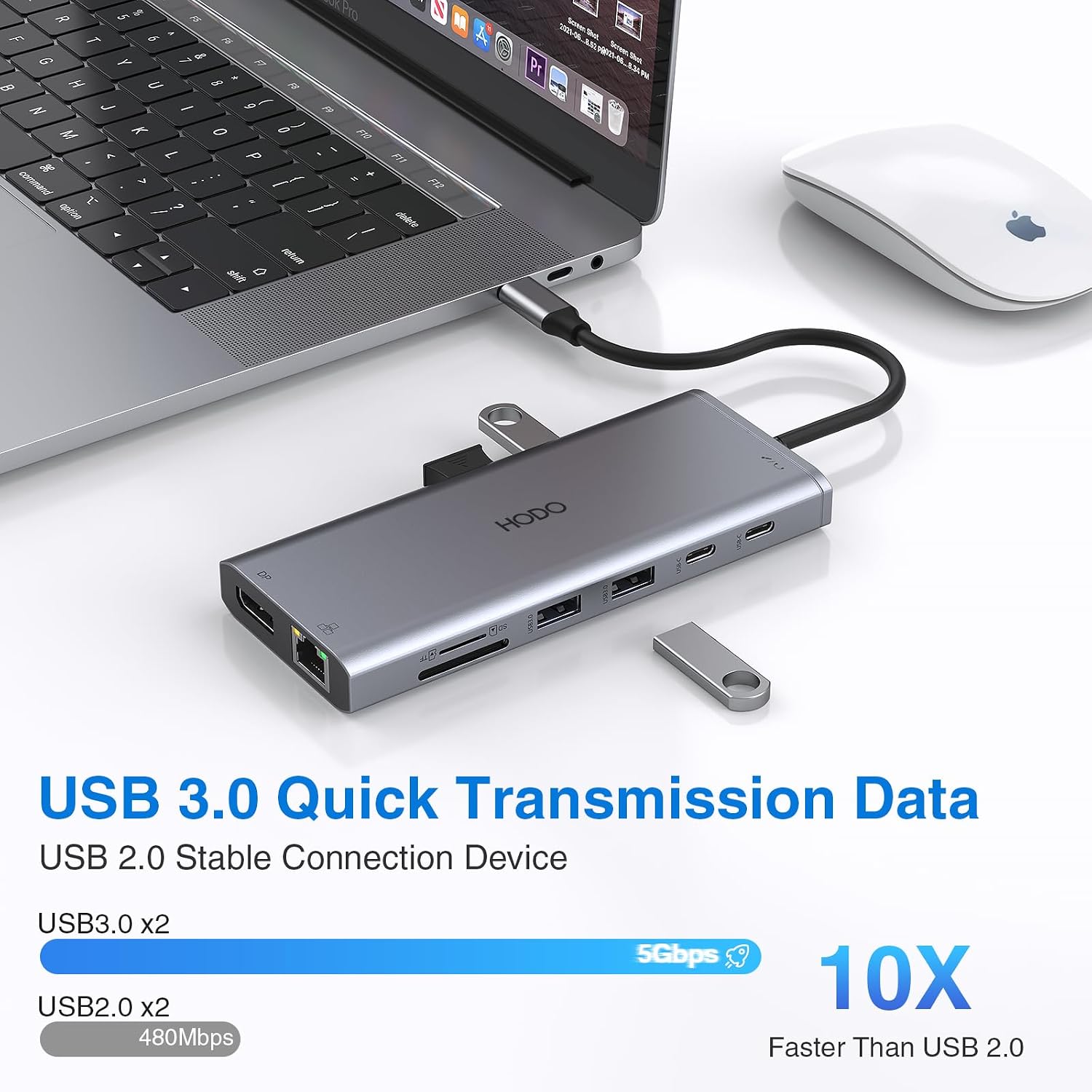
The dock also includes two USB 3.0 ports and two USB 2.0 ports. The 5Gbps USB 3.0 transfer speed is meant to keep file moves from USB drives and storage from feeling painfully slow, while the USB 2.0 ports can support a keyboard or mouse without lag (at least per the product’s intended use).
Key points to understand before you buy
Compatibility and display behavior are the two areas worth paying attention to.
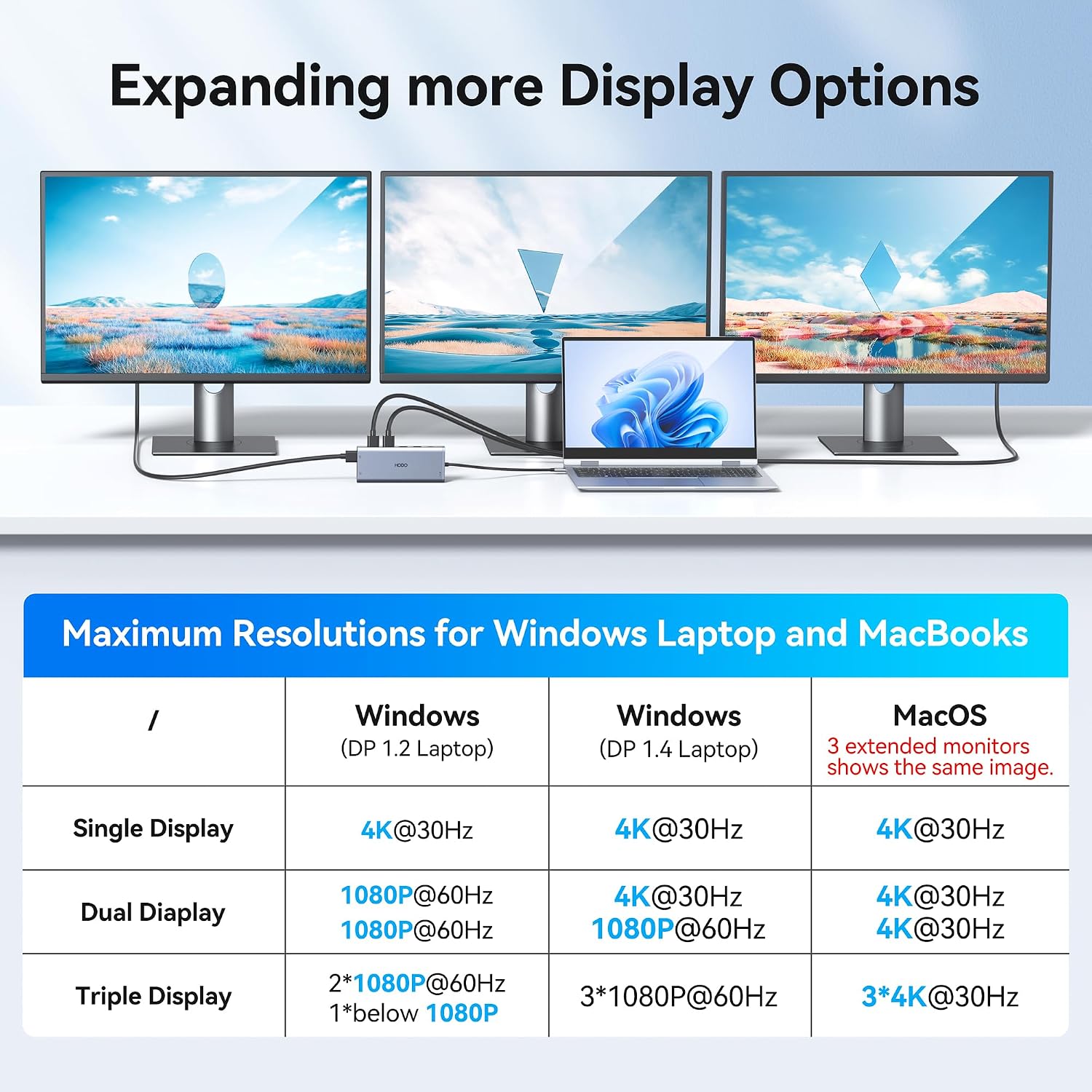
First, multi-monitor output depends on your laptop’s USB-C capabilities. The product explicitly notes that only the built-in USB-C port of your laptop is fully functional for the dual/triple monitor features. If you’re using a dock-only setup or a USB-C port that isn’t meant for video, the results may disappoint.
Second, macOS is called out: external monitors may show the same screen regardless of mirror vs extend mode. So if you’re on macOS and you’re expecting true extended desktop across multiple displays, you may be better off confirming expectations early.
Finally, this dock is positioned for everyday productivity rather than “advanced workstation” demands. For example, one note says it’s a USB-C dock only allowing connection of one HDD/SSD at a time—so if your storage workflow is complex, you’ll want to plan around that limitation.
Tech specs (as stated by the manufacturer)
- Power delivery: USB-C Power Charging Port up to 100W
- Video output: Dual Monitor 4K HDMI and additional DisplayPort support for triple display use
- Network: Gigabit Ethernet (10/100/1000BASE-T)
- USB ports: 2x USB 3.0 and 2x USB 2.0, USB-C data transfer ports up to 5Gbps
- Card readers: SD and microSD
- Audio: 3.5mm Mic/audio jack
- Storage note: supports USB-C dock use with only 1 HDD/SSD connected at the same time
- Charging/power accessory note: power cord and power adapter are not included
- Manufacturer note: macOS may mirror external displays
The main trade-offs (so you’re not surprised)
This dock can be a strong “one-cable desk” upgrade, but there are a few practical caveats.
If your goal is multi-monitor extended desktops on macOS, the manufacturer’s note suggests behavior may be limited (mirroring). If your priority is truly independent multi-screen work, you may need to check your specific macOS workflow expectations first.
Also, the power delivery is rated up to 100W, but the dock doesn’t include the power cord or power adapter. That means you’ll want to make sure you already have what’s needed to actually feed the dock and charge your laptop as intended.
And while the dock offers a lot of ports, it’s still “only” a USB-C hub/dock approach—so the more demanding your display setup or data-heavy tasks are, the more important it becomes to confirm that your laptop’s USB-C port supports the required video modes.
Who it’s for (and who should skip it)
This is a solid fit if you:
- Want a 14-in-1 style USB-C docking hub to reduce cable clutter on a daily desk setup.
- Need gigabit Ethernet without relying on WiFi reliability.
- Use SD/microSD media and wired audio via the 3.5mm mic/audio port.
- Are comfortable verifying that your laptop’s built-in USB-C port supports the dual/triple monitor functions.
It might not be the best match if you:
- Are counting on extended multi-monitor behavior on macOS, since mirroring is specifically mentioned.
- Don’t have (or can’t confirm you have) the right power accessory for charging through the dock.
- Expect simultaneous multi-storage expansion (the dock note suggests only one HDD/SSD at a time).
When it makes sense to buy it
If your laptop is compatible and your target is a dual-monitor (HDMI) + wired Ethernet + peripheral hub setup, this docking station can be a practical productivity upgrade. The feature mix—Ethernet, multiple USB types, card readers, and audio in one dock—maps well to common home-office and desk routines.
For buyers who want a simple “plug in once” experience and already have a laptop that supports the right USB-C video capabilities, it’s exactly the kind of adapter that earns its place on the desk.
Buying verdict
It’s worth considering if you need a port-rich USB-C docking station that supports dual HDMI plus DisplayPort-based multi-display setups, while also adding gigabit Ethernet, SD/microSD readers, and a 3.5mm audio + mic jack. The trade-off is that compatibility and macOS display behavior aren’t something to assume—those notes matter.
If you’re on macOS and you want true extended desktops across multiple external monitors, you may want to skip or verify carefully first. And if you’re missing the power cord/power adapter, factor that in before you commit.
Mini FAQ
Is this docking station compatible with Mac?
The manufacturer notes that on macOS, external monitors may mirror rather than extend, regardless of mirror or extended mode.
Do I need to use the laptop’s built-in USB-C port?
Yes. The product states that only the built-in USB-C port of your laptop is the fully functional port for the dual/triple monitor feature.
Does it include the power adapter?
No. The product notes that the power cord and power adapter are not included.
How fast are the USB ports for file transfers?
The stated USB 3.0 transfer speed is up to 5Gbps for the USB 3.0 USB-C hub/data ports.
Can I connect more than one HDD/SSD?
The listing notes that the dock supports only one HDD/SSD connection at the same time.