

RK Royal Kludge F99 Wireless Mechanical Keyboard with Number Pad (Tri-Mode, Hot-Swappable, 5000mAh)
Product description
The essentials
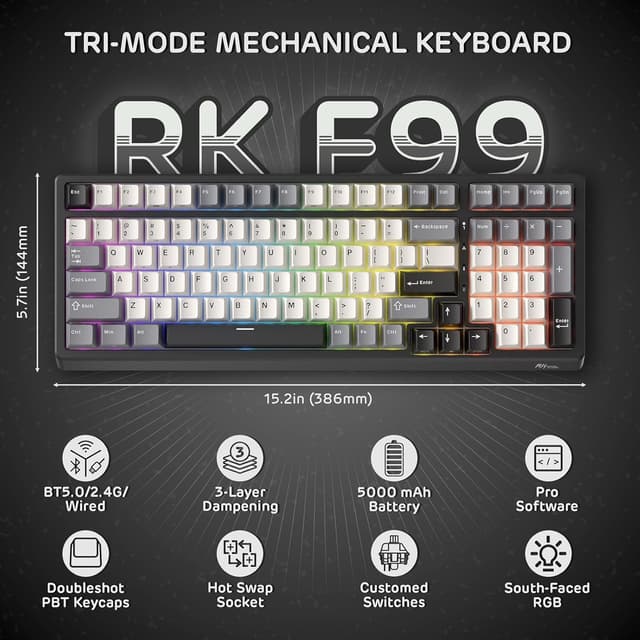
The RK Royal Kludge F99 is a compact 95% mechanical keyboard that keeps the arrow keys and includes a full number pad, so your desk layout stays efficient without turning daily tasks into a keyboard-manoeuvre. What makes it stand out on paper is the tri-mode connectivity: it can switch between 2.4GHz wireless, Bluetooth 5.0, and wired USB-C.
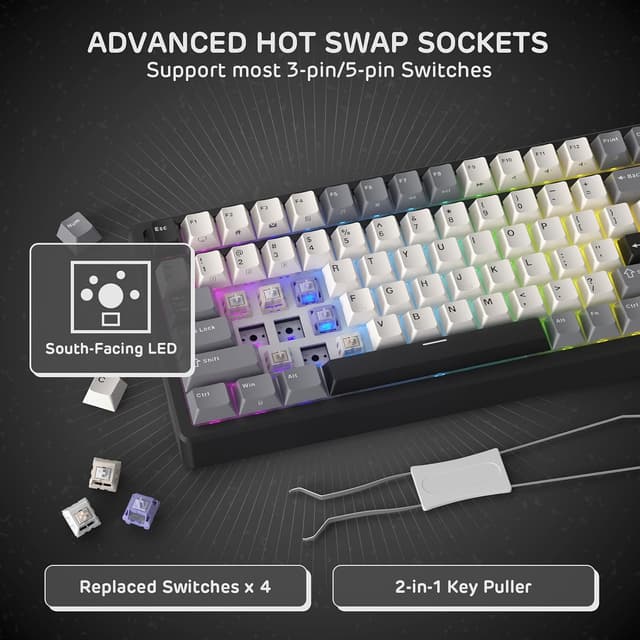
It also leans into customisation rather than locking you into a single switch feel. The board is hot-swappable (single-slotted hot-swap PCB) and is described as compatible with both 3-pin and 5-pin switches, so you can change switch types without soldering. Add in a sizeable 5000mAh battery for wireless use and the option to tweak lighting and key behaviour through software, and you end up with a gaming-and-work capable package.
That said, it’s not perfect for everyone. If you mainly want a no-frills typing tool and don’t care about macros, remapping, or switch swapping, you might find simpler boards more than sufficient.
Key takeaways on performance and feel
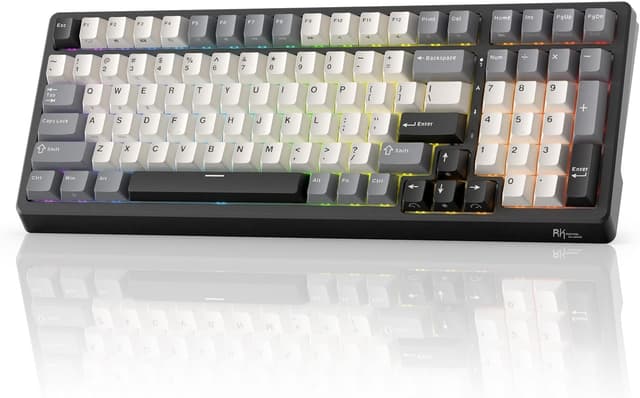
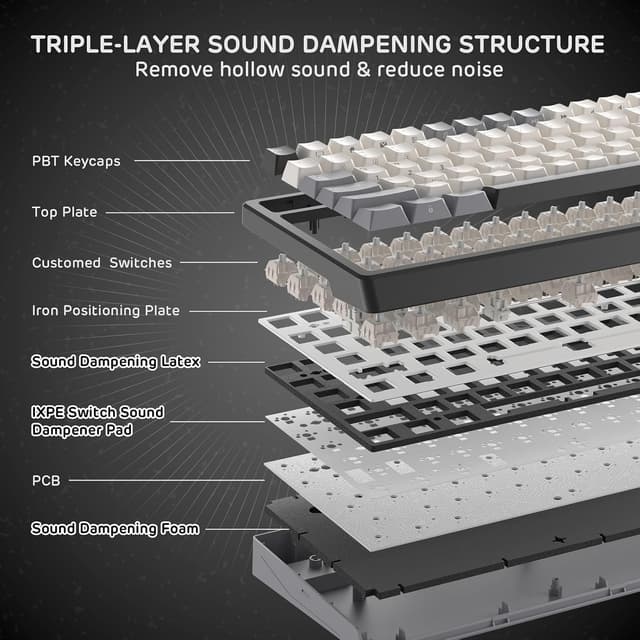
Where the F99 aims to please is the typing experience. It uses a triple-layer sound dampening approach: three layers of internal padding (including a thick bottom sound-absorbing foam, an IXPE switch pad, and a latex dampener). The result the description promises is less hollow sound and cavity noise, giving a smoother, more satisfying feel in day-to-day use.
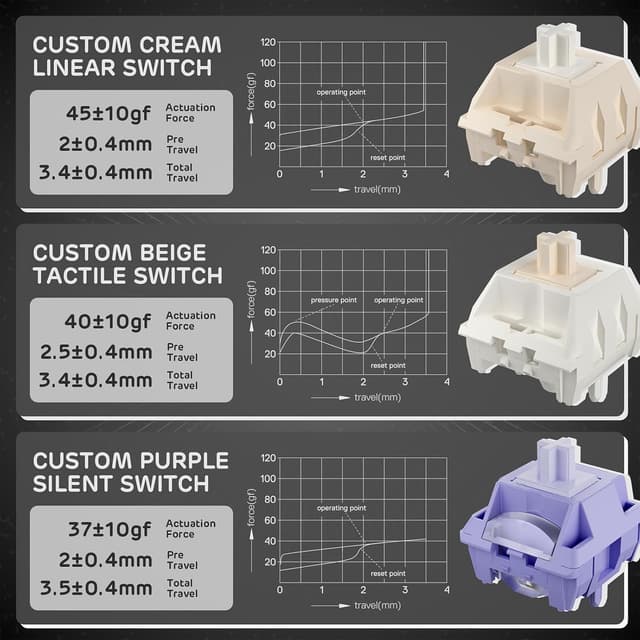
It also comes with customed tactile beige switches (as per the provided details). If you like tactile feedback that isn’t just a light bump, this should land in the “quick, satisfying feedback” category. Still, tactile switches aren’t everybody’s cup of tea. If you prefer a very light, linear keystroke with minimal resistance, you may want to consider swapping later.
A practical example: for a mixed day of spreadsheets and gaming, you can keep the wireless mode for general work, then move to 2.4GHz for lower-latency sessions. The number pad helps for budgeting, shortcuts, and number-heavy tasks where you’d otherwise be reaching for the mouse too often.
Connectivity and battery life you can actually plan around
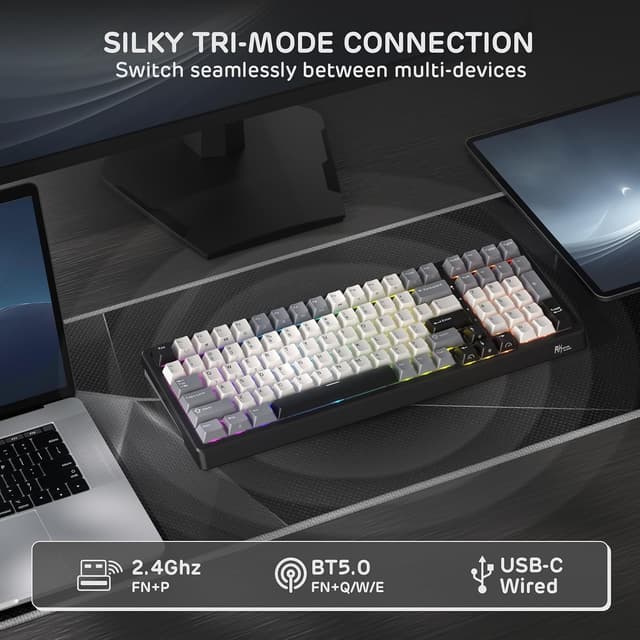
Tri-mode connectivity is the biggest usability win here. Instead of committing to one setup, you can move between modes: 2.4GHz wireless is typically the “I want it to feel responsive” option, Bluetooth is convenient for pairing across devices, and USB-C is there when you want a stable, no-charge-worry connection.
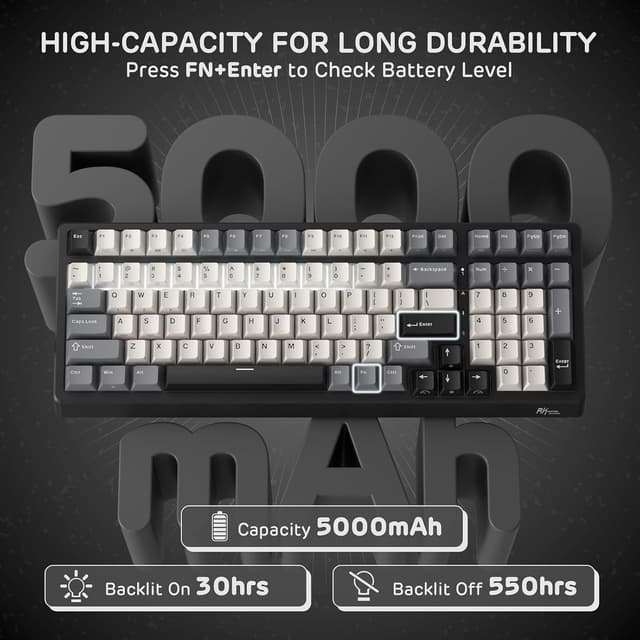
The battery is described as 5000mAh, with an estimated up to 550 hours of non-stop use when RGB backlight is off, and up to 30 hours with RGB on. There’s also a shortcut (FN+ENTER) to check remaining power, and the claim is that it can recharge fully within 10 hours.
Worth noting: battery estimates are always conditional on how you use wireless and whether you run lighting effects. If you tend to keep RGB on with animations, you should expect the “with RGB on” figure to be closer to your reality.
What you’ll notice about the design and keycaps
The F99 is a 95% layout with 100 keys, which is essentially a compact board that still includes the arrow keys and number pad. That’s a useful compromise if you’re tight on desk space but don’t want to sacrifice full numerical input.
Keycaps are described as PBT in a Cherry profile, with an oil-resistant claim intended to prevent shine and maintain texture. If you touch and press your keys a lot, keycap texture is one of those “you feel it over time” factors. PBT keycaps are often chosen because they tend to hold up better to daily use than thinner plastics, and that’s the angle RK is going for here.
RGB lighting is described as south-facing, which typically affects how well lighting shines through keycap legends depending on design. If you like clean shine-through, this is aimed at making the effects look vibrant.
Software support and customisation
The keyboard is set up for personalisation: remap keys, create custom macros, and adjust lighting effects, speeds, and colours. The description mentions 16.8 million colour options.
For drivers, there’s an important detail: the macOS compatibility is ONLY for the web driver. If you’re on macOS and want a smoother setup using an app rather than a browser-based driver, you may need to rethink the approach.
Also, because it’s hot-swappable, you can tailor the switch feel later. The description lists pre-lubed RK Linear Cream switches, tactile beige switches, and a silent switch option for an ultra-quiet typing experience. Just bear in mind: the actual switch included is the customed tactile beige switches as stated, and any alternative switch types would be something you’d add separately.
Who it suits best (and who should look elsewhere)
It’s a good fit if you want a 100-key, 95% style keyboard that keeps the number pad, and you care about moving between devices using 2.4GHz and Bluetooth without giving up wired reliability. It also makes sense if you enjoy tweaking feel and sound: the combination of sound dampening layers and hot-swap support gives you room to experiment.
It may not suit you if you’re after a basic keyboard experience and won’t touch remapping, macros, or switch swapping. It might also not be a great match if you specifically want full macOS support through a standalone app (the details provided point to web driver only).
Quick FAQ before you buy
Is the RK F99 easy to switch between devices?
Yes, the keyboard is designed for tri-mode connectivity: 2.4GHz wireless, Bluetooth 5.0, and USB-C wired, with multi-device connectivity supported as described.
Does it include a number pad?
Yes. The layout is described as a compact 100-key design that retains arrow keys and includes a number pad.
Can you change switches without soldering?
That’s the point of the hot-swappable PCB: it’s described as compatible with both 3-pin and 5-pin switches.
How long does the battery last?
The description claims up to 550 hours with RGB backlight off, and up to 30 hours with RGB on, with a stated full recharge time within 10 hours.
Is macOS fully supported?
Not in the same way as Windows. The description specifies that macOS is ONLY compatible with the web driver.
Final verdict
If you want a tri-mode, hot-swappable mechanical keyboard with a number pad and a battery designed for wireless convenience, the RK Royal Kludge F99 looks like a sensible buy on paper. The sound-dampening approach and PBT keycaps are the kind of details that can make a real day-to-day difference, especially for mixed work and gaming.
But if you only care about basic typing and don’t plan to use the software features or swap switches, you might prefer a simpler board. And if macOS convenience is your priority, keep in mind the provided note about web driver compatibility.