

MSI MAG 275UPD E14 27-inch 4K gaming monitor
Product description
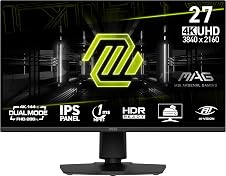
This 27-inch gaming monitor from MSI brings a versatile panel that balances high resolution with very fast refresh rates for both cinematic detail and competitive play. It combines a 4K UHD IPS display with a dual-mode refresh capability, making it suitable for content creators and esports players who need sharp imagery and low latency.
Key Points
The monitor uses an IPS-grade panel that keeps colours consistent across wide viewing angles and reduces image distortion. Colour depth reaches up to 1.07 billion colours and the panel covers around 130% of the sRGB gamut, which helps with more vivid visuals and finer gradations for photography or video work. 🌈
Dual-mode operation allows 4K resolution at up to 144 Hz or Full HD at up to 288 Hz, so you can prioritise resolution or extreme frame rates depending on the task. The low 1 ms MPRT response time aims to minimise motion blur, which is especially useful in fast-paced games. 🎮
Eye-care features include reduced blue light and anti-flicker technology to help lower visual fatigue during long sessions. The rear joystick navigator simplifies on-screen adjustments without interrupting the view. The design is frameless with tilt and height adjustments, and it supports VESA mounting for varied setups.
Technical Specifications
- Name: MSI MAG 275UPD E14
- Screen size: 27 inches
- Resolution: 3840 x 2160 (4K UHD)
- Panel type: IPS, dual-mode UHD@144Hz / FHD@288Hz
- Response time: 1 ms (MPRT)
- Colour and contrast: 1.07 billion colours, 130% sRGB, native contrast 1500:1, dynamic contrast 100M:1
Usage Recommendations
For competitive gamers who value frame rate over native resolution, switch to FHD at 288 Hz to reduce input lag and gain smoother motion tracking. For creators and viewers of high-resolution content, use the UHD@144 Hz mode to take advantage of the 4K detail and wide colour support. 🔁
Place the monitor at eye level and use the height and tilt adjustments to reduce neck strain during extended use. The reduced blue light and anti-flicker settings are useful for late-night sessions, however consider that HDR performance is described as HDR ready according to the manufacturer and may vary depending on source material and settings.