

iVANKY 23-in-1 Thunderbolt 5 FusionDock Max 2 (120Gbps) MacBook triple 6K dock with 140W PD
Product description
The essentials
If your MacBook desk setup is starting to feel a bit… cramped, a Thunderbolt dock is often the neatest way to reclaim ports. The iVANKY FusionDock Max 2 is built around Thunderbolt 5 (with intel certification noted in the product name) and is designed specifically for MacBook models, with support for triple extended displays under the right chip/compatibility conditions.
On paper, this is a fairly feature-dense dock: multiple display options, fast data transfer via Thunderbolt 5, a mix of USB ports, plus SD/TF card support and 2.5GbE networking. It’s also got a cooling fan and a multi-layer heat-dissipation design, which matters if you use your dock for long stretches rather than brief sessions.
Still, it’s not perfect for everyone. There’s an explicit limitation: it’s incompatible with Windows, so if you’re switching between operating systems, you may want to rethink the choice.

Key features
What stands out most is the display setup. The dock supports triple extended displays “up to 6K at 60Hz” for the Mac series that supports extended triples (the base description is clear that this is limited to certain Mac chip generations). For other Mac chip tiers, the maximum supported configuration drops (for example, dual 6K at 60Hz for some Pro/Mac variants, and even single 6K extended for older M1/M2/M3 cases).
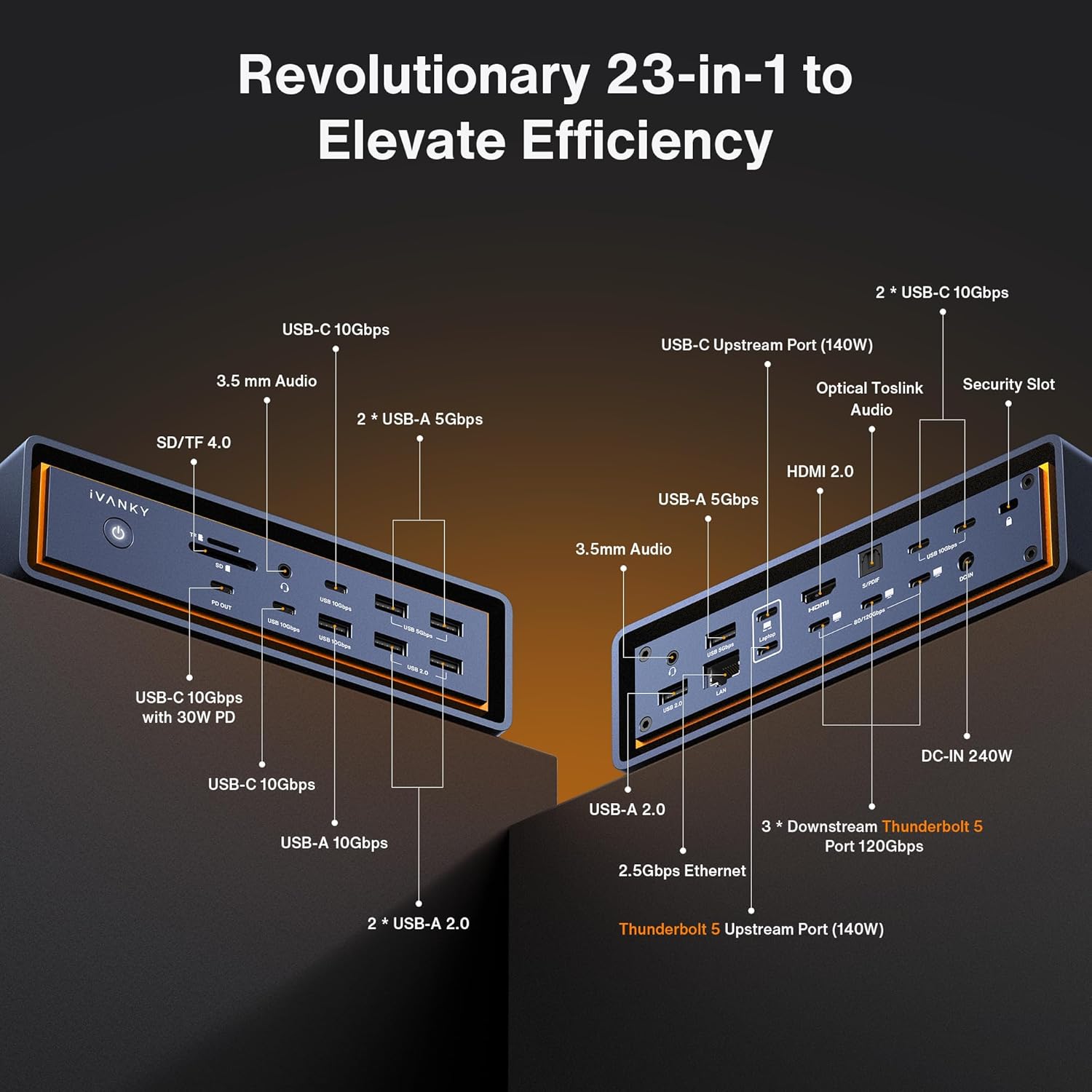
Then there’s the connectivity side. The product description calls out: - 3x Thunderbolt 5 ports rated up to 120Gbps total data transfer, aimed at quickly pushing large files and maintaining smooth performance. - 10x USB ports, supporting data transfer up to 10Gbps, which is helpful if you rely on external drives, webcams, or other accessories.
For “normal office + media” setups, the practical extras are the ones you’ll use daily: an SD/TF 4.0 slot rated up to 312MB/s, and an RJ45 Ethernet port for a stable 2.5Gbps connection.
What you’ll notice day to day
This dock is also clearly designed with sustained use in mind. The hybrid cooling approach combines a copper internal plate for heat dissipation, a raised structure to promote airflow, and an integrated fan for continuous cooling. It’s not hard to imagine the scenario: you dock your Mac in the morning, run external storage and Ethernet all day, and keep it powered through meetings and file transfers. A dock that aims to stay stable under longer loads is a sensible choice.
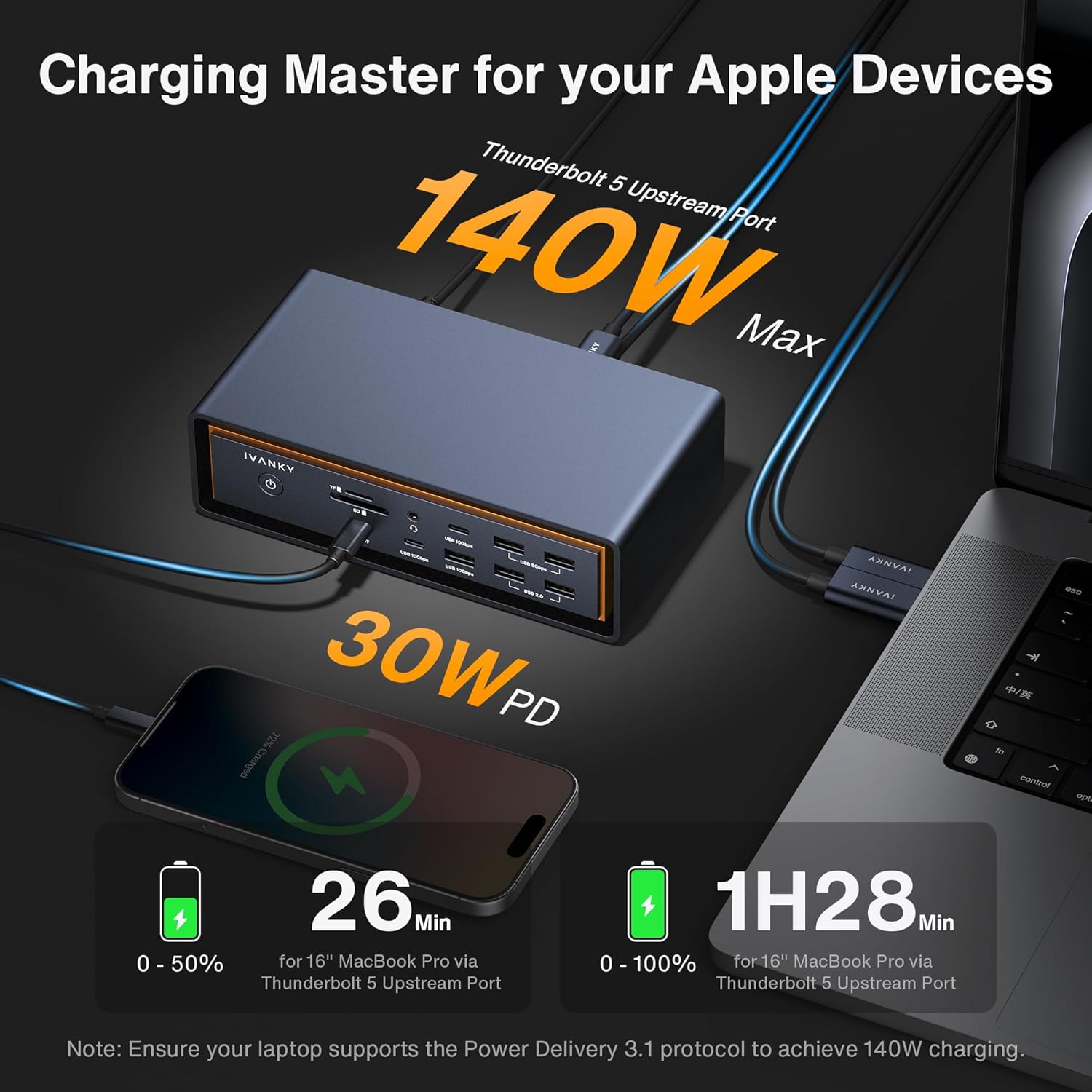
Power delivery is another day-to-day consideration. The description says it includes an adapter that supports charging at up to 140W for compatible laptops, and PD USB-C devices up to 30W. If you prefer a single-cable desk workflow, that’s the kind of feature that reduces fiddling (though it will still depend on what your specific Mac model can draw).
Tech specs

- Name: iVANKY 23-in-1 Intel Certified Thunderbolt 5 FusionDock Max 2
- Type: Thunderbolt 5 docking station
- Format: Triple display capable (with Mac compatibility conditions)
- Display: Up to triple 6K@60Hz (Mac series dependent)
- Processor: Not specified
- Memory: Not specified
- Capacity: 120Gbps data transfer via 3x Thunderbolt 5 ports
- Dimensions: Not specified
- Weight: Not specified
- Material: Not specified (copper internal heat-dissipation plate mentioned)
- Colour: Not specified
- Refresh rate: 60Hz (as stated for supported displays)
- Resolution: 6K and 4K (as stated)
- Processor: Not specified
It suits you if…
It makes sense if you’re on a compatible MacBook setup and you genuinely want a multi-display desk rather than “just one extra monitor”. The triple 6K@60Hz claim is only relevant if your Mac chip generation supports extended triple displays (the base description spells out that only certain Mac series qualify), so it’s worth double-checking before buying.
It’s also a solid fit if you want a single dock covering networking, card reading, and multiple USB peripherals, while keeping data transfer fast via Thunderbolt 5 and high-speed USB.

It might not be a great match if…
You may want to skip it if you use Windows, because the product is stated to be incompatible with Windows.
It may also be less satisfying if your Mac model isn’t in the subset that supports the triple extended display configuration. In that case, you’d likely need to accept reduced display capability (the description indicates different maximums depending on chip series), and that’s the sort of mismatch that can lead to “it works, but not how I hoped”.
Also, keep expectations realistic: for any docking station, the display outcome depends on your exact Mac model and how it supports multiple external displays.

Buying verdict
If your priority is a Mac-focused Thunderbolt 5 desk dock with triple display potential, plentiful connectivity, and a cooling design meant for longer sessions, the iVANKY FusionDock Max 2 is worth considering. It targets people who want one cable to run monitors, drives, and networking without constantly unplugging things.
However, it’s not the one to choose if you need Windows compatibility, or if your Mac chip generation can’t achieve the higher triple/dual display modes described. In those cases, you may end up paying for features you can’t fully use.
FAQs

Does it work with Windows?
No. The listing explicitly states that it’s incompatible with Windows.
What display setups does it support?
The base description says triple extended displays up to 6K@60Hz are supported for certain Mac series/chip generations, with reduced maximum configurations for other chip tiers.
How many Thunderbolt 5 ports are there?
The dock is described as having 3 Thunderbolt 5 ports rated up to 120Gbps.
Is there an SD/TF card slot?
Yes. There’s an SD/TF 4.0 slot with speeds stated up to 312MB/s.
What charging power does it offer?
The description says it supports laptop charging up to 140W and PD USB-C devices up to 30W (depending on compatibility).