


Redragon K719 Wireless Gasket Gaming Keyboard (95 keys) with Hype Screen & Knob
Product description
The essentials
If you like your keyboard to do more than just type, the Redragon K719 Wireless Gasket Gaming Keyboard leans into that idea. It pairs a compact 95-key layout with a built-in info display and a physical control knob, so you can glance at connection/battery status and manage media or backlight brightness without hunting through layers.
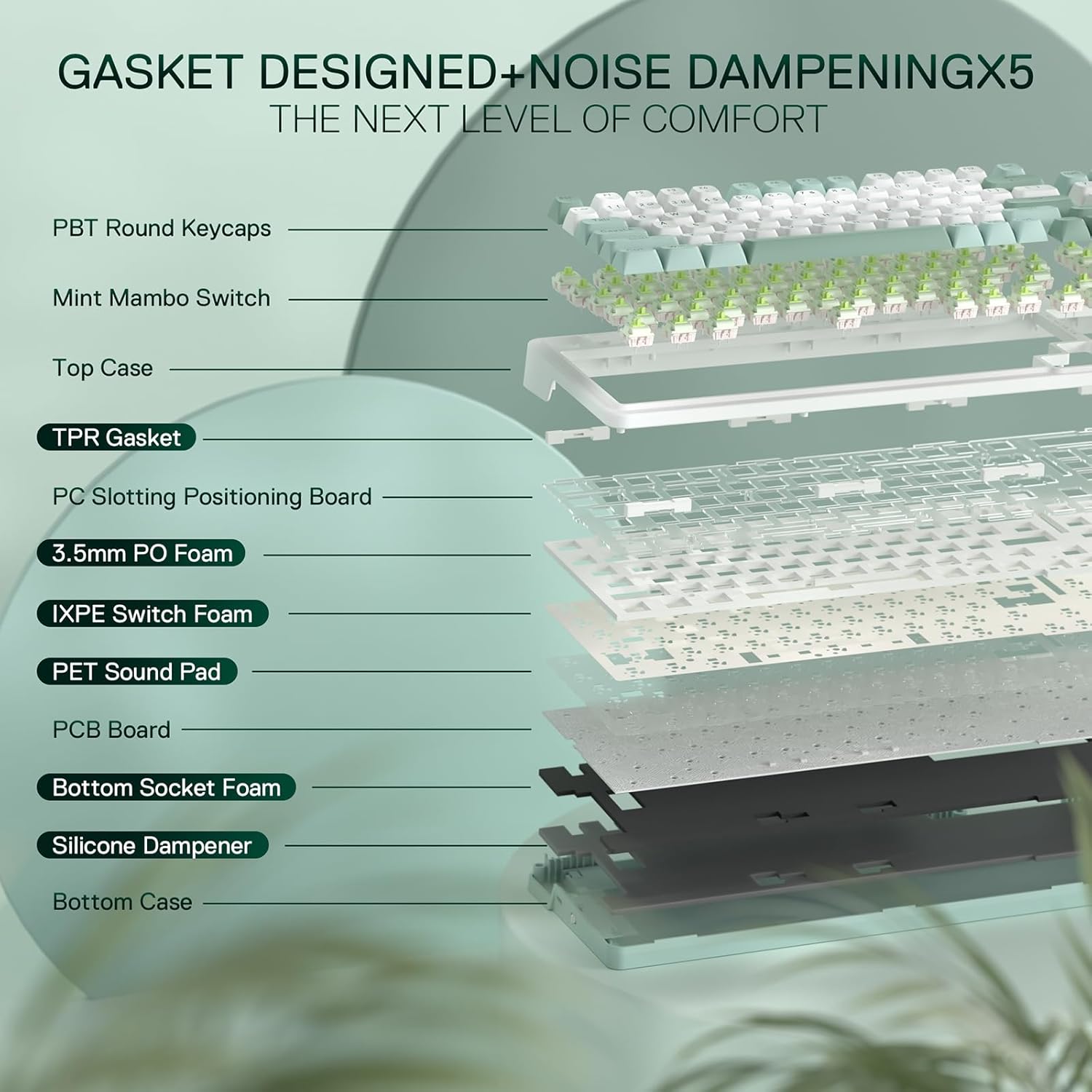
On paper, it also goes for a more comfortable, less “hollow” sound thanks to a gasket-style build and a five-layer noise dampening approach. That combo—wireless flexibility, extra controls, and a tuned feel—is exactly the sort of feature set people tend to look for when they want something practical for everyday use, but still fun for gaming.
It’s not a blank-screen budget board, it’s closer to a mid-range “enthusiast-lite” pick where the extras matter. That said, it may feel like overkill if you’d rather keep things simple and never use an on-screen display or the dedicated knob.
What matters most in day-to-day use
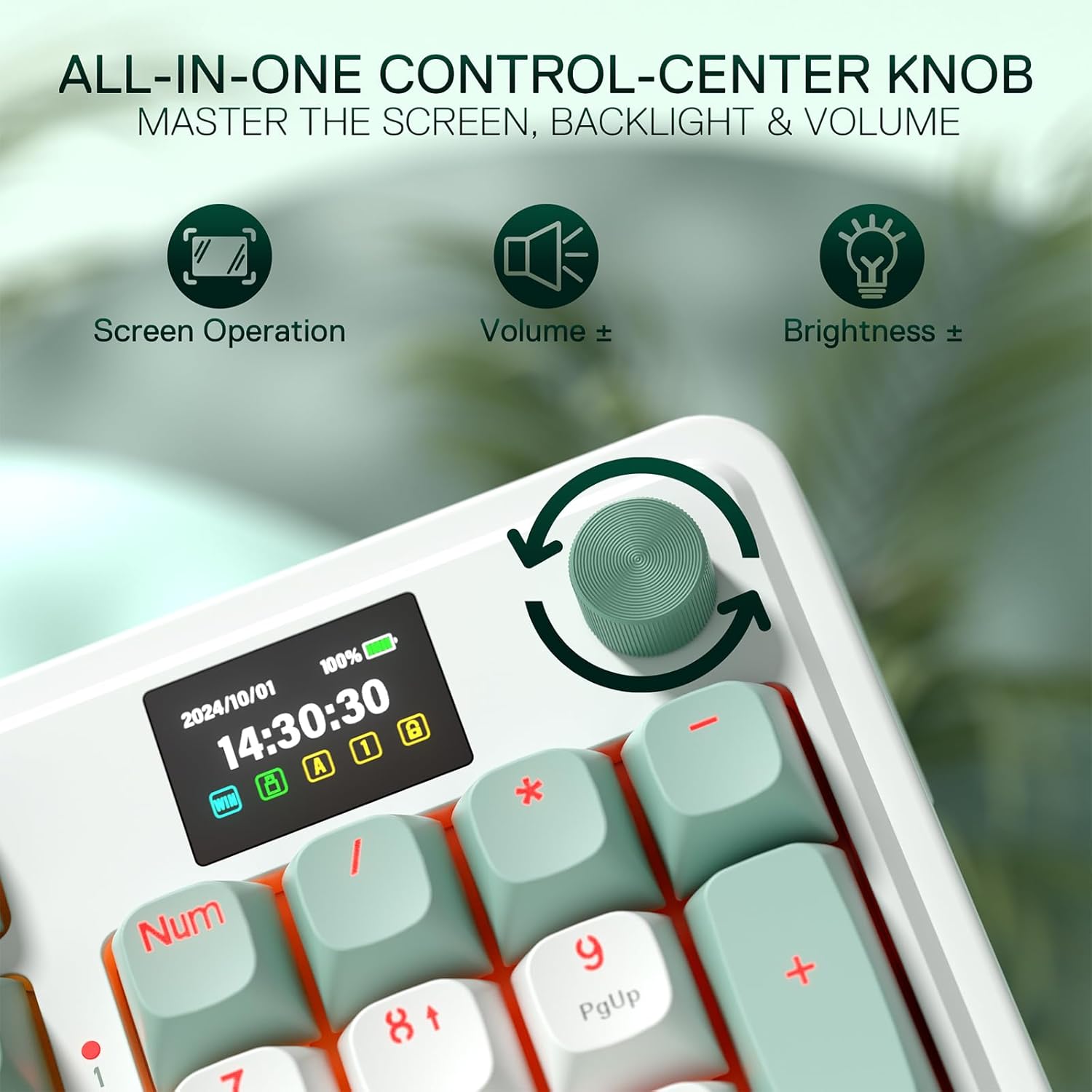
The K719’s standout is the “Hype Screen” / smart info display in the info area. The description says it gathers useful keyboard information like connection mode, battery level and typing status, and it can show content in a more playful, GIF/meme-style way. In practical terms, that means you can switch between wired and wireless modes and still know what you’re on without checking an app.
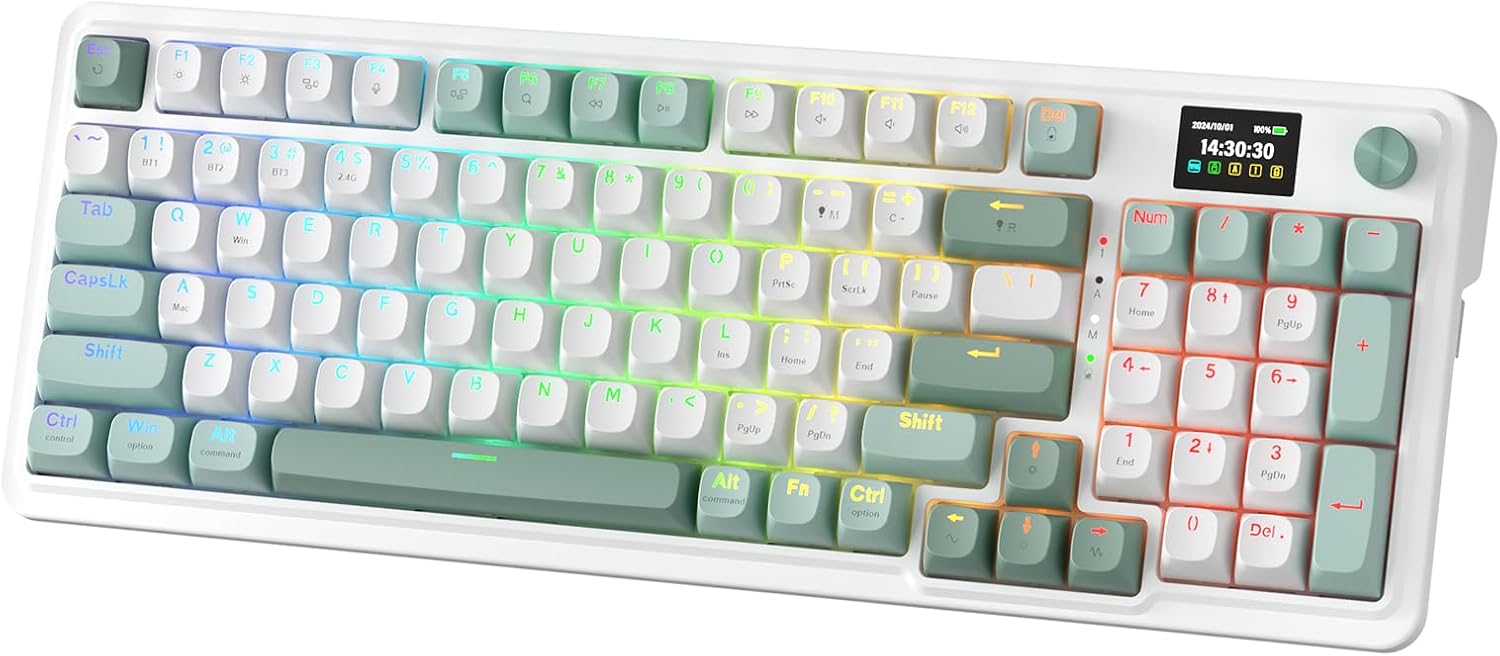
Then there’s the knob. It’s positioned as an easy-control access feature for backlight brightness and media functions like volume and play/pause, plus switching. If you’re the type who adjusts brightness often or uses your keyboard for media during breaks, this is one of those “you’ll notice it once it’s there” additions. The limitation is also obvious: you’re committing desk space to a control element, and if you rarely touch brightness or media controls, it won’t bring much.
Where the gasket design helps
Gasket design is aimed at a softer, more controlled typing experience. Instead of a traditional screw-fixing body, the K719 uses precision-locked covers with gaskets, and the vertical cushioning is intended to reduce rigid noise while delivering even feedback.
What does that mean for you? Over time, it tends to make the keyboard feel less harsh and a bit more forgiving, especially when you’re typing quickly or bottoming out more often. The board is also described as creating crisper, cleaner and softer typing acoustics than a more rigid build.
But do keep expectations realistic: the “gasket + dampening” mix should improve sound and feel, yet it won’t magically erase all noise in a shared space. If you need silent typing for a quiet office, you may still want to pair it with other noise-control habits.

Wireless options that are actually usable
The K719 supports a three-mode connection setup: USB-C wired, Bluetooth (BT 3.0/5.0 mentioned), and 2.4GHz wireless. The idea is straightforward—use whichever connection suits your setup at the time, rather than being locked into one method.
This is particularly handy if your desk changes or you regularly switch between a PC and another device. Having wired as an option can also help if you want the keyboard always responsive during long sessions, then move to wireless when you need flexibility.
One thing to be mindful of: wireless setups can vary by environment (signal congestion, device distance, etc.), and the entry in the description doesn’t include range guarantees. So if you plan to use it far from your receiver or through thick barriers, it’s worth sanity-checking your typical layout.
Switch feel and sound: custom linear + layered dampening
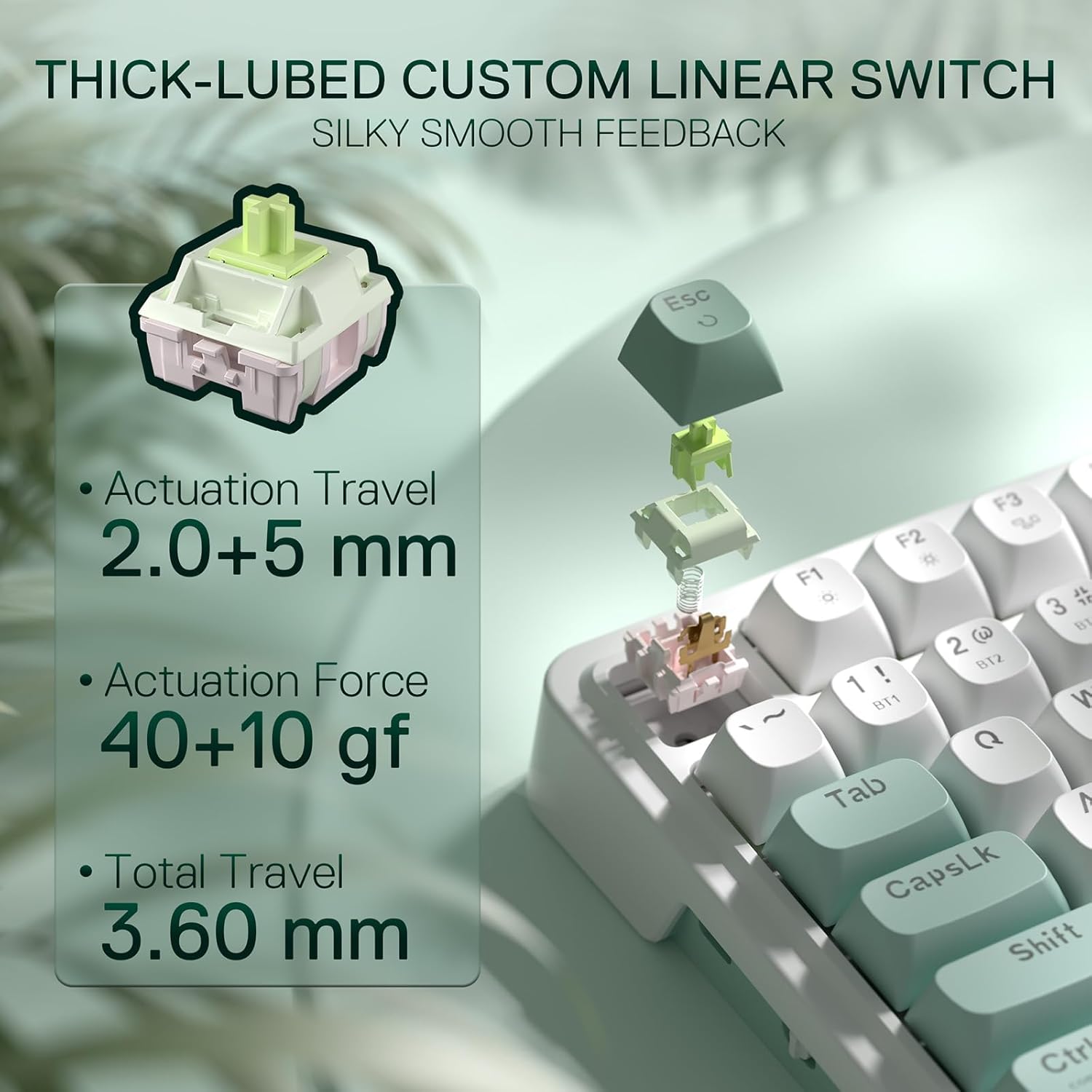
The keyboard uses a custom linear switch described as “Mint Mambo” with thick-lubed linear switches. Combined with the gasket form factor, it’s pitched as cushioned, rich linear travel with a silky, creamy and cosy typing feedback.
Alongside that, the noise dampening is listed as a five-layer system: 3.5mm PO foam, IXPE switch foam, PET sound pad, bottom socket foam and a silicone bottom pad, plus the silicone gasket. The target outcome is reduced hollow noise and a more dampened, cleaner acoustic character.
If you tend to prefer linear switches for smooth, consistent actuation, this is aligned with that taste. The one caveat: if you’re specifically after a light, crisp sound and lots of “ping,” this kind of dampening-heavy approach may not be your favourite direction.
Size, layout and the “95 keys” compromise
The K719 keeps the original 100% layout’s function but shrinks the size by about 20%, using a 95-key format. That’s a common sweet spot for people who want a compact desk footprint while keeping navigation/functionality more available than a very small layout.
Worth considering if you switch between typing documents and gaming and you don’t want to relearn everything from scratch. If you’re already fully comfortable with a smaller layout or you need a strict layout standard for a specific workflow, you’ll still want to double-check how the board positions functions for your habits.

The software side (and when it’s worth using)
The K719 is described as supported by “Pro Software”, letting you design your own modes and effects and set up macros with different keybindings or shortcuts. The on-screen time is also said to auto-sync with your PC’s system time when the software is launched.
This is only useful if you’re willing to set things up. If you want a plug-and-play experience with minimal configuration, you might not get the most out of the display customisation and macro options.
Included controls you can use without thinking
A quick micro-scenario: say you’re gaming on 2.4GHz in the evening. When you finish, you switch to Bluetooth for a laptop in the next room. On the K719, the info display is meant to show connection mode and battery level, while the knob lets you adjust backlight brightness and handle volume or playback without opening menus.
It’s a small thing, but it reduces friction during real transitions.
Pros
- Tri-mode connectivity (USB-C wired, BT 3.0/5.0, and 2.4GHz) for flexible desk setups
- Gasket-style build plus 5-layer noise dampening approach aimed at reducing hollow sound
- 95-key layout for a compact footprint while keeping 100% layout functionality in mind
- Info display that shows connection mode, battery level and typing status
- Dedicated knob for quick backlight brightness and media control
What to watch before you buy
- If you dislike extra features (display, knob, and software effects), it could feel like paying for something you won’t use.
- The dampening-heavy sound/feel isn’t necessarily aligned with people who want a very bright, “bouncy” acoustic character.
- Wireless performance depends on your environment, no range details are provided in the description.
Final verdict
It’s a good fit if you want a compact 95-key gaming keyboard that’s genuinely multi-device (wired + Bluetooth + 2.4GHz) and you’d use the info display and control knob often. The gasket design and five-layer dampening are also the right direction if you care about a softer, less hollow typing sound.
You may want to skip it if you prefer plain, no-fuss keyboards or you’re not interested in software-based modes, macros and display customisation. Also, if your ideal switch feel is crisp and loud, the dampening focus may not be the match you’re hoping for.
Quick FAQ
Is the K719 good for both gaming and everyday typing?
The feature set points in that direction: linear switches, a dampened acoustics approach, and a compact 95-key layout are all practical for daily use, not just gaming.
What does the info display show?
The description says it shows keyboard information such as connection mode, battery level and typing status, and it’s presented as an info-centre screen.
Can I use it without the software?
On paper, you can still use the keyboard via wired or wireless modes. The software is mainly for macros, custom modes/effects and display-related tweaks.
Does the gasket design affect sound?
It’s designed to reduce rigid noise through vertical cushioning, and the board adds multiple foam and pad layers to dampen hollow acoustics.
Should I consider it if I want a very loud, resonant keystroke?
Probably not. The dampening-focused build is aiming for cleaner, softer acoustics, so it may not deliver the “bright ping” some people chase.