


AOC CU34G4Z 34-inch curved UW-QHD gaming monitor (240Hz, Fast VA, HDR400)
Product description
Quick overview
If you’re looking at a curved ultrawide for gaming, the AOC CU34G4Z is one of those monitors that looks built around smoother motion and a more immersive feel. It pairs a 34-inch curved display with UW-QHD resolution (3440x1440) and a 240Hz refresh rate, so it’s aimed at players who care about responsiveness rather than just bigger screen real estate.
On paper, it also ticks a lot of the boxes you’d expect in this bracket: a Fast VA panel, Adaptive Sync with FreeSync Premium (to help with tearing and stutter), and HDR400 for stronger contrast and more vivid colour/brightness cues. The 0.3ms MPRT response figure is also there for “crisp” movement, though in practice you still want to manage expectations about motion clarity beyond what the specs can fully guarantee.
Key features that affect real gameplay
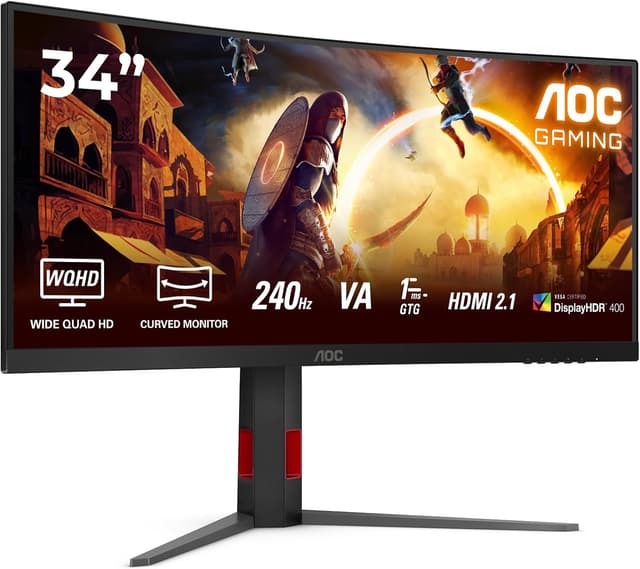
This monitor’s appeal is mostly about motion and flow. The 240Hz refresh rate is the headline for anyone who plays fast shooters or competitive titles where a slight delay can feel noticeable. Combined with Adaptive Sync / FreeSync Premium, the idea is to keep gameplay looking steadier when frame rates fluctuate.
The curved screen design is another practical choice. It can make wide gameplay feel more encompassing, especially in ultrawide formats, and it may help reduce the “flat screen” feeling when you’re moving your eyes around the edges. That said, curvature is personal—if you strongly prefer a flat panel, you might find the curve more of a habit adjustment than a win.
HDR400 is included for more contrast and a richer look than SDR. Just bear in mind HDR400 is not the top-end of the HDR ladder, it can still improve visual punch, but it may not feel like the biggest leap compared with higher-tier HDR implementations.
Tech specs (useful to know before you buy)

- Name: AOC CU34G4Z
- Type: Gaming monitor
- Size: 34 inch
- Display: Curved
- Resolution: 3440x1440 (UW-QHD)
- Refresh rate: 240Hz
- Panel type: Fast VA
- Response time: 0.3ms MPRT
- Adaptive sync: FreeSync Premium
- HDR: HDR400
Connections, viewing setup and daily convenience
The CU34G4Z is presented as having HDMI 2x 2.1, DisplayPort 1x 1.4 and a USB hub. That matters if you’re planning a single desk setup—switching between a PC and a console, or connecting peripherals without constantly unplugging everything. It’s a small convenience, but over weeks it adds up.
There’s also a common “ultrawide reality check” to consider: ultrawides can be brilliant for gaming, but not every workstation workflow is automatically easier. If you intend to do office work alongside gaming, it can be worth checking your app scaling and how comfortable the width feels during long sessions—some people love the space, others find it takes a bit of time to tune.

What stands out (and where it could fall short)
Where it really leans in is the combination of high refresh (240Hz), Fast VA response (0.3ms MPRT as stated), and Adaptive Sync / FreeSync Premium. If your priority is smooth, tear-free-looking gameplay rather than purely cinematic visuals, that mix is the core logic of the CU34G4Z.
Where it may not satisfy everyone: VA panels can be a different experience depending on the lighting in your room and the kind of games you play. Also, if you’re chasing the most dramatic HDR performance, HDR400 can be a bit conservative compared with higher-spec HDR options—again, it’s not “bad”, but it may not fully replace a more ambitious HDR screen if you’re sensitive to that.
Who it’s for (and who should probably skip it)
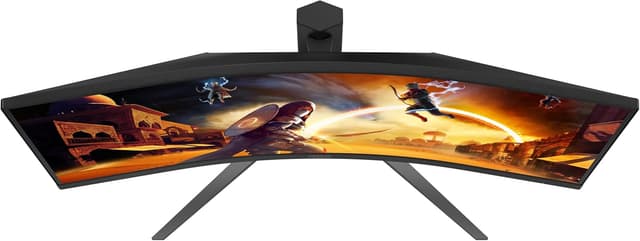
It’s a solid pick if you want an immersive curved 34-inch ultrawide with UW-QHD resolution, and you care about high refresh rates for fast gaming. It also suits you if you’re the sort of person who sets up a multi-device desk and appreciates having HDMI plus DisplayPort and a USB hub.
It’s not the best match if you only want basic 60Hz/entry-level smoothness, or if you’re firmly focused on maximum HDR impact above all else. It might also be less ideal if you’re strongly opposed to curved screens—no spec sheet can fix that kind of personal preference.
Practical tips for getting the most from it
Start by using the monitor’s high refresh potential. In a typical home setup, that means checking your PC/GPU settings (or console output settings) so you actually run at the refresh rate and resolution the monitor supports. Then pair that with Adaptive Sync/FreeSync Premium so frame-rate changes don’t make the image feel unstable.

For a quick micro-test: launch a game with fast camera movement, sit in your usual spot, and toggle between a couple of in-game motion/graphics settings. You’re mainly looking for whether the image feels consistent during quick pans—if it still feels “off”, it’s often a settings alignment issue rather than a monitor fault.
Is it worth it?
Worth considering if you’re shopping for a curved 34-inch UW-QHD gaming monitor and want the emphasis to be on smooth motion, supported by Adaptive Sync / FreeSync Premium and a 240Hz refresh rate. The CU34G4Z makes sense as a performance-focused ultrawide for desk-based gaming.
You may want to skip it if your main goal is top-tier HDR drama or if you know you don’t get on with curved displays. It’s aimed more at gamers who value responsiveness and fluidity than at buyers who only care about “bigger screen” convenience.

Small FAQ
Will HDR400 make a big difference?
It should add more contrast and a more vivid look than plain SDR, but keep in mind HDR400 is not necessarily the most extreme HDR tier.
Does FreeSync Premium help with tearing and stutter?
Yes, the stated goal of FreeSync Premium is tear-free and stutter-free, so it’s designed to help the image stay fluid when frame rates vary.
Is UW-QHD good for ultrawide gaming?
UW-QHD (3440x1440) is a common sweet spot for ultrawides, offering more detail than standard 16:9 at the same time as keeping a wide field of view.
Does it suit a multi-device desk?
Based on the included HDMI 2.1, DisplayPort 1.4 and USB hub, it’s the kind of setup monitor that can simplify switching and peripheral use.