

Raywego 4K 32-inch Office Monitor with IPS panel, 97% sRGB and eye-care
Product description
What you’re buying and why it matters
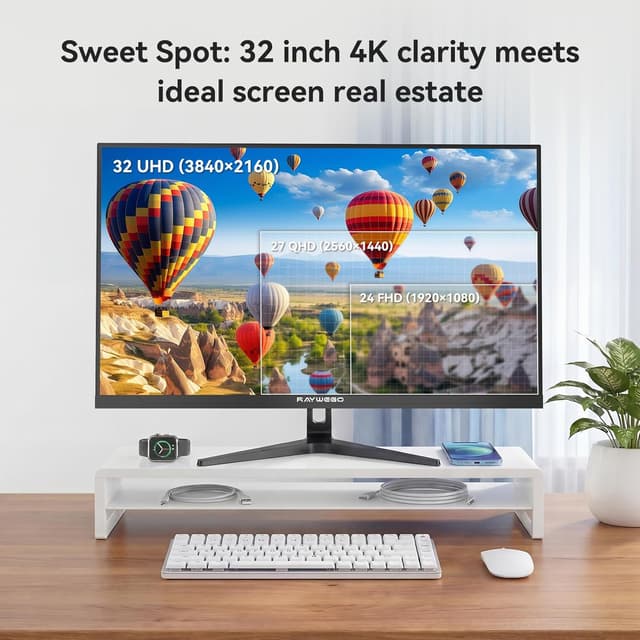
If your daily work involves long stints in spreadsheets, documents, and the occasional design task, screen comfort and readable detail start to matter as much as raw specs. The Raywego 4K 32-inch Office Monitor is positioned as a productivity-first display: a 32-inch IPS panel, UHD 3840 × 2160 resolution, and a stated 97% sRGB colour coverage, with an eye-care approach that targets blue light.
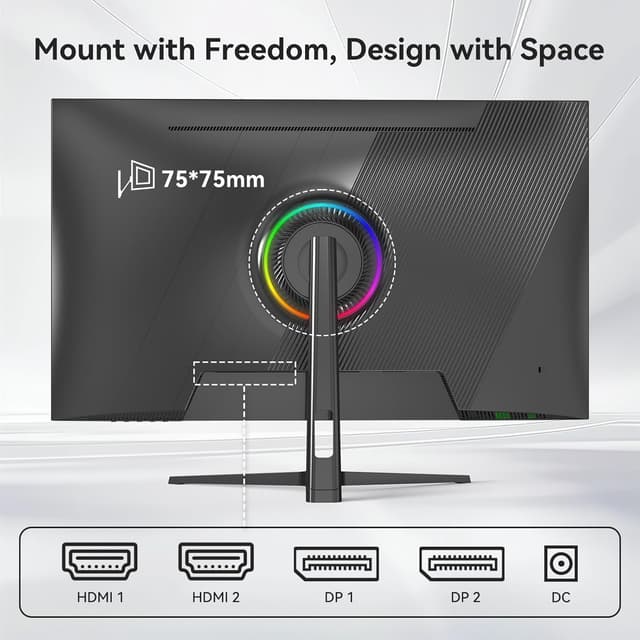
It’s also built with versatility in mind. With HDMI and DisplayPort connectivity mentioned in the description, it’s the sort of monitor people buy to run a laptop/desktop during the day and switch over to a console or streaming device when work’s done. That dual-purpose angle can make sense if you don’t want to juggle multiple screens.
Key features that show up in everyday use
The headline is the 32-inch size paired with 4K UHD. On paper, that combination gives you more room than smaller 27-inch class displays, so you can comfortably keep multiple windows visible side-by-side—useful for things like a spreadsheet alongside a reference document, or editing assets while keeping a browser open. The description also leans on the idea that 4K should look sharper than 1080p and typical QHD setups, which is exactly the sort of difference you tend to notice when you spend hours reading and zooming.

The panel type is IPS, which the manufacturer positions as having better viewing angles and more consistent colour than common TN or VA panels. That tends to be a practical benefit in office settings where people might sit slightly off-centre, or when you share your screen with colleagues.
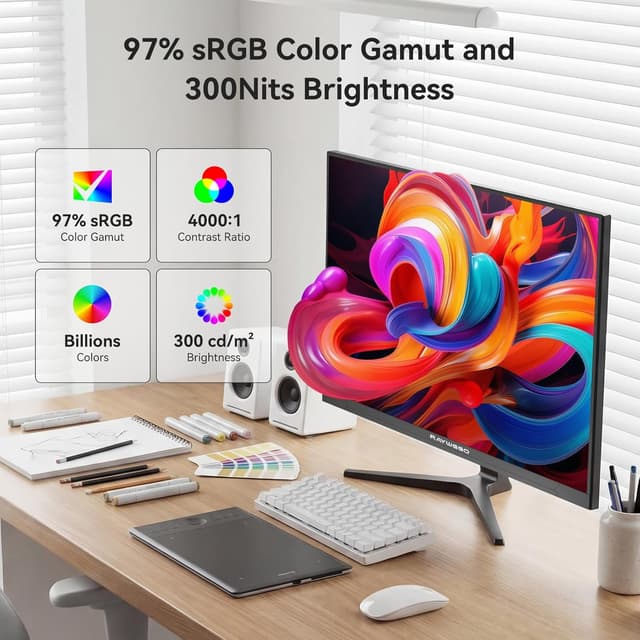
For colour, the stated 97% sRGB and 1.07 billion colours suggest this monitor isn’t only for “office text”. It’s described as aiming at colour-accuracy tasks like photo editing and graphic work, where sRGB coverage matters more than you might think—especially if your output needs to look right rather than just “good enough”.
Eye-care: helpful, but don’t expect miracles
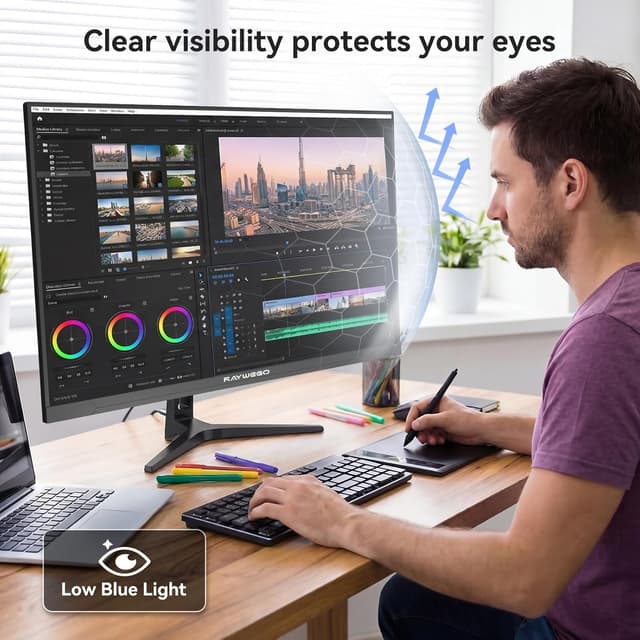
A standout claim here is the eye-care tech: filtering “over 90%” of harmful 415–455 nm blue light, with wording that the display maintains natural colours rather than turning the screen yellow. That’s the right direction for people who get dry or strained eyes during long work sessions.
That said, it’s worth keeping expectations realistic. Blue-light filtering and comfort features can help, but they don’t replace basic habits like taking breaks, adjusting brightness, and ensuring your viewing distance is sensible. If you already have specific sensitivity concerns, it’s still smart to see whether this kind of feature aligns with how you personally feel.
Tech specs, in plain English
The essentials from the information provided are straightforward: a UHD (3840 × 2160) 32-inch IPS office monitor, with a 60Hz refresh rate, 4000:1 contrast ratio, and 97% sRGB colour coverage. The “60HZ” detail matters mostly if you care about motion smoothness for competitive gaming—this is more of a general gaming/work monitor than something clearly aimed at high-refresh esports.
Also, the description mentions both HDMI and DisplayPort, which is useful if you’re connecting more than one device. In practice, that can reduce cable swapping and make it easier to keep a tidy desk.
What you’ll like, and where it could fall short
It’s not perfect for every buyer, but it looks like a sensible fit for a lot of typical office situations:

- Good fit if you want a larger workspace than 24–27-inch class monitors and you regularly use multiple windows.
- Good fit if you care about colour consistency for day-to-day creative work where sRGB coverage is relevant.
- Good fit if you want one monitor for work and a bit of leisure (since HDMI and DisplayPort are mentioned).
It may not be a great match if:
- you’re specifically chasing high-refresh gaming performance (the stated 60Hz can feel limiting compared with higher refresh options),
- you need certification details or more precise calibration information (the entry doesn’t mention calibration tools, accuracy testing, or factory calibration specs).
Buying checklist before you commit
Before buying, it’s worth double-checking a few practical things since the provided info doesn’t cover everything:
- Connections you actually use: the description mentions HDMI and DisplayPort, but confirm they match your laptop/PC/console setup.
- Desk layout: 32-inch monitors can dominate a desk. Measure your available space and consider how far you sit from the screen.
- Your expectations for gaming: with 60Hz stated, treat it as a competent “general gaming and office” monitor rather than a dedicated competitive gaming display.
Should you buy it?
It makes sense if you want a 32-inch 4K IPS monitor geared towards everyday office use, with colour coverage (97% sRGB) and a comfort-oriented blue-light approach aimed at long sessions. You’re likely to appreciate the extra workspace, and IPS viewing consistency can be a real day-to-day difference.
You may want to skip it if your main priority is very high-refresh gaming performance, or if you require documented calibration results beyond the headline sRGB figure. In that case, you’d probably be better off looking for options that are clearer about motion targets and accuracy verification.

Mini FAQ
Is this monitor aimed at gaming or work?
The wording is mixed in a sensible way: it’s described for gaming and work, but with a 60Hz refresh rate, it reads more like an all-rounder than a pure high-performance gaming screen.
Does the 97% sRGB claim matter for creative work?
On a typical sRGB-focused workflow, it can matter because it suggests better coverage for colours meant to be viewed in the sRGB space. The entry doesn’t include calibration testing details, so treat it as a “promising spec” rather than a fully verified colour guarantee.
Will the eye-care feature stop eye strain completely?
It’s designed to filter a large portion of harmful blue light and keep colours from shifting yellow, which could help comfort. Still, eye strain depends on lighting, brightness, breaks, and your own sensitivity.
What connections does it have?
The information provided states HDMI and DisplayPort, which should cover many laptops, desktops, and consoles/streaming devices.
What’s included with the monitor?
The entry doesn’t specify box contents, so you’d need to check the listing details for what comes in the pack.