

Adobe Creative Cloud Photography Plan 1TB (Photoshop + Lightroom) | 12-month Subscription
Product description
What is it and who it’s for
The Adobe Creative Cloud Photography Plan 1TB gives you desktop and mobile access to Lightroom, Photoshop, and Lightroom Classic with a substantial cloud storage basket (1TB) and regular feature updates. It’s a 12-month subscription with auto-renewal, designed for photographers who want a combined workflow from capture to edit to output, across devices. If your goal is a unified suite for photo editing and some light graphics work, you’ll likely appreciate the breadth of tools and the promise of seamless cloud sync. It’s worth noting that this plan is distinct from the 20GB Photography Plan, and purchasing this one does not extend or renew the 20GB tier.

What you get, on the surface
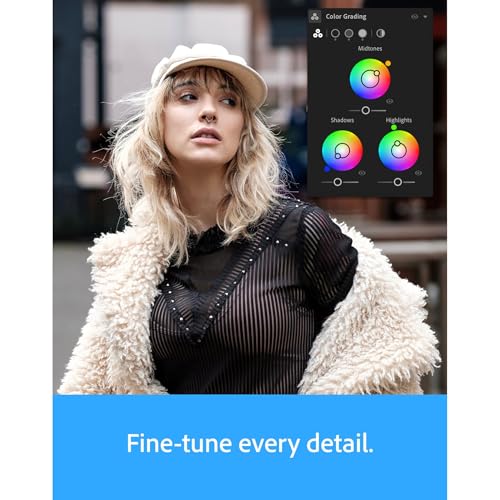
On the software side, you have full versions of Lightroom (desktop and mobile), Photoshop (desktop, iPad, and iPhone), and Lightroom Classic (desktop). Generative AI features are baked in, including Generative Remove for removing elements, Generative Fill and Generative Expand for content-aware edits, and AI-assisted portrait effects like Lens Blur. You also get access to Firefly-powered AI tools within Photoshop and a suite of presets, color and light controls, batch adjustments, and cropping options. The plan emphasizes rapid editing workflows, presets, and a pathway to more creative outputs without needing to juggle multiple apps or licenses.

How it performs in real use
On paper, this setup supports a wide range of common photo tasks: quick light and color tweaks, applying presets, and exporting finished images. In practical terms, it means you can manage your edits from a central toolkit, and then push outputs to your preferred formats or social channels. The inclusion of 1TB cloud storage helps with syncing large libraries across devices, which is a plus for photographers who move between desktop work and mobile reviews. Yet the AI features, while intriguing, depend on ongoing updates and can feel auxiliary to the core edits—sometimes they work as expected, other times you might still prefer traditional cloning and masking techniques within Photoshop.

Strengths you’ll notice day to day
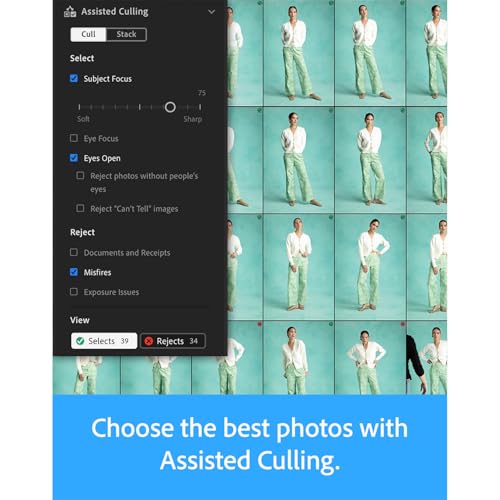
You’ll likely value the integrated workflow: Lightroom for culling and batch editing, Photoshop for pixel-level manipulation, and Lightroom Classic for traditional cataloging. The AI tools can speed up routine edits, and the 1TB of cloud storage helps safeguard and transfer large image libraries. The cross-device availability (desktop, iPad, iPhone) can be a real productivity booster if you work away from a single workstation. For creative tasks that rely on text prompts and generative content, the Firefly-based capabilities add a newer dimension to your toolkit without leaving the app ecosystem.

Limitations and caveats
If your work hinges on advanced, meticulous retouching and precise compositing, you may notice that the AI-assisted features are not a substitute for seasoned manual techniques in every scenario. Some users will prefer dedicated third-party plugins or standalone tools for certain tasks, and the AI features can introduce non-deterministic results in some images. Also, this plan is a year-long commitment with auto-renewal, so you’ll want to be comfortable with the billing cadence and the possibility of feature changes with updates. If you’re primarily interested in a lighter editing workflow or a smaller library, the 1TB plan may feel heavier than needed.
What to review before you buy
- Confirm you’re comfortable with the ecosystem: desktop and mobile access across Lightroom, Photoshop, and Lightroom Classic.
- Consider your storage needs and whether 1TB aligns with your current photo library size and future growth.
- Think about AI features: they’re compelling for speed, but you’ll want to test whether generative tools align with your usual editing style.
- Check your device compatibility for iPad/iPhone and whether you’ll rely on cloud-based workflows or prefer local-only catalogs.
- Acknowledge the 12-month term and auto-renewal, plan for how you’ll evaluate value as features evolve.

Practical use case: a day in the studio
Imagine you’re shooting a wedding full of moments that require both wide landscape adjustments and detailed portraits. You start in Lightroom to select the best frames, quick-adjust exposure, and apply a base look. You move into Photoshop for precise skin retouching or compositing tricky scenes, using AI-assisted Fill to experiment with background content. You save a set of web-ready previews from Lightroom and export high-resolution prints, all while your library stays synchronized to the cloud for access on a laptop or tablet during edits with clients onsite.
FAQ highlights (brief)
- Is 1TB storage enough for a large RAW library? It depends on your file size and growth, this plan prioritizes cloud sync alongside desktop storage, so you may need to manage local backups if your library is exceptionally large.
- Do the AI features replace traditional retouching? They accelerate certain tasks, but not every project will rely on AI, experienced edits may still require manual techniques.
- Can I use this plan on multiple devices without extra cost? Yes, the plan includes access across supported devices with cloud syncing, subject to licensing terms.
Is it worth it?
It makes sense if you want a tightly integrated photo-editing stack with cross-device access, regular updates, and AI-assisted tools that speed up routine edits. If your workflow leans heavily on manual retouching or you’re cautious about committing to a 12-month term, you may want to weigh the investment against your current setup and future plans. For photographers who value an all-in-one subscription that covers both editing and broad creative tasks, this plan offers a compelling, though not flawless, balance of capabilities.