

Logitech Brio 300 Full HD webcam with privacy shutter 🎥
Product description
This compact Full HD webcam helps you present a clear, natural image on calls and streams, making it suitable as a streaming webcam for professionals and everyday users alike. The Logitech Brio 300 focuses on reliable image correction and simpler audio so you can join meetings and broadcasts with minimal setup.
Key Points
This webcam records in Full HD 1080p for a crisp picture that works well across popular conferencing apps. Auto light correction using RightLight 2 adjusts exposure to compensate for dim or uneven lighting, so faces remain visible even in less-than-ideal conditions. 🎥
Audio is handled by a mono microphone with noise reduction that reduces background sounds and keeps speech intelligible during calls. The physical privacy shutter spins over the lens for instant visual privacy when the camera is not required. 🔒
Compatibility is broad and includes certification for Zoom, Microsoft Teams and Google Meet, and the device is plug-and-play via USB-C for straightforward connection. The manufacturer also notes that the webcam contains a minimum of 48% post-consumer recycled plastic, which may be relevant for users prioritising sustainability.
Technical Specifications
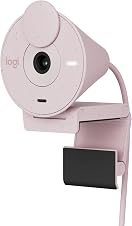
- Name: Logitech Brio 300 Full HD Webcam
- Resolution: 1080p Full HD
- Connection: USB-C
- Microphone: Mono noise reduction microphone
- Features: Auto light correction (RightLight 2), privacy shutter
- Certifications: Certified for Zoom, Microsoft Teams, Google Meet
Benefits
The combination of automatic lighting adjustment and 1080p capture reduces the need for external lighting or manual camera configuration. This is useful when moving between rooms or when daylight changes during long meetings. The mono noise-reducing mic keeps the focus on speech and cuts down on common office or home disturbances, so attendees hear you without frequent interruptions.
Customisation is available through the Logi Tune app which lets you tweak colour and image settings if you prefer a specific look. For creators who switch often between conferencing and streaming, the simple privacy shutter offers quick control without detaching the device. ⚙️
Usage Recommendations
Place the camera at eye level on a monitor or tripod for the most natural framing. Allow a short warm-up after plugging in so auto light correction can adapt to your environment. Consider using a separate headset for multi-person recordings or when stereo audio is needed, as the built-in mono microphone is tuned for clarity rather than full-band audio capture.
Note that in very low-light conditions performance depends on ambient light and may not match a dedicated studio setup according to the manufacturer. Also, the mono mic is designed for speech clarity and may not be the best choice if you need high-fidelity audio for music or stereo recording.