


Aceele USB 3.0 Hub (5-in-1) with Type-C Powered Port for extra USB and stable data transfer
Product description
If your laptop’s USB ports disappear faster than you can plug in accessories, a USB hub becomes one of those practical purchases you don’t regret. The Aceele USB 3.0 Hub is designed to turn a single USB 3.0 connection into more expansion for everyday peripherals and storage devices, with an additional Type-C powered port to help it run more steadily when power-hungry USB devices are involved.
That said, it’s not a magic solution for every scenario. It’s built around USB 3.0 expansion plus a power-assisted port, so it suits certain use cases well, while others may need a different approach.
What it is and what it’s for
This is a compact USB hub that expands connectivity. On paper, it takes one single USB 3.0 port from your computer and provides four USB 3.0 ports plus a Type-C powered port. The practical idea is simple: use it to connect items like a keyboard, mouse, USB flash drives, and—depending on your setup—USB storage such as HDDs/SSDs.
It also supports “normal” hub operation even when the Type-C powered port isn’t connected, but the power port is there for a reason: to provide 5V/2A (10W) so the hub can work more stably with higher-power devices.

What matters most in daily use
Where the Aceele hub tries to earn its place is data stability and port independence. The hub uses three USB 3.0 interfaces that are independently controlled by advanced chips, and the brand claims this helps keep data transmission stable without disconnection.
It’s also built with “independent chip” control for each port and mentions protection against issues like over-current, over-voltage, short circuit and high temperature. That’s reassuring on paper, especially if you’re repeatedly plugging in storage devices rather than only using low-power accessories.
There’s also a stated temperature limit: under full load operation, the maximum temperature is claimed to be only 100℉. Real-world results vary by workload and surrounding conditions, so treat that as a guideline rather than a guarantee for every desk, bag, or desk-lamp setup.

Speed and compatibility, explained without the guesswork
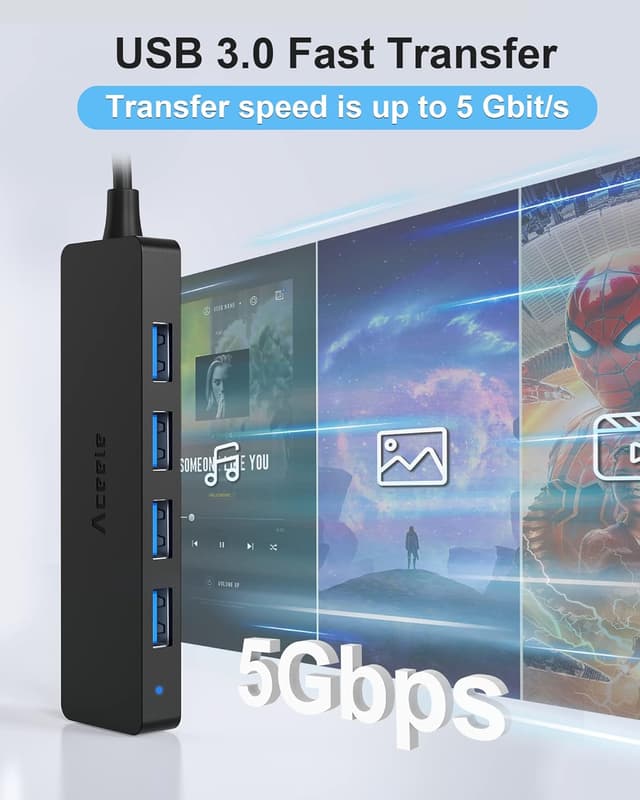
The hub is positioned for USB 3.0 performance, with a claimed data transmission speed up to 5Gbps and compatibility with USB 3.0 and USB 2.0 class devices. That means you can plug in slower peripherals like mice, keyboards, and some Wi‑Fi adapters alongside faster USB flash drives.
If you expect it to behave like a high-end docking station with broad device support and advanced charging features, it may not match that expectation. This is more of an expansion hub for practical port coverage and stable transfers, rather than a full replacement for everything you might use in a modern workstation.
Power-assisted Type-C port: when it helps
A key detail is the Type-C powered port. The hub can work without it connected, but the moment you connect higher-power USB devices (the description calls out HDD and SSD), the power input is meant to make operation more stable.
In plain terms: if you plan to use external drives frequently, you’ll get a smoother setup by using the powered port as intended. If you’re mainly connecting low-power accessories—keyboard, mouse, and USB sticks—you might not need to lean on the power input as much.

Port layout and portability
The design is described as ultra-slim and pocket-friendly. If you often move between home, office, and meetings, that matters: you can keep it in a laptop sleeve or bag without it turning into a bulky extra.
It’s also presented as plug-and-play, so you shouldn’t need to install anything just to start using it. Again, that’s the intended experience—actual behaviour can depend on your device’s USB setup.

Who it suits best (and who should think twice)
It’s a solid fit if you want extra USB 3.0 ports for a mix of everyday accessories and occasional storage. It also makes sense if you care about stable transfers and you’re likely to plug in higher-power USB drives more than once in a while.
It may not be the best match if you’re expecting a premium docking experience (multiple high-bandwidth display outputs, specialised charging, or enterprise-style throughput guarantees). It can also be a bit of a let-down if you only have one USB port and you need something tailored to a very specific set of high-demand devices—because hubs are always a compromise compared with a more capable dock or direct connections.
Worth considering if you want: a compact USB hub, USB 3.0 expansion, and a powered option for external HDD/SSD use.
It might not suit you if: you’re mainly chasing maximum speed for demanding storage workloads where a more serious dock or dedicated controller is typically better suited.
Tech summary
- Type: USB 3.0 hub with added Type-C powered port
- Expansion provided: four USB 3.0 ports plus one Type-C powered port
- Data rate (claimed): up to 5Gbps
- Power for the auxiliary port (stated): 5V/2A (10W)
- Temperature claim (full load): up to 100℉
- Use style: plug-and-play, portable and ultra-slim
Is it worth it?
Buy the Aceele USB 3.0 Hub if you need quick, everyday USB expansion for things like keyboards, mice, USB flash drives and occasional external HDD/SSD connections—and you’d appreciate the extra stability the Type-C powered port is meant to provide.

Skip it (or at least look closer at alternatives) if you’re trying to replace a more capable dock for demanding workstation tasks, or if your requirements are so specific that a generic hub setup could become frustrating. Overall, it sits in the practical “add ports, keep transfers steady” category rather than the “do everything at once” category.
Mini FAQ
Does it work without plugging in the powered Type-C port?
The description says the hub can work normally without the Type-C powered port connected, but the powered port is included to help stability when higher-power USB devices are connected.
What devices is it intended for?
It’s described for accessories like keyboards, mice, USB flash disks, phones, and also USB storage such as HDD/SSD, plus other USB 3.0/2.0 style low-speed devices.
What speed should you expect?
The stated maximum data transmission speed is up to 5Gbps, and it’s compatible with USB 3.0 and USB 2.0 devices.
Is it portable enough to carry around?
Yes, it’s marketed as ultra-slim and compact, intended to fit into a laptop sleeve, bag or pocket.
Is the temperature claim reassuring?
It’s a helpful spec on paper (100℉ under full load is claimed), but real-world performance depends on what you connect and how long you keep the hub under heavy load.