


Aceele USB-C 3.2 Gen 2 Hub with 4 Ports (USB-A + USB-C) and 10Gbps Extension Cable
Product description
If you’re juggling USB-A peripherals and newer USB-C devices, this Aceele hub is aiming straight at the practical middle ground. On paper, it’s built around USB 3.2 Gen 2 with up to 10Gbps data transfer, plus it uses a 100cm extension cable approach so the adapter is easier to position around a desk or work setup.
That said, it’s not a magic all-in-one. It doesn’t provide video output, and the 10Gbps claim is only realistic when your connected devices actually support the same speed. If you’re mostly plugging in keyboards, mice, or USB flash storage, it can still make day-to-day life simpler, but don’t buy it expecting phone charging or display use.
The essentials
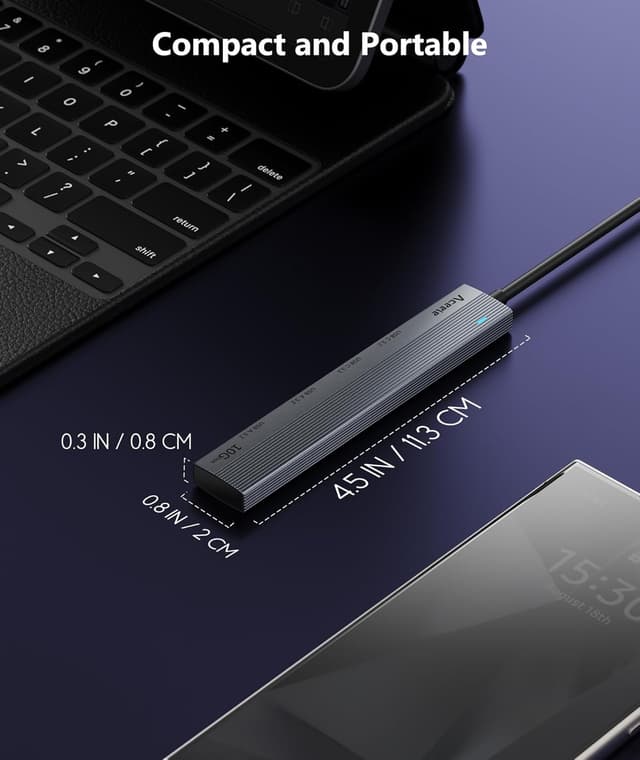
This is a multiport USB hub/splitter from Aceele that brings four USB data connections together in one compact setup: it includes both USB-C and USB-A ports (USB 3.2 A and USB 3.2 C ports). The idea is straightforward: keep your main laptop or tablet ports free, then expand what you can connect for data-focused tasks like transferring files to/from external storage, using USB accessories, or connecting standard peripherals.

The included extension cable is part of the design. Rather than fighting for clearance behind your laptop, you can place the hub where it’s comfortable—handy at home, in the office, or in any workspace where ports are awkwardly placed.
Key points
The standout angle here is flexibility: you’re not choosing between USB-A and USB-C ecosystems, because the hub offers both. That matters if you have a mix of devices such as a USB-A mouse/keyboard and a USB-C storage drive, for example.
Another thing to note is speed expectations. USB 3.2 Gen 2 is described as potentially offering double the transfer speed of traditional USB 3.0, and the hub is positioned as a 10Gbps adapter. But you should take the “up to” seriously—if your input/output devices don’t support 10Gbps, the hub can’t magically force it.

Also, there are clear limits that help prevent disappointment: the hub’s USB ports are for data expansion, and the manufacturer explicitly says none of the ports support video output. And the USB-A and USB-C data ports are stated as not suitable for charging phones or other mobile devices.
What stands out in everyday use
In real use, this kind of adapter is mainly about making connections less fiddly.
For instance, you might connect a USB flash drive to the hub for quick file transfers, then plug in a USB keyboard and mouse so everything stays in one place when you move between desk and couch. With a 100cm cable, the hub can sit closer to you rather than being trapped behind a laptop.

Where it feels less convincing is when you expect it to act like a power hub or a display extender. If your goal is charging a phone/tablet from the hub, the design isn’t meant for that. And if you’re hoping to add a monitor through USB, the answer is no—there’s no video output.
Compatibility & requirements
The hub is described as compatible with a wide range of USB-C 3.2-capable computers and devices, including MacBook Pro/Air models, iPad Pro models, and several Surface models, plus some Galaxy S series devices listed in the description.
The important “gotcha” is the speed requirement. For the 10Gbps performance to be believable, you’ll want to ensure both the connected source device (your laptop/tablet/phone) and the target device (like compatible storage) support 10Gbps.

It’s also explicitly a data solution. The ports are intended for devices such as USB memory, external hard drives, and USB peripherals like mouse and keyboard—so it’s a good match if you’re building a data/desktop accessory setup.
Tech specs
- Name: Aceele Hub USB C 3.2 Gen 2, 10Gbps Data Transfer Multiport Adapter Splitter with 4 Ports
- Type: USB data hub / adapter splitter
- Format: USB-C and USB-A multiport expansion
- Size: 100cm extension cable
- Capacity: up to 10Gbps data transfer (only when devices support it)
- Compatibility note: USB ports do not support video output
- Power/charging note: ports are not for charging phones or other mobile devices
Who it suits best—and who should skip it

It makes sense if you’re trying to add more data connections on a USB-C 3.2-capable laptop or tablet, especially when you need both USB-A and USB-C devices in the same setup. A good use case is a work desk where you rotate between external storage and USB peripherals, and you want the hub reachable without plugging into a cramped side port.
It may not suit you if you need charging through the hub, or if you’re buying specifically to add video output to a monitor. It could also feel like overkill if your current devices don’t support high-speed USB 3.2 Gen 2 / 10Gbps—then you’re mainly getting extra ports rather than the headline speed.
FAQs
Does this hub support video output?
No. The manufacturer states that none of the hub’s ports support video output.
Can it charge phones or tablets?
No. The USB-A and USB-C ports are stated as not usable for charging mobile phones or similar devices.
Do I need to install drivers?
The listing states Plug & Play with no need to install drivers.
Will I always get 10Gbps?
Not necessarily. The listing notes that the input and output devices need to support 10Gbps for that level of performance.
Final verdict
Should you buy it? The Aceele 10Gbps USB-C 3.2 Gen 2 hub is worth considering if your goal is simple USB data expansion—especially when you have a mix of USB-A and USB-C accessories—and you want an easy-to-place 100cm extension cable setup. It’s not the best choice if your priority is charging devices or adding video output, because those functions aren’t supported by design. Also, if your devices don’t support 10Gbps, keep expectations realistic: you’ll still gain extra ports, but you likely won’t see the headline speed the marketing points to.