


PRISMXR PC-VR Streaming Air Link Router (Puppis S1) for Meta Quest 3S/3/2 & Pico 4 with AX1200 Wi‑Fi6 — Wireless stable setup
Product description
What it is and why you’d want it
If you’re trying to stream PC VR to a Meta Quest headset (like Quest 3S/3/2) without the usual “why is this stuttering?” headaches, PRISMXR’s PC‑VR Streaming Air Link setup is aimed directly at that. It’s built around the Puppis S1 approach, where the router and desktop software work together to bridge your PC and VR headset for wireless streaming.
On paper, the focus is clear: less interference, more consistency, and a setup flow designed to be easier than troubleshooting a full DIY wireless setup. The included software angle—Puppis S1 with PrismXR Desktop App—also matters if your goal is “press start, get into VR,” rather than constantly tuning settings.
That said, no router magically removes every network variable. If your room Wi‑Fi environment is extremely congested or your PC placement is awkward, you may still need to experiment.

Key features that affect real streaming
The headline here is a dedicated streaming router mode (Puppis S1), using a 1.3GHz dual‑core chipset and beamforming to reduce interference from other Wi‑Fi signals. Beamforming is one of those specs that’s hard to judge from a listing, but the intent is to help the connection behave more predictably when you’re moving around.
For throughput, the listing calls out Wi‑Fi 6 performance with 2x2 MIMO, 160MHz bandwidth, and 1024‑QAM, with total network speed listed as 3000 Mbps (2402 Mbps on 5GHz and 575 Mbps on 2.4GHz). Overkill? Not necessarily. For VR streaming, the “feels smooth” factor depends on stability as much as raw speed—so a router positioned as a dedicated PC‑to‑VR link can be a meaningful shift compared to sharing the same Wi‑Fi network for everything.
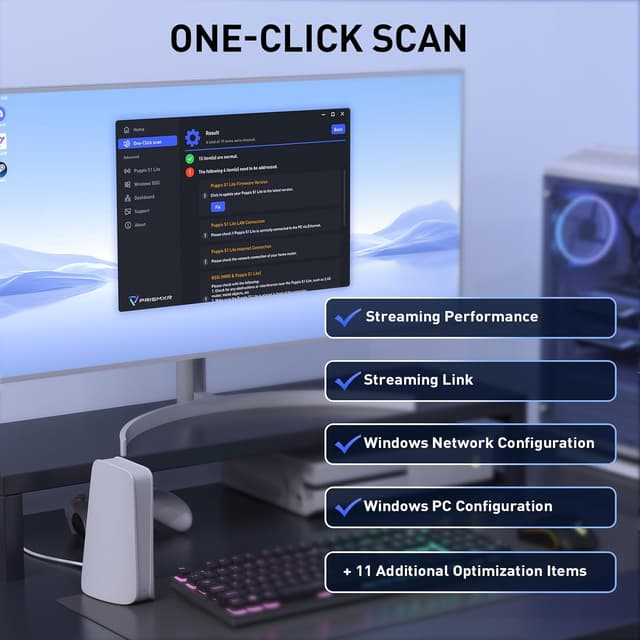
There’s also the PrismXR Desktop App layer. The listing mentions a “21‑item One‑Click Scan and Fix,” meant to eliminate common system issues and keep performance at a higher baseline. If you’ve ever had PC VR streaming degrade after some setting change, this kind of automated sanity check is the practical part.

Setup experience: what you’ll notice first
This is where PRISMXR tries to remove friction. The listing describes an “EaseLink” technology using Bluetooth to create an independent link between the PrismXR App and the Puppis S1 router. The claim is that you don’t need to install drivers before using Puppis S1.
If you’re the type who wants the fastest path from “box arrives” to “I’m in a game,” the “independent, reliable link” concept is the selling point. Still, take the compatibility note seriously: it mentions compatibility with devices that have built‑in wireless receivers, and it also states the product does not include a C‑C data cable.
Tech specs (as listed)

- Name: Puppis S1 PC‑VR Streaming Air Link Router (PrismXR/EaseLink approach)
- Type: Dedicated Wi‑Fi streaming router for PC VR
- Wireless standard: Wi‑Fi 6
- Chipset: 1.3GHz dual‑core
- Antenna/MIMO: 2x2 MIMO
- Bandwidth: 160MHz
- Modulation: 1024‑QAM
- Network speed (total): 3000 Mbps
- 5GHz speed: 2402 Mbps
- 2.4GHz speed: 575 Mbps
- Software: PrismXR Desktop App with One‑Click Scan and Fix (21 items)
- OS compatibility: Windows 10/11
Compatibility and limitations to double-check
This setup is described as compatible with VR headsets such as Meta Quest 3/3S/2/Pro and Pico 4 / Pico 4 Ultra. It also lists compatibility with third‑party software including Virtual Desktop, Steam, and Steam Link.
Two practical caveats from the listing are worth paying attention to:

First, the device is described as compatible with headsets that have built‑in wireless receivers, and it specifies that the product does not include a C‑C data cable. If your setup depends on a specific cable connection path, you may need to verify what you already have.
Second, compatibility is tied to Windows 10/11. If your gaming PC is outside that (or you’re on a different OS entirely), this may not fit your use case.
Is it worth it?
A solid pick if you want a more dedicated, less “mixed-use” wireless environment for PC VR streaming—especially if you’re using a supported headset like Meta Quest 3S/3/2 and you’re open to using the PrismXR Desktop App workflow. It’s also a good match if you’d rather rely on a guided scan/maintenance step (the 21‑item One‑Click Scan and Fix) than manually chase performance issues.

It may not be a great match if your PC can’t be placed where the router signal is reliably strong, or if your setup requires cables or device connections that aren’t covered by what’s included. Also, if you’re already perfectly happy with your current wireless streaming approach, this is more of a “targeted improvement” buy than a must-have upgrade.
Quick FAQ
Frequently asked questions
Does it include a C‑C data cable?
No. The listing notes that the product does not include a C‑C data cable.
What headsets does it support?
It lists Meta Quest 3/3S/2/Pro and Pico 4 / Pico 4 Ultra among others.
Do I need to install drivers?
The listing says you needn’t install any drivers before using Puppis S1.
What PC operating systems are supported?
Windows 10 and Windows 11.
What streaming apps does it mention?
Virtual Desktop, Steam, and Steam Link are listed as compatible third‑party software.