

UGREEN HDMI to USB-C Video Capture Card, 1080p 60fps with 4K Passthrough
Product description
Capturing video at up to 1080p 60fps gives this UGREEN card a practical role in streaming or recording gameplay, while HDMI loop-out lets the source feed a separate screen at the same time.
It connects an HDMI source to a USB-C capture device and includes a 2-in-1 USB cable and an HDMI cable. Capture requires streaming or recording software, OBS Studio and Streamlabs are among the listed options.
The key distinction is that 4K applies to passthrough, not capture. The USB-C capture output is limited to 1080p 60Hz, so it suits a Full HD recording workflow rather than capturing in 4K.
Key features
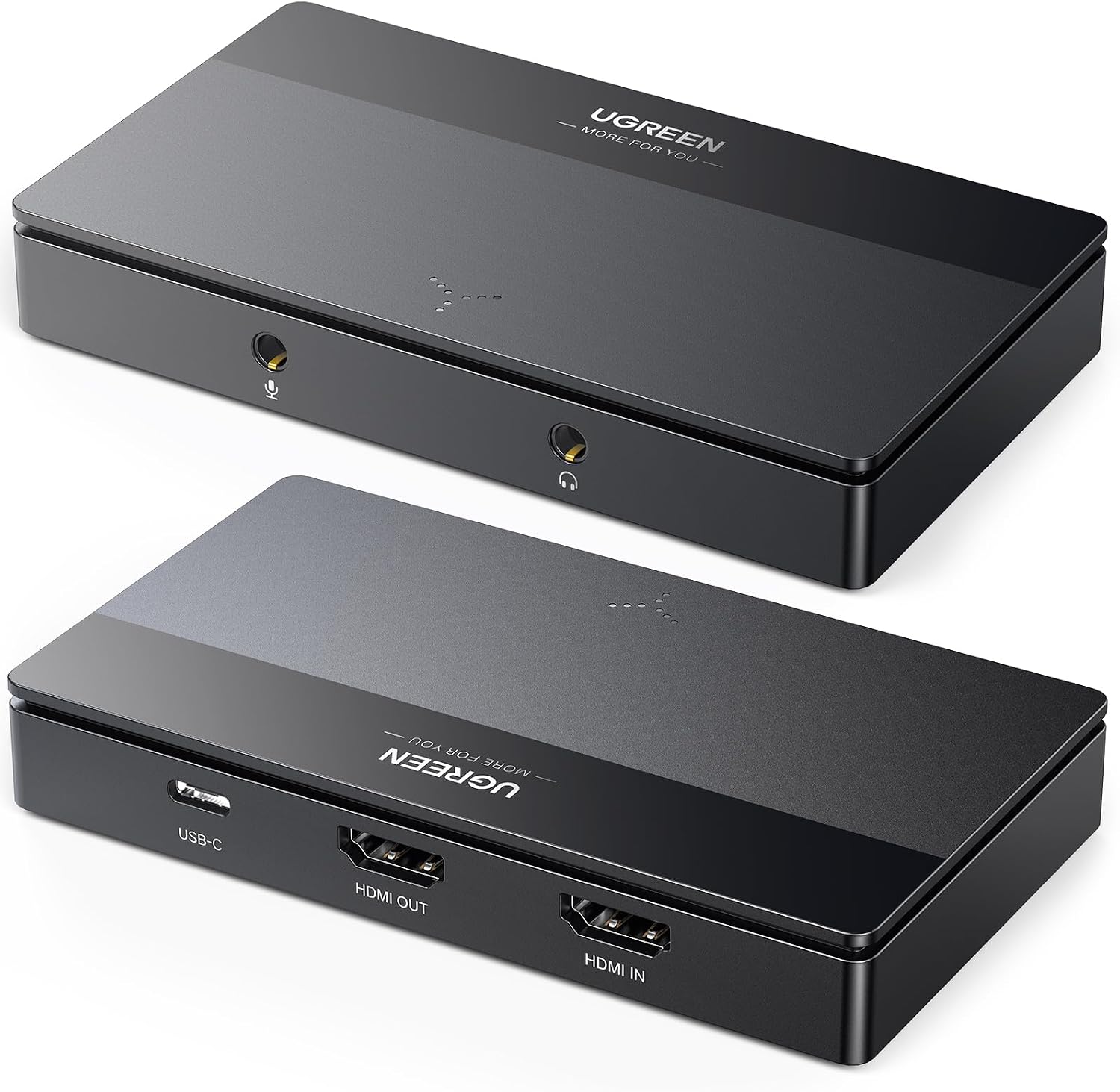
The card accepts HDMI input and captures over USB-C at up to 1080p 60Hz, with 5Gbps bandwidth and YUV2 or MJPG formats. Its HDMI output can pass video through to a monitor, television or display while the capture software records or streams. Supported passthrough modes include 4K@60Hz (4:2:0) and 4K@30Hz (4:4:4). This is useful when keeping a higher-resolution display feed matters, even though the recording itself remains Full HD.
A 3.5mm audio input and output allow a microphone, mixer or headphones to be connected. The card is described as driver-free and compatible with software such as OBS Studio, XSplit, Streamlabs, QuickTime Player and Potplayer. However, it still needs a streaming or capture app to handle the recording or broadcast.
There are content restrictions to factor in: HDCP signals are not supported, and HDCP may need to be disabled on a connected console. HDR, 3D and Blu-ray disc content are also listed as unsupported. Buyers’ feedback on audio is mixed, with some reporting unwanted noise from the headphone output, so audio handling may be worth considering if clean monitoring is central to your setup.
Who it’s for
This is aimed at people who want to capture an HDMI source on a USB-C device, including console players, camera users and streamers. Listed HDMI sources include PS5, PS4, Xbox, Switch, DSLR cameras and TV sticks. USB-C capture devices include MacBooks, PCs and some iPads running iPadOS 17 or 18, Quest compatibility is listed for Quest 3/3S/2/Pro running V67 or above with Quest HDMI Link. These are stated compatibility ranges, not a guarantee that every device or configuration will work. Buyer feedback on iPad support is divided, with some reporting that it did not work for them.
A solid pick if your main aim is 1080p 60fps capture with a separate HDMI display feed. Compared with a basic 1080p 30fps capture card, the higher capture frame rate is the main practical difference. If you need the capture itself in 4K, this model does not provide that.
Everyday use
A typical setup would send a console’s HDMI signal into the card, connect its HDMI output to a display, then connect USB-C to a computer running capture software. That arrangement lets a player keep the display feed while recording or streaming. The same general workflow can suit a camera used as a video source, provided the device and software are compatible.
Buyers often describe setup and recording positively, but overall performance feedback is mixed: some report freezing or a black screen. Picture-quality comments are also varied. That makes it sensible to treat plug-and-play as a simple connection process, not a promise that every source, app and cable arrangement will behave identically.
Should you buy it?
Not the best choice if you need 4K capture, HDR support or HDCP-protected playback. Its stated capture ceiling is 1080p 60Hz, and the audio jack has attracted some complaints, despite the convenience of having both input and output connections. If your workflow fits those boundaries, the USB-C capture connection, HDMI loop-out and included cables make this a focused option for recording or streaming an HDMI source. For a setup where reliability or audio monitoring is critical, weigh the mixed buyer reports alongside the listed features before choosing.