McAfee Total Protection 2026 Antivirus for 5 Devices + Auto-Renew
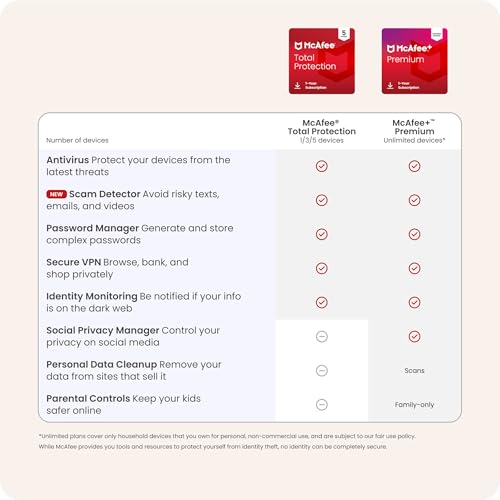
What this is and what problem it solves\nMcAfee Total Protection 2026 is a multi-device antivirus suite designed to guard phones, laptops, and tablets with real-time threat protection. Beyond classic malware defense, it includes scam detection for risky texts, emails, and videos, plus a secure VPN for private browsing. If you frequently use public Wi-Fi or want a safer online routine, this package aims to reduce exposure to phishing, malware, and data theft.\n\n## How it stands out in practice\nOn paper, the offering packs several layers of protection into one subscription: identity monitoring with dark web scans, safe browsing that blocks risky sites, password management with auto-fill, and a 24/7 support footprint. The auto-renewal setup is designed for ongoing protection without manual re-purchases, which can be convenient for households or small teams relying on continuous security. The inclusion of a downloadable digital code after purchase makes activation straightforward for Prime members who want a quick start.\n\n## Strengths you’ll notice day to day\n- Real-time threat protection helps block malware before it harms devices.\n- Scam detector and on-demand checks can cut down on risky communications.\n- VPN feature keeps online activity more private on public networks.\n- Identity monitoring adds an extra layer of vigilance against personal data exposure.\n- Password manager reduces the friction of remembering multiple credentials.\n\n## Limitations and where it might fall short\nNo security suite is perfect for every use case. If you mainly need lightweight protection on a single device, the multi-device plan could feel like overkill. Features like VPN and identity monitoring are valuable, but some users may want deeper customization or advanced security settings that are only essential for power users. If you rely on extremely strict, business-grade controls, you may want to compare enterprise options.\n\n## Who this is for\nFamilies or individuals who want comprehensive protection across up to five devices, plus extra features like password management and secure browsing. It’s a reasonable fit for users who value automation (auto-renew) and want an all-in-one solution rather than juggling separate apps.\n\n## Who this isn’t ideal for\nIf you only need basic antivirus on a single device, you might prioritise simpler or cheaper options. If you prefer open-source or manually configured security, this bundled approach could feel heavier or less flexible.\n\n## When it makes sense to buy\nWhen you want broad, integrated protection across multiple devices, with additional layers like scam detection, VPN, and identity monitoring, and you’re comfortable with a yearly auto-renewal model via amazon.\n\n## What to check before you buy\nConfirm the number of devices in your household or team, ensure you’re comfortable with auto-renewal, and review how the VPN and identity monitoring are billed in your region. Consider how often you’ll actually use the identity monitoring features and whether you need the password manager cross-platform compatibility.\n\n## Practical usage example\nImagine you’re often on coffee shop networks. The VPN helps keep your traffic more private, while the scam detector could flag suspicious messages before you click. If you share devices with family members, the password manager can reduce login friction across apps and sites.\n\n## Technical snapshot (quick reference)\n- Tech specs: see the dedicated section for a concise list of core capabilities across devices.\n\n## FAQ (brief)\nQ: How many devices are supported? A: Up to 5 devices.\nQ: Is there a time-limited trial? A: The listing mentions a 1-year subscription with auto-renewal.\nQ: Can I activate on mobile and desktop? A: Yes, the package covers phones, laptops, and tablets.\n\n## Final considerations\nIf you prioritize broad protection across several devices with a combined feature set (antivirus, scam detection, VPN, identity monitoring, password manager) and you’re comfortable with an auto-renewing license, this McAfee Total Protection 2026 offer is worth evaluating. If your needs are narrower or you require deeper enterprise controls, you may want to explore more specialized options.