

McAfee AntiVirus Virus Protection Software 2026 for 1 PC | Auto-Renews
Product description
What matters most
McAfee AntiVirus Virus Protection Software 2026 for 1 PC offers real-time protection against malware, viruses, spyware, ransomware, and other online threats. On the surface, the product emphasizes fast scans and proactive safety measures to keep your device secure as you browse, work, and shop online. If you’re looking for a straightforward layer of defense for a single computer, this solution positions itself as a practical option with automatic renewal to maintain continuity.
Key features and what they mean in practice
Real-time protection is designed to monitor activity as it happens, potentially catching threats before they cause damage. Safe Browsing aims to steer you away from risky links and phishing attempts, which can be a welcome guardrail for everyday browsing. The Advanced Firewall is described as blocking unauthorized access and up to more malicious websites, which translates to a more controlled network boundary while you’re online.

How it fits into daily use
The software is pitched as easy to use, with a user-friendly interface that helps you manage security settings without getting bogged down in technical detail. For someone who wants protection that runs in the background and doesn’t require constant tinkering, this can be compelling. The inclusion of 24/7 customer support suggests help is available if you run into issues or need help understanding alerts.

What to consider before buying
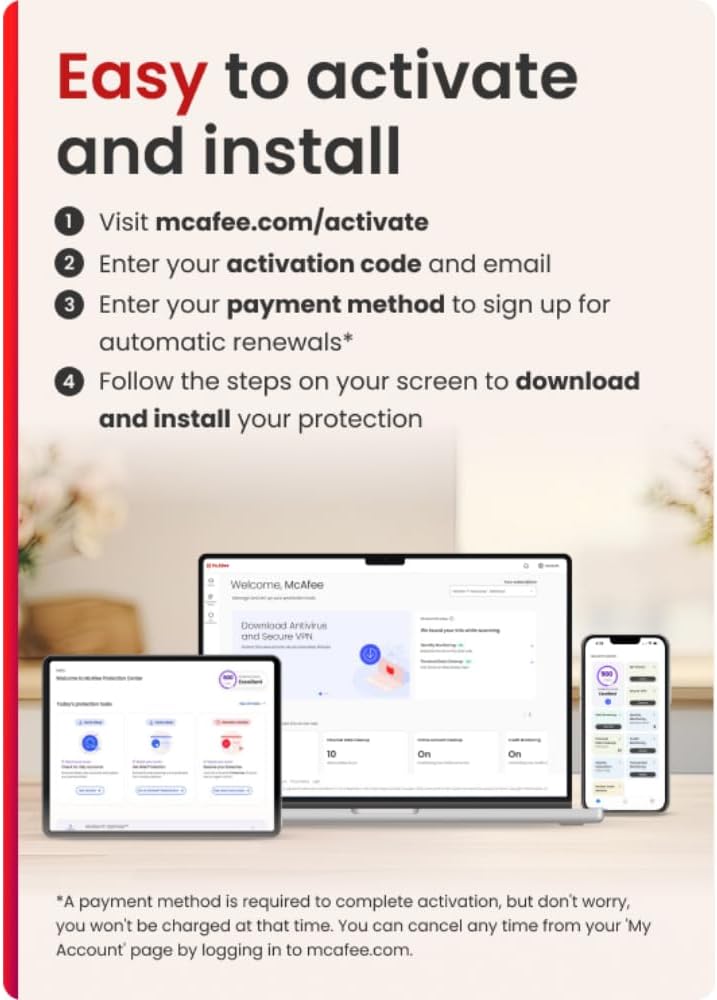
One notable element is the auto-renewal model. The subscription renews annually to keep protection uninterrupted, but you’ll want to review the renewal price and remember that you’ll be charged 30 days before each renewal. The activation process is described as an instant code download delivered by email, which means setup often happens quickly after purchase.

Who it’s best for
If you’re purchasing protection for a single PC and prefer a service that handles ongoing updates and renewal without frequent decisions, this option may align with that approach. It’s also a reasonable pick if you value a branded, expert-backed solution with around-the-clock support.

Who it might not be for
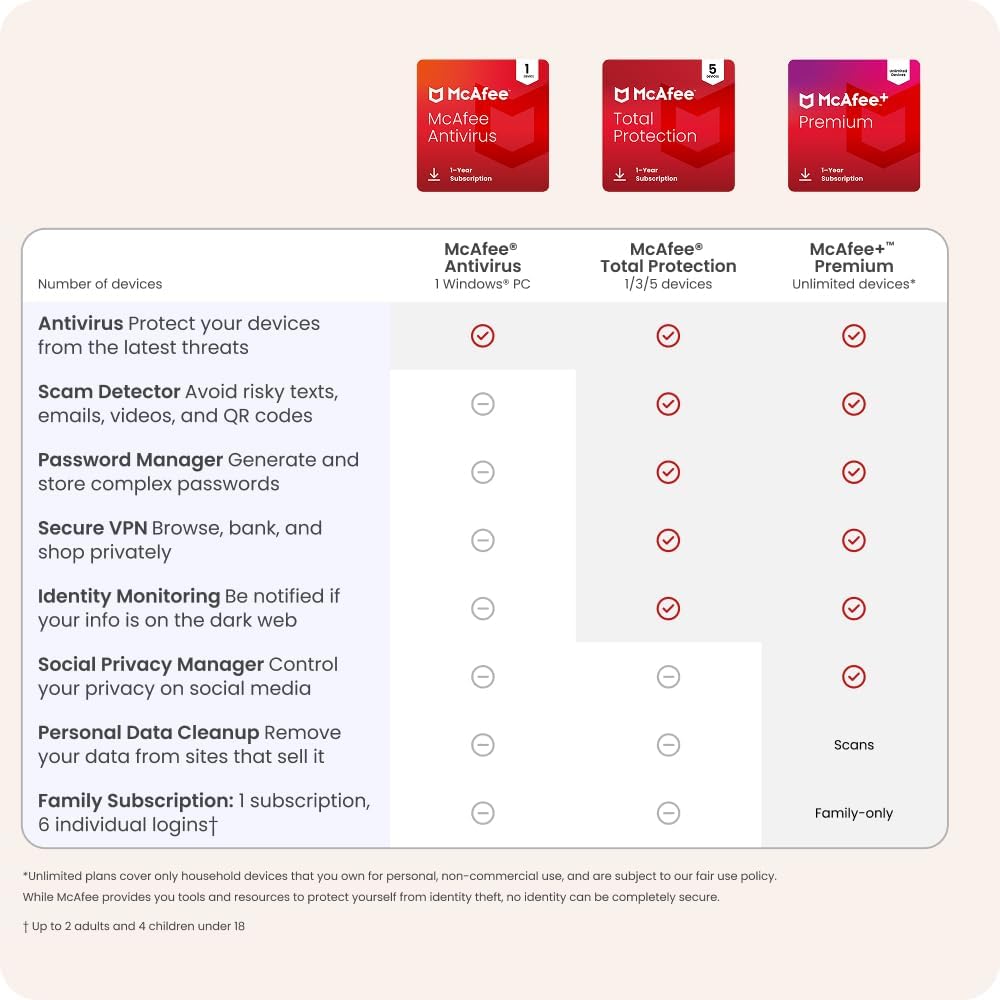
If you’re comparing options across multiple devices, or you crave highly customizable security strategies, you may find this one lacks the depth or flexibility some power users want. Also, if you’re sensitive to auto-renewal terms or price fluctuations at renewal, you’ll want to assess the cost over time.
What to verify before checkout
- Confirm you’re buying for 1 PC, as advertised.
- Be aware of the auto-renewal cadence and renewal price in your region.
- Check the activation email timing to ensure a smooth setup after purchase.
- Consider your current OS and any compatibility notes from McAfee’s support resources.
Practical usage snapshot
Imagine you’re finishing a tight workday when a suspicious link pops up. Real-time protection should flag it, while Safe Browsing helps you avoid the trap. If you’re managing a home network, the firewall aims to block unauthorized access as you transition from work to personal tasks. It’s not about over-promising dramatic performance gains, it’s about practical, ongoing protection that fits a typical home or small-office setup.
Final verdict
Is it worth it? It can be a solid fit if you want a single-PC security solution with renewal simplicity and a brand backed by security experts. It may not be the strongest pick if you need multi-device coverage or highly specialized security controls. If you prioritize easy setup, reliable support, and a familiar brand, this McAfee option tends to satisfy those expectations for a straightforward security baseline.
FAQ
- How does auto-renewal work with this plan? It renews annually, with a reminder 30 days before charging, you can cancel from your account before renewal.
- What happens after purchase? You receive a digital code and activation instructions by email to enable protection quickly.
- Can I manage security settings easily? Yes, the interface is described as user-friendly for managing protections without deep technical know-how.
- Does it protect against phishing? Safe Browsing is designed to guide you away from risky links and phishing sites as you browse.
- Is it suitable for gaming or resource-intensive tasks? The description emphasizes ease of use and real-time protection, it does not specify performance impacts, so consider testing during a trial period if you’re sensitive to background activity.