

TP-Link Archer TXE72E AX5400 Wi‑Fi 6E PCIe adapter
Product description
This Wi‑Fi 6E PCIe network card brings a PC access upgrade for high‑bandwidth activities such as AR/VR, 8K streaming and competitive gaming, offering lower latency and wider spectrum by adding the new 6 GHz band to a desktop. It is useful for users wanting to reduce interference and increase throughput when paired with a compatible Wi‑Fi 6E router.
Key Points
Two high‑gain external antennas improve reception for rooms where the desktop sits away from the router. This setup tends to deliver more consistent signal strength across the 5 GHz and 6 GHz bands, and it can extend usable range for demanding applications. 📶
The adapter supports AX5400 aggregate throughput offering a combination of 2402 Mbps on 6 GHz, 2402 Mbps on 5 GHz and 574 Mbps on 2.4 GHz according to the manufacturer, which helps with simultaneous streaming and online play. Bluetooth support is updated to Bluetooth 5.3, which brings modest improvements in connection reliability and efficiency over previous versions. 🔊
Security is enhanced with support for WPA3, adding protection to personal networks when the router also supports the standard. Consider that the 6 GHz channel is currently supported only on Windows 11, so older operating systems will not be able to use that band even though the card remains backward compatible with earlier Wi‑Fi standards.
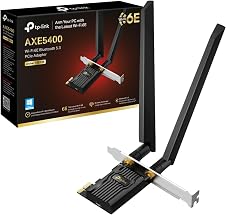
Technical Specifications
- Name: TP‑Link Archer TXE72E
- Standard: Wi‑Fi 6E (802.11ax) tri‑band
- Max throughput: 2402 Mbps (6 GHz) + 2402 Mbps (5 GHz) + 574 Mbps (2.4 GHz)
- Interface: PCIe x1
- Bluetooth: Bluetooth 5.3
- Antennas: Two external multidirectional antennas
- Security: WPA3 support
Usage Recommendations
Install the card in a free PCIe slot on a desktop motherboard and attach both antennas for best reception. For use of the 6 GHz band ensure the PC runs Windows 11 and the router supports Wi‑Fi 6E channels. Keep antenna orientation flexible while testing placement to find the strongest signal, as small changes in angle or height can affect throughput and latency. 🔧
When pairing with Bluetooth devices expect improved stability for audio peripherals and controllers, though range will still depend on obstacles and interference in the room. Note that peak speeds rely on the router, network congestion and distance, so real‑world rates may be lower than the theoretical maximums stated by the manufacturer.