

Logitech MK950 Signature Slim Wireless Keyboard 3‑device combo
Product description
This wireless keyboard and mouse combo from Logitech offers a slim, full-size typing experience and a contoured Bluetooth mouse for quieter work and smooth multi-device use. It is aimed at users who need to switch between a desktop, laptop and mobile device while keeping a clean desk and low noise levels.
Key Points
The keyboard provides familiar laptop-style keys in a QWERTY UK layout, with reduced key noise to help maintain focus in shared spaces. The mouse features SilentTouch technology for up to 90% less click noise according to the manufacturer and an easy-scroll SmartWheel that handles both line-by-line navigation and fast scrolling. Both devices connect via Bluetooth and can be paired to up to three devices for quick switching between work and personal setups. The combo includes recycled plastic in the construction, reflecting a lower environmental impact for the keyboard and mouse.
Technical Specifications
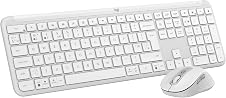
- Name: Logitech MK950 Signature Slim Wireless Keyboard and Mouse Combo
- Layout: QWERTY UK
- Connectivity: Bluetooth, multi-device switching across three devices
- Compatibility: Windows and macOS, also works with Chrome OS, Linux, iPadOS, iOS and Android according to the manufacturer
- Materials: keyboard contains minimum 48% post-consumer recycled plastic, mouse contains minimum 25% post-consumer recycled plastic
Benefits
This set reduces distractions with quiet typing and clicking, which helps when concentration is required or when working in open-plan offices. The low-profile keyboard keeps a slim footprint on the desk while still offering a full-size keyset and a numeric pad. The mouse’s SmartWheel adapts between precise line scrolling and rapid page movement, making it easier to handle long documents and web pages without repeated gestures.
Usage Recommendations
Pair the keyboard and mouse through your device’s Bluetooth settings and use the multi-device switch to move between computer, tablet and phone with a single tap. Customisable keys and buttons can be set up via the Logi Options+ app on supported platforms to create shortcuts and streamline repetitive tasks. Consider that some advanced customisation features require the Logi Options+ app and that the stated noise reduction figure is provided by the manufacturer.