


Blackview DCM6 14" Triple Laptop Screen Portable Monitor (0.17") – Eye Protection, Plug & Play
Product description
If you’re the type who keeps saying “I just need a bit more screen space”, the Blackview DCM6 portable monitor is built for that exact itch. It’s a slim 14" IPS display designed to extend (or mirror) a laptop’s screen, and the emphasis here is on travel-friendly working without turning your bag into a wiring project.
On paper, it sits in the “practical productivity” lane: enough spec to feel like a proper secondary display, plus two eye-care certifications and a flicker-free approach. Still, it’s worth bearing in mind that a portable panel will never fully replace the comfort of a proper desk monitor if you work all day long.
The essentials
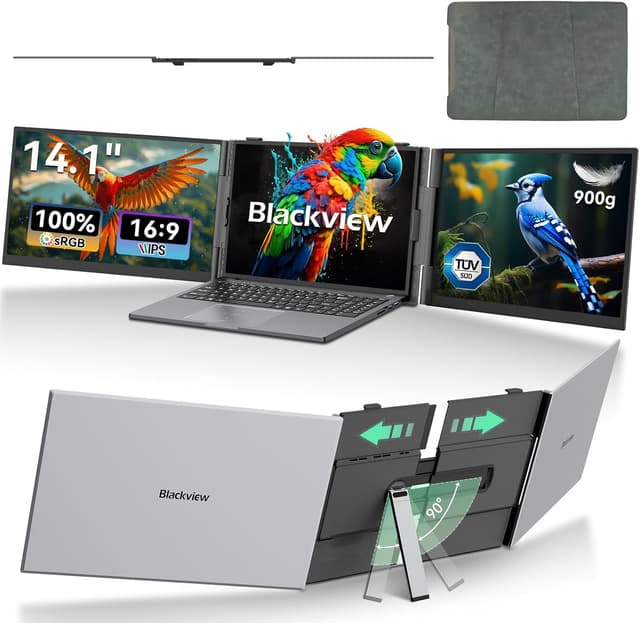
The Blackview DCM6 is a portable laptop screen (14" FHD IPS) aimed at people working on the move or setting up quick workstations. The key idea is simple: add a second (or mirrored) screen so you can split tasks—like editing on one side while referencing on the other—rather than constantly alt-tabbing.
It’s also positioned as lightweight and compact, with an ultra-thin panel and CNC-machined aerospace-grade aluminium alloy body. That combination matters if you regularly travel, work from cafés, or just don’t want bulky kit taking over your space.
What you’ll notice in everyday use
Where this model feels more considered is the multi-tasking workflow. The DCM6 supports toggling between extended and mirrored modes, so you can run an extended dual-screen layout for things like writing on one side and previewing on the other.
A micro example: imagine you’re drafting a document while searching sources—document on the main laptop, reference material on the portable display. You’re not scrolling through tabs all the time, and your focus stays steadier.
That said, “triple” is in the product name, but the most clearly described use is extending/mirroring your laptop with this portable screen. If you’re expecting a specific multi-screen arrangement beyond what’s outlined in the description, you’ll want to double-check how many screens you plan to connect in your setup.

Tech specs
- Type: Portable laptop monitor / laptop screen extender
- Display: 14-inch IPS
- Resolution: 1920×1080 (Full HD)
- Colour: 100% sRGB wide colour gamut
- Brightness: 300 cd/m²
- Contrast ratio: 1000:1
- Panel slimness: 4.5mm ultra-thin panel (as stated)
- Weight: as little as 960g (as stated)
- Eye protection: TÜV Low Blue Light and Flicker-Free certifications
- Connectivity: Type-C two-cable connectivity (video + power via two cables as described)
- Stand range: telescopic adjustable stand for 13 to 17-inch laptops (as stated)
Where it shines (and where it can fall short)
This is a good match if you care about eye comfort as part of longer sessions. The DCM6 is certified TÜV Low Blue Light and Flicker-Free, and it’s also described as reducing visual fatigue thanks to anti-glare technology. That’s exactly the kind of “small but meaningful” feature set people tend to notice after a few weeks, not just on day one.
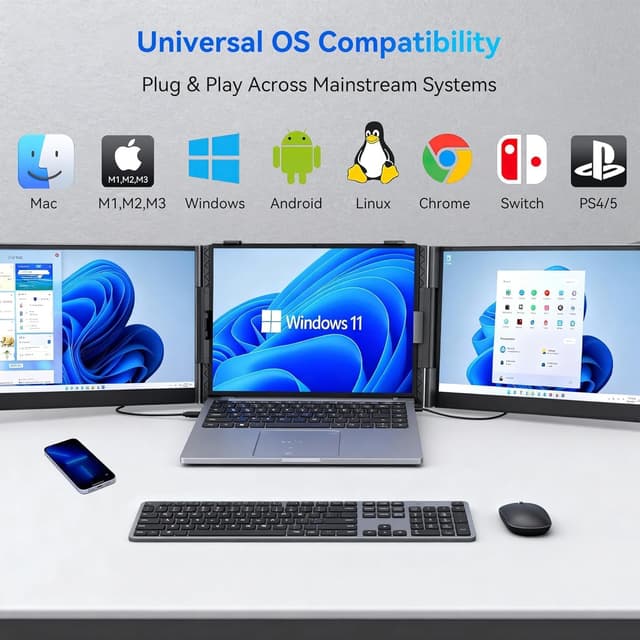
It also looks convenient in terms of setup: it’s described as plug-and-play with no driver installation required. For compatibility, it’s said to work with Windows, macOS (including M1/M2/M3 chips), Android, Chrome OS, and Nintendo Switch—useful if you bounce between devices.
However, don’t expect miracles from brightness alone. At 300 cd/m², it should be fine for typical indoor use, but if you often work in very bright daylight, you may find glare and contrast aren’t as forgiving as you’d like.

Compatibility & what to check before buying
The description says the DCM6 uses a Type-C two-cable approach—video signals and power are transmitted with two separate USB-C cables. That matters because your laptop/phone/host device may need the right Type-C capabilities for video output.
The package is described as including two USB-C to C data cables, a USB-A to C power cable, and a protective case. That’s helpful if you travel, but you should still check what Type-C ports you have available and whether you prefer one cable management setup over another.

It suits you if you want a lightweight secondary display for 13–17.3" laptops and you regularly work with documents, code, or designs that benefit from side-by-side viewing.
Pros
- Slim, travel-friendly build using CNC-machined aluminium alloy (as described)
- 14" Full HD IPS panel with 100% sRGB coverage (useful for clarity)
- TÜV Low Blue Light and Flicker-Free certifications for eye comfort
- Extended and mirrored modes for flexible workflows
- Plug-and-play described across Windows/macOS/Chrome OS and more
What’s included & practical setup
You should get the cables needed for the two-cable Type-C connectivity, plus a protective case. The stand is telescopic and designed to fit laptops from 13 to 17 inches, with anti-slip silicone pads for stability.
If you’re setting it up in a hurry, the workflow is straightforward: place your laptop on a flat surface, extend the stand, connect the Type-C cables, and use it as an extended or mirrored screen.
¿Merece la pena?
For many people, the Blackview DCM6 portable monitor is worth considering if you want a genuinely portable way to add screen real estate—especially for mixed tasks where references matter. The eye-care certifications and flicker-free focus are a strong point for anyone who spends long stretches looking at a display.
It might not be the best fit if you’re expecting a desk-monitor experience with maximum brightness for outdoor or very bright environments, or if you’re planning a multi-screen arrangement that goes beyond what the described extended/mirrored modes cover.

Mini FAQ
Is the Blackview DCM6 easy to set up?
It’s described as plug-and-play with no driver installation required, and the box includes the cables needed for Type-C connectivity.
Does it support extended and mirrored display modes?
Yes, the description says you can toggle between extended and mirrored modes.
What eye-care features does it include?
It’s described as holding TÜV Low Blue Light and Flicker-Free certifications, plus anti-glare technology to help reduce visual fatigue.
What laptops is the stand meant for?
The built-in telescopic stand is described as accommodating laptops from 13 to 17 inches.
What should I watch out for?
The connectivity uses a Type-C two-cable approach (video and power via two cables as described), so it’s worth checking your device ports and cable arrangement preferences before committing.