


Smart Ink Remanufactured 910XL Black and Color Combo Pack for HP OfficeJet Pro e-Series
Product description
If you’re looking to keep an OfficeJet Pro running without constantly shopping for new cartridges, a 910XL replacement combo pack is usually the move. The Smart Ink Remanufactured cartridges are built to work as replacements for HP 910XL and target multiple OfficeJet and OfficeJet Pro e-series models—so in the right printer setup, they can be a straightforward way to stay printing.
That said, remanufactured cartridges are never a completely “set it and forget it” situation. Paperwork, recognition timing, and the way your specific HP firmware behaves can affect the first install experience more than you’d expect.
Key takeaways
Smart Ink’s remanufactured 910XL cartridges are designed for HP printer compatibility across listed e-series OfficeJet Pro and OfficeJet models. The biggest practical points are the install recognition delay and the “Altered or Cloned” message you may see on first setup. If you’re comfortable clicking OK when that message appears, you’re likely fine. If that kind of popup makes you hesitate, you may want to reconsider.
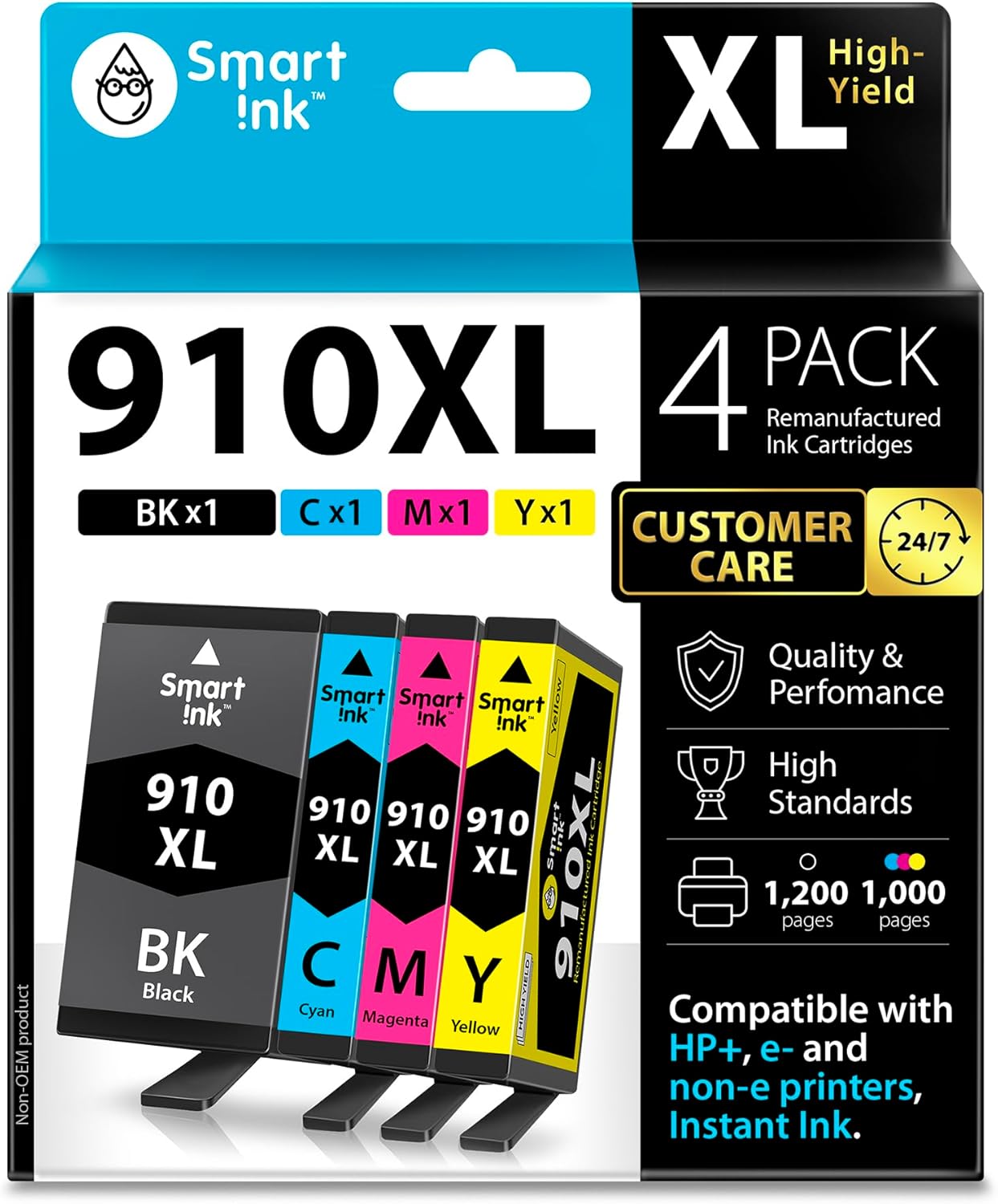
On the plus side, this combo pack approach targets both black and color in one purchase, which is useful if you print mixed documents for work. On the downside, it’s still a replacement cartridge set, not an original, so expectations should stay realistic around day-to-day behavior.
What to know before you buy
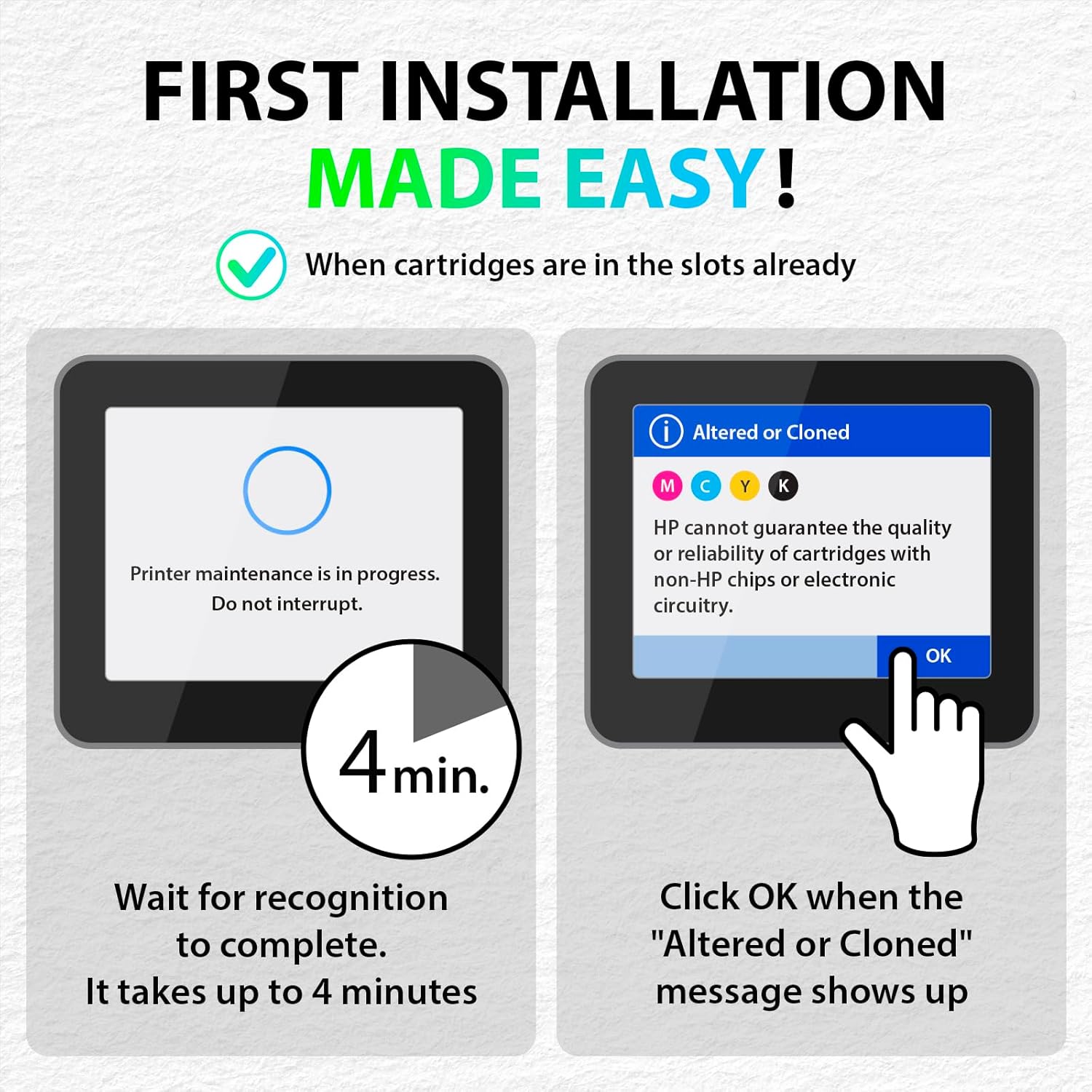
The product listing calls out a first-install behavior you should plan for: you should expect a roughly 4-minute recognition period during the first install. After that, when the “Altered or Cloned” message appears, you’re instructed to click OK to proceed printing (the note specifically mentions HP 8015e, but the model compatibility list includes other printers).
This matters because the first time you install replacement ink is often when people get stuck—either they assume something is wrong, or they don’t want to confirm prompts. If you can follow the instructions during install, you’ll save yourself a lot of hassle later.
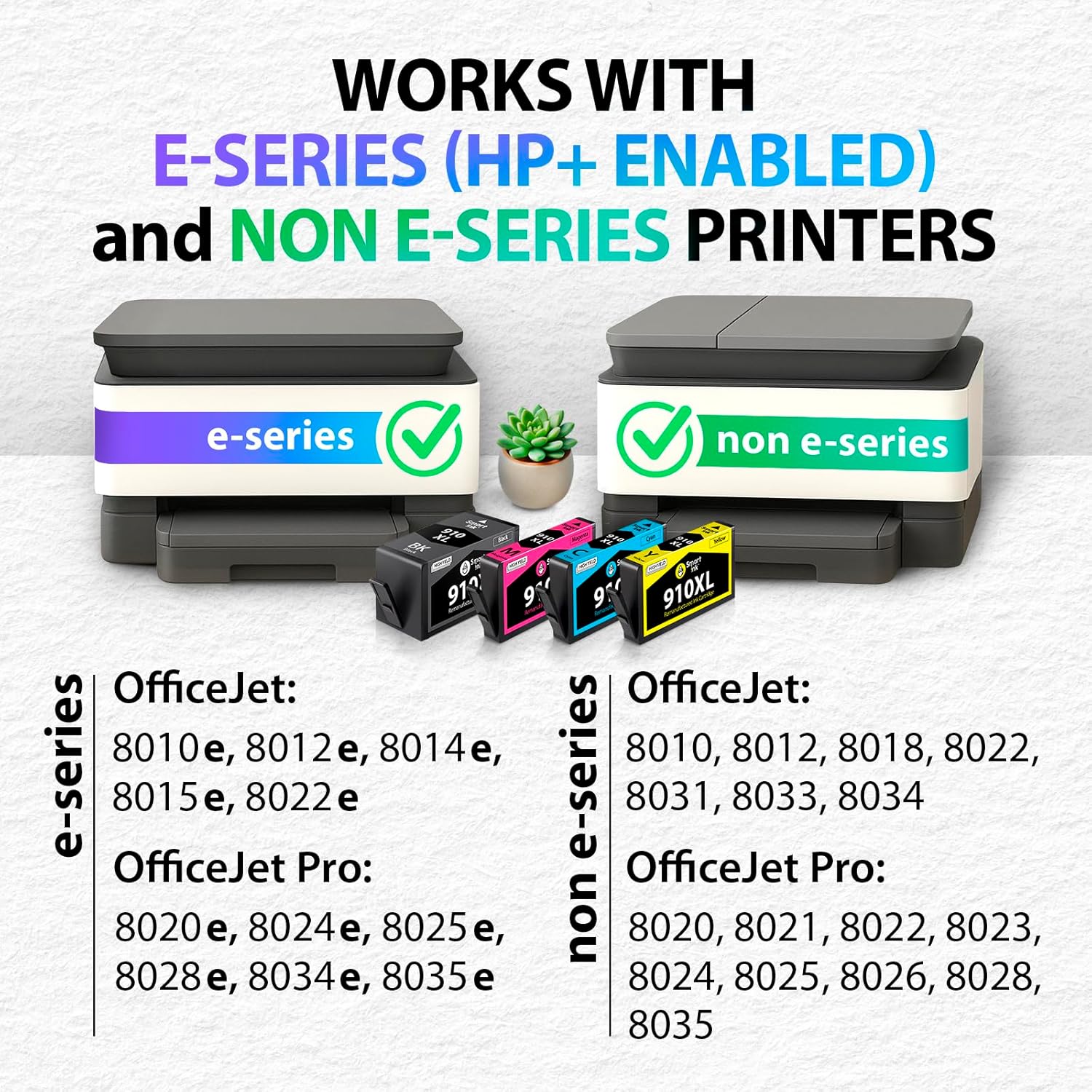
Also, the compatibility is tied to the specific OfficeJet / OfficeJet Pro models listed in the description. It mentions use with e-series printers and even references HP+ and HP Instant Ink-activated printers in the general product claims. Still, if your printer model isn’t clearly on the included list, don’t assume it will work.
Tech specs
- Type: Remanufactured ink cartridges (HP 910XL replacement)
- Color options: Black and color combo pack
- Cartridge recognition behavior: Expect about a 4-minute recognition period during first install
- Install prompt: “Altered or Cloned” message may appear, click OK to proceed
- Compatibility (listed models): OfficeJet Pro e-series (8025e, 8020e, 8024e, 8028e, 8034e, 8035e) and OfficeJet e-series (8010e, 8012e, 8014e, 8015e, 8022e)
- Extra compatible printers mentioned: OfficeJet (8010, 8012, 8018, 8022) and OfficeJet Pro (8020, 8021, 8022, 8023, 8024, 8025, 8026, 8028, 8030, 8035)
Where it shines in everyday use
On paper, this combo pack is aimed at office printing that needs both black text and color elements—think customer forms, school-style worksheets, basic marketing pages, or mixed print jobs where you don’t want to pause for a separate color purchase.
A practical example: if your OfficeJet Pro prints weekly and you notice black starting to look light, grabbing a black-and-color replacement together can keep your output consistent. Instead of waiting for one cartridge to empty, you’re stocking up for the cycle and reducing the number of replacement events.
Limitations and who should avoid it
This isn’t a “no surprises” install. If you strongly dislike dealing with recognition delays or warning prompts during installation, the first setup process may feel like a hassle. The listing also frames recognition and confirmation steps as normal for this replacement—so if you’re the type who wants zero interaction with on-screen messages, you might want to skip.

It may also not suit you if your exact printer model isn’t clearly covered by the list provided. Printer families can look similar, but ink cartridge behavior isn’t always interchangeable.
Customer support and what “peace of mind” looks like here
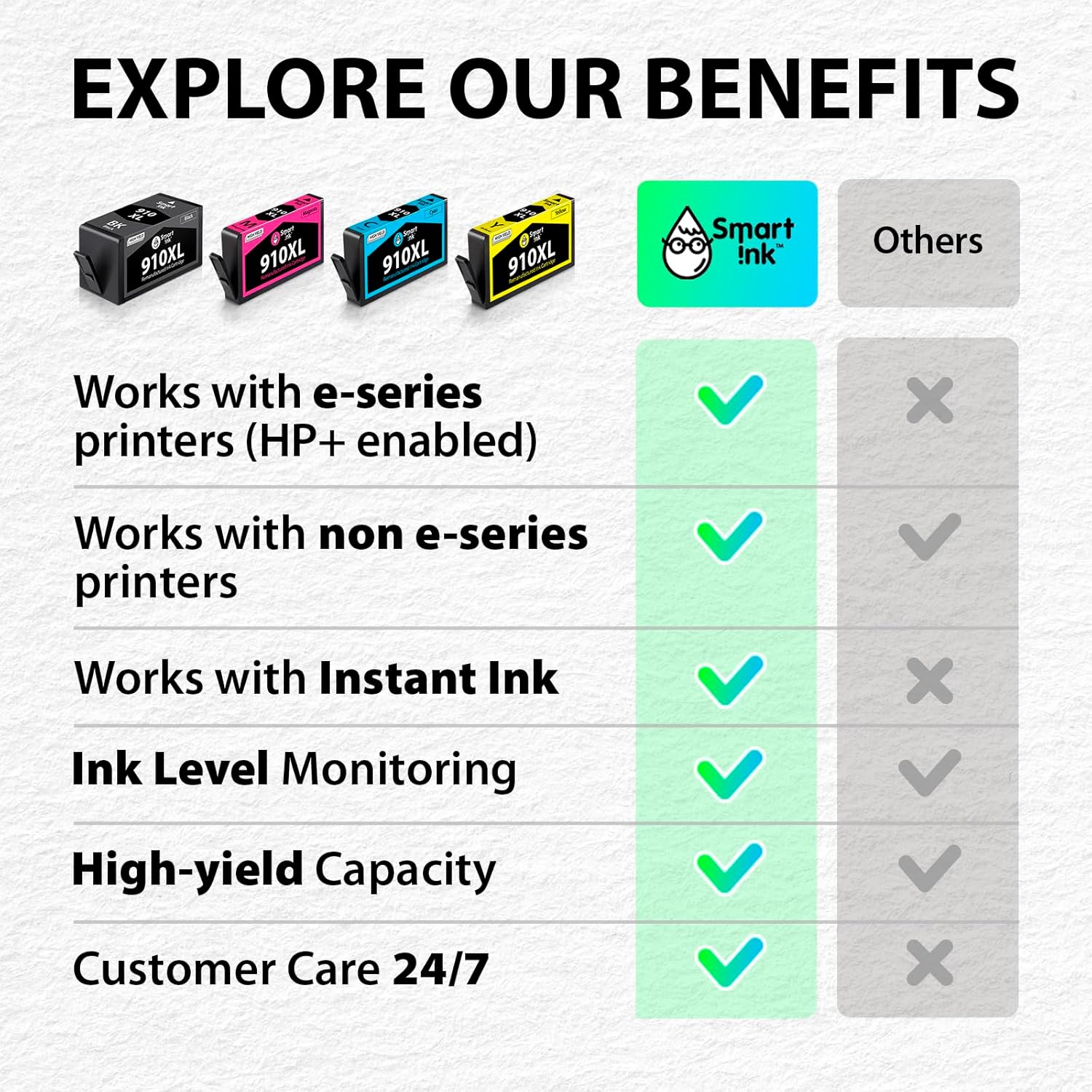
The listing emphasizes customer live support availability 24/7, including holidays, with a short stated response time. That’s a real comfort factor when cartridges don’t get recognized the way you expected.
Still, the best “support” is prevention: double-check your printer model against the listed compatibility and follow the install steps so the recognition window and the “Altered or Cloned” prompt don’t throw you.

Should you buy it?
You’ll likely be satisfied with the Smart Ink Remanufactured 910XL Black and Color Combo Pack if your HP OfficeJet / OfficeJet Pro model is on the compatibility list and you’re okay with a first-install process that includes a recognition period and a confirmation prompt. It makes the most sense when you want a complete black + color replacement in one purchase for mixed office printing.
Skip it if you can’t or won’t handle the initial recognition timing and the “Altered or Cloned” message workflow, or if your printer model isn’t clearly listed. In those cases, the friction is higher than the potential savings.
Mini FAQ
Will this work with HP 910XL cartridges for my OfficeJet Pro?
It’s sold as a replacement for HP 910XL cartridges and lists multiple OfficeJet Pro e-series models (including 8025e and 8028e) plus additional OfficeJet Pro models. Confirm your exact printer model is included.
How long does it take to recognize the cartridges during first install?
The listing says to expect about a 4-minute recognition period during the first install.
What does the “Altered or Cloned” message mean in this context?
The product instructions specifically say that when the message appears, you should click OK to proceed printing on the listed HP models.
Is it a black-only or black + color pack?
It’s a black and color combo pack.
Does it include support if I run into install issues?
The listing mentions daily 24/7 customer live support and a stated response time, and it encourages contacting them if you need manufacturer-style assistance with the cartridge replacement.