



ACEMAGIC M1 Mini PC Intel Core i9 32GB 1TB SSD
Reviews
Price
Product description
This compact mini desktop balances high-end laptop-class processing with a small footprint for home and office use. It is built around an Intel Core i9-11900H and aims to handle demanding tasks such as video editing, 3D modeling, and multitasking with smoother performance, while also supporting multi-monitor setups for productivity.
Key Points
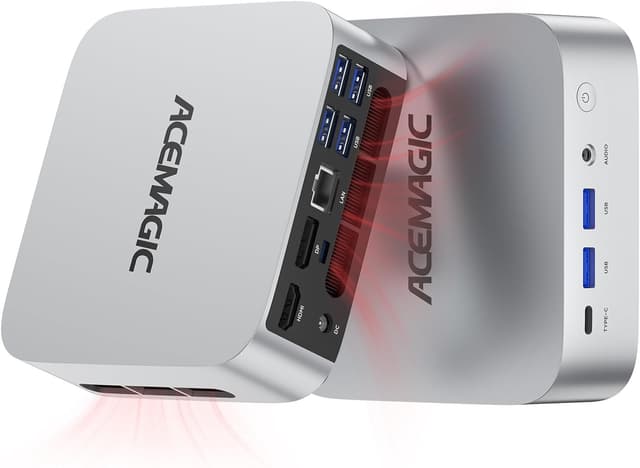
The ACEMAGIC M1 Mini PC brings laptop-grade power into a mini tower that fits on a desk or behind a monitor. It targets users who need strong single- and multi-threaded performance from an 8-core, 16-thread CPU, with burst speeds up to 4.9 GHz according to the manufacturer. Connectivity is broad with USB Type-C, HDMI, DisplayPort, and a 2.5G LAN port for faster wired networking. ⚡

This model is equipped for multimedia and light gaming thanks to integrated graphics and a GPU option with 8 compute units running up to 2000 MHz that supports 4K output across up to three displays. The system also includes dual-band Wi-Fi 6 and Bluetooth connectivity for wireless peripherals and network access.
Technical Specifications
- Name: ACEMAGIC M1 Mini PC
- Processor: Intel Core i9-11900H, 8 cores / 16 threads, up to 4.9 GHz
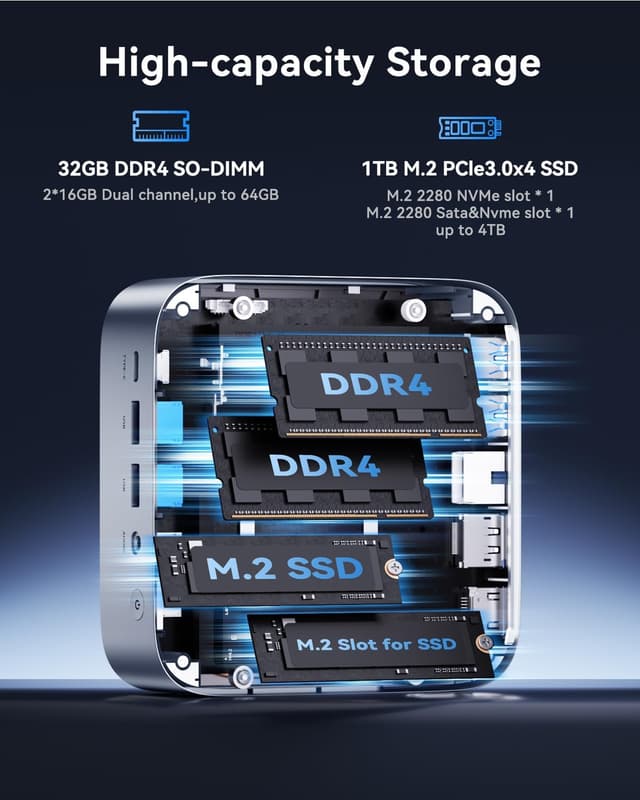
- Memory: 32 GB DDR4 (2 x 16 GB, dual channel, up to 3200 MHz, expandable to 64 GB)
- Storage: 1 TB M.2 2280 SSD, supports additional M.2 NVMe PCIe 3.0 expansion
- Graphics: Integrated Intel UHD and Radeon-style GPU with 8 cores, up to 2000 MHz, supports 4K @ 60 Hz
- Networking: 2.5G Ethernet, Wi-Fi 6, Bluetooth 5.2
- Video outputs: HDMI 2.0, DisplayPort 1.4, USB Type-C with DP and PD support

Benefits
With 32GB RAM and a 1TB SSD, the system handles large projects and multiple applications without frequent swapping or long load times. The triple 4K display capability makes it practical for extended desktop setups, stock trading screens, or immersive streaming and editing workflows. A high-speed LAN interface and Wi-Fi 6 reduce latency and maintain stable connections during heavy transfers or online collaboration. 🎧
Thermal design uses a centrifugal fan, dual copper heat pipes, and optimized airflow channels to keep frequencies higher under load while aiming for quieter operation. The small chassis and modern LED status lighting make it unobtrusive on a work desk while offering visual cues for power and standby.
Usage Recommendations
For content creators and professionals working with large media files, populate the extra M.2 slot to separate system and project storage and consider upgrading to 64 GB if heavy virtualization or large datasets are routine. For multi-monitor setups, use the combination of HDMI, DP, and USB-C to run three independent 4K displays. Note that manufacturer claims of generation-over-generation performance gains are indicative according to their specifications, and actual results will vary with workloads and software optimization.