


ORGBRO X1 portable label maker Bluetooth mini
Product description
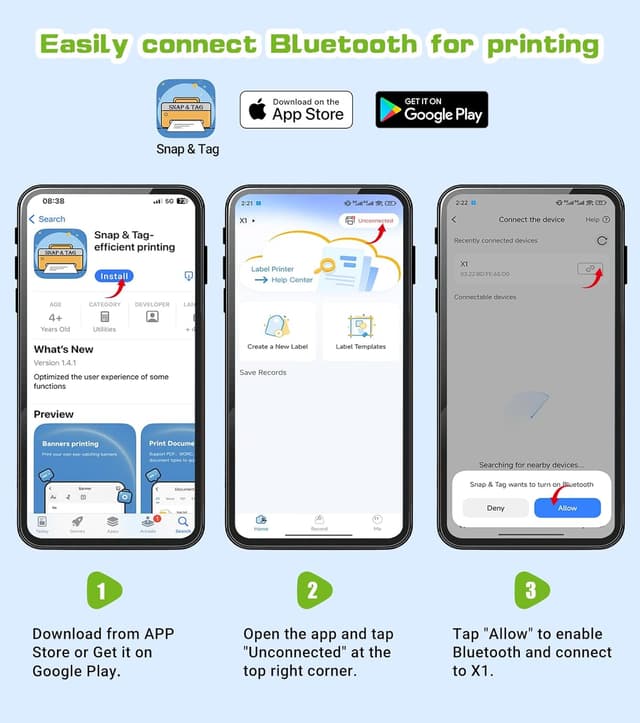
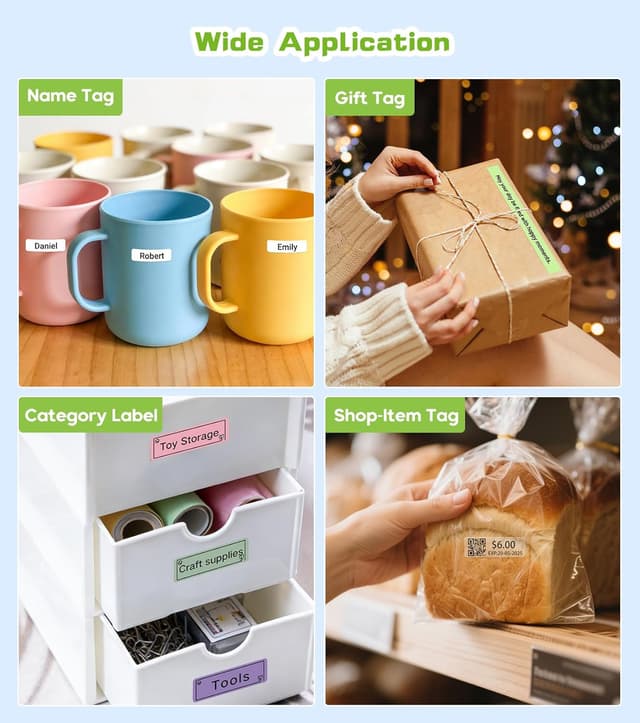
This compact handheld label printer brings quick, portable labelling to home, school and office tasks with easy smartphone control and durable thermal output. It connects via Bluetooth to the free app for fast design of name tags, storage labels, barcodes and QR codes, helping keep cupboards, files and cables organised in a few taps.
Key Points

The ORGBRO X1 is light and pocket-sized, aimed at users who need fast, one-hand printing and simple setup. The included app offers a wide variety of templates and fonts so you can create labels for spice jars, school supplies or equipment identification without extra software. It prints without ink by using thermal technology, which reduces running costs and makes it convenient for on-the-go use. 🖨️

Connectivity and control are straightforward. The device pairs with iOS and Android phones and the app supports multiple languages and over 550 templates for quick customisation. The rechargeable battery means you can print away from mains power, and the thermal labels are described as waterproof and oil-resistant for longer-lasting organisation. 📱
Technical Specifications
- Name: ORGBRO X1
- Printing technology: Thermal printing
- Battery: 2000mAh rechargeable battery
- Label compatibility: Continuous roll 14 mm width and fixed 12 x 40 mm labels
- Connectivity: Bluetooth (app control for iOS and Android)
- App features: Over 550 templates, 95 fonts, multi-language support


Usage Recommendations
Use the app to set up common label categories first, such as pantry, stationery and cables, which speeds recurrent labelling sessions. For neat results, allow the device to be fully charged before extended use and feed the recommended thermal label rolls to avoid jams. When applying labels to curved or textured surfaces, press firmly and allow a few seconds for adhesion. 💧
Consider printing small test labels when switching from continuous rolls to fixed-length labels so you adjust margins and alignment. For barcode or QR code printing, check the scanability with a smartphone after printing to ensure adequate contrast and size. The labels are described by the manufacturer as removable without residue, which helps when you need to relabel or update markings.