


McAfee LiveSafe Unlimited Devices 2026: Antivirus, VPN and Identity Monitoring for Everyday Protection
Product description
What this product is
McAfee LiveSafe Unlimited Devices 2026 is a digital security suite designed to protect multiple devices—PC, Mac, iOS and Android—from malware, unauthorised access and online threats. It combines antivirus software, a Secure VPN, scam detection, breach monitoring and a password manager in one subscription, with automatic renewals to keep protection active year after year.
How it helps you in practice
On the face of it, the setup targets households or individuals with several devices who want consolidated protection. The antivirus relies on McAfee’s Smart AI to detect evolving threats, while the Secure VPN aims to make public Wi‑Fi safer by encrypting your activity. The scam detector uses AI to flag suspicious texts, emails and even deepfake videos, which can be a practical safeguard in today’s digital landscape. Additionally, breach monitoring scans a wide range of data points—emails, IDs, phone numbers—to prompt action if your information resurfaces in a breach.

What stands out and what might not convince you
What stands out is the breadth of coverage in a single subscription: malware protection, privacy tools, identity monitoring and password management. For some users, the convenience of a unified solution is a clear win, especially if you prefer not to juggle multiple security apps. However, the package relies heavily on ongoing auto-renewal, and the renewal price is described as being in effect at the end of the term. If you value transparency and control over costs, this is something to check in your account settings.
Who this is best for
If you have several devices across a family or a small home office and you want a straightforward, multi‑device security plan, LiveSafe could simplify management. It can also suit users who prioritise privacy on public networks and want an easy way to monitor for data breaches without signing up for separate services.

Who might want to think twice
If you mainly use a single device, or you already use a different security stack with highly specific needs (for example, advanced parental controls, enterprise-grade protection, or very particular privacy features), this all‑in‑one approach may feel like overkill or may not align perfectly with your setup.

When to buy and when to pause
Consider LiveSafe if you need protection across multiple devices with a single licence and you don’t want to manage several security apps. On the other hand, if you’re comfortable with a lighter footprint or you require a different security emphasis (e.g., more aggressive VPN features, or separate breach monitoring), you may want to review alternatives or complementary tools before committing.

What to review before purchasing
- Confirm the number of devices you intend to cover and ensure it matches the Unlimited Devices promise.
- Check how the Secure VPN handles data in your region and its impact on speed for typical activities like streaming or browsing.
- Understand the breach monitoring scope and the notification process so you know what to expect if your data appears in a breach.
- Be aware of auto-renewal timings and the renewal price to avoid surprises at the end of the term.
- Verify compatibility with your main devices and operating systems, noting that some features may require specific versions.
Practical use example
A family with laptops, tablets and a couple of mobiles can install LiveSafe across all devices and benefit from automatic protection when connecting to public Wi‑Fi during travel. If one member receives a suspicious text or email, the scam detector can provide an extra layer of warning, while the breach monitoring keeps an eye on any of the family’s data showing up in compromised databases. The password manager adds a layer of convenience, encouraging stronger, unique passwords across sites.
FAQ at a glance
- Does it protect only when connected to the internet? It covers online interactions and devices running the supported platforms, including off-network scenarios where the password manager can still help with login credentials.
- How does the VPN impact speed? Typical outcomes vary by network conditions, using public Wi‑Fi generally benefits from encryption, but some users may notice a change in browsing speed depending on server distance and network load.
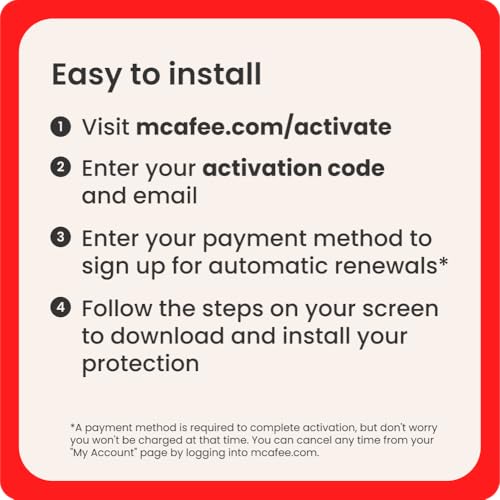
- Can I cancel if it doesn’t fit? The product description notes a renewal structure and the ability to cancel from your My Account page, which is worth verifying during setup.
Is it worth it?
It makes sense if you want a cohesive, multi‑device security suite with identity monitoring and a built‑in password manager, delivered as a single subscription. If your needs are narrower or you require more granular controls, you may prefer to mix and match tools. Overall, for households or small teams seeking practical, all‑in‑one protection, there’s value in the convenience and breadth of features, provided you’re comfortable with ongoing auto‑renewal.