


Norton 360 Platinum 2026: Comprehensive antivirus with VPN, AI assistance and 20-device coverage
Product description
What it is
Norton 360 Platinum 2026 is an all-in-one antivirus suite designed to protect devices and family members from a range of online threats. On paper, it combines award-winning malware protection with features such as dark web monitoring, a private VPN for safer browsing, parental controls, and a password manager. It also introduces Norton Genie, an AI-powered assistant intended to help with scams, cyber safety questions and general product guidance. The plan is described as a 1-year subscription with automatic renewal and activation via email.
What stands out in use
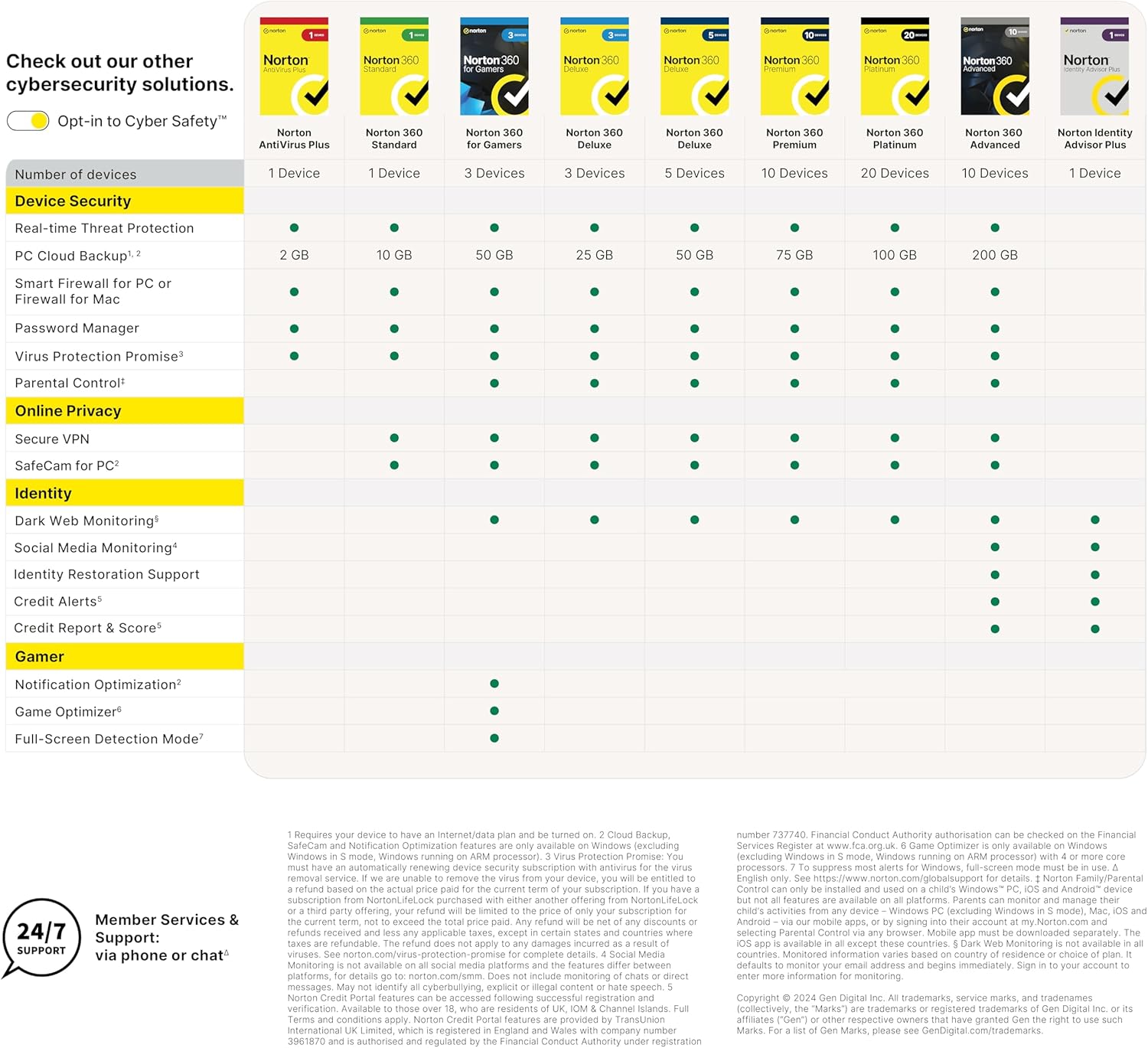
If you’re managing multiple devices across a household, the promise of up to 20 devices under a single subscription can be appealing. The VPN component supports private browsing, which is useful when you’re on public networks or just want an extra layer of privacy during online shopping or banking. Dark Web Monitoring adds a proactive alert layer should your personal information appear on criminal marketplaces. Safe SMS and Safe Web offer additional checks against scams in messages and web pages, which can be particularly valuable if you regularly engage in online purchases or financial transactions.
Strengths and potential drawbacks
On the strength side, Norton’s multi-layer approach tackles several facets of modern digital risk: malware, phishing and scams, data leakage via the dark web, and privacy during browsing. The inclusion of a password manager and parental controls can streamline family-oriented security planning. The AI-powered Norton Genie adds a novel assistive touch—helpful if you want quick guidance or scam detection tips.

However, there are caveats. The product description emphasises a lot of features, but the practical experience can vary by device ecosystem and user habits. Some users may find the accumulation of tools a bit busy or rely more on one core capability (e.g., antivirus) than the rest. The plan’s billing is stated as automatic yearly renewal, if you’re budget-conscious, you’ll want to confirm you’re comfortable with ongoing charges and understand how to cancel. Also, performance impact can differ across devices and networks, so it’s wise to monitor how it affects system speed and responsiveness after installation.
Who it’s for
This offering suits households or small businesses that want centralised protection with a mix of threat defence and privacy tools. If you prioritise scam protection for text messages, web browsing safety, and a built-in AI assistant to navigate cyber risks, this package covers those angles. It’s particularly relevant for families or users who value an integrated VPN, a password manager, and controls to manage screen time for younger users.

Who it might not be the best option for
If you only need basic antivirus protection and don’t require a VPN or parental controls, there could be more compact or cost-effective options. Likewise, if you use a lot of devices outside the 20-device limit or rely on feature-specific security suites from other providers, this Norton package may feel like overkill. For absolute beginners or users who prefer a simpler setup, the breadth of features could feel overwhelming rather than clarifying.
When it makes sense to buy

Consider Norton 360 Platinum 2026 if you want an all-in-one security environment with solid malware protection, privacy tools, and proactive scam safeguards within one subscription. It makes sense when you manage multiple devices and want a single renewal path, plus you value the inclusion of dark web monitoring and AI-driven assistance. If you already have strong privacy practices and only need limited protection, you may want to compare whether you truly need 20 devices or a VPN at all times.
What to review before buying
- Confirm the number of devices supported by your current plan and ensure it aligns with your household’s needs.
- Check activation method (email-based activation) and how easy the initial setup is on each device type (PC, Mac, mobile).
- Consider how the automatic renewal works in your region and your preferred payment method.
- Take note of how VPN and parental controls perform across devices you actually use daily.
- Reflect on whether you need AI-assisted scam guidance and how Norton Genie would fit into your routine.

Practical usage example
Imagine you’re shopping online from a café with a public Wi-Fi network. You’ve activated Norton VPN as part of the package. Safe Web helps surface warnings if you land on a suspicious page, while Safe SMS keeps an eye on any scammy messages that might arrive during the trip. If a friend forwards you a questionable link, Norton Genie can offer a quick privacy and safety check and explain what steps you should take next.
How this compares to other approaches
For those weighing options, this product bundles antivirus protection with privacy and monitoring tools, so you’re not just paying for malware removal. If you prioritise a single, broad security solution with family features, it tends to be more straightforward than mixing separate software licences. If you only need antivirus and manual password management, a lighter setup might be more cost-effective and less resource-intensive on older devices.
Key takeaways
- A broad, multi-device security suite with VPN, dark web monitoring, parental controls, and an AI assistant.
- Best for households seeking centralised protection across many devices with convenience of a single renewal.
- Not ideal if you want a lean setup or don’t need VPN or family controls.
Is it worth it?
It depends on how much you value the consolidated protection and extra features versus the cost and a potentially heavier system load. If privacy, scam protection and 20-device coverage matter to you, and you’re comfortable with annual renewals, it can be a sensible choice.
FAQ
- Does Norton 360 Platinum protect both Windows and macOS? Yes, the package is designed for PC/Mac/Mobile usage.
- Can I cancel auto-renewal easily? The renewal is described as automatic, and you can cancel before the billing date in your Norton account.
- What happens if I exceed the device limit? The description doesn’t specify, so confirm device management options within your Norton account before purchase.
Final decision
Is it worth it? If privacy and broad protection across many devices are priorities, and you want an all-in-one solution with a VPN and AI assistance, this Norton option makes sense to consider. If you prefer a simpler setup or a lower-cost antivirus-only solution, you may want to explore alternatives or a smaller plan.