


EZclicker TV Remote for Seniors (Green) — Extra Simple Big Button Remote for TV Control
Product description
What this remote is for
The EZclicker TV Remote for Seniors is built around one job: making everyday TV control easier when small buttons, confusing labels, or tight hand movements are getting in the way. It uses an extra simple big-button layout and tactile feedback to support people with limited dexterity or vision. It’s also described as a universal-style remote for major TV brands—but with an important limitation: it’s for TVs only, not for streaming devices.
On paper, that focus matters. If you’re tired of remotes that are packed with tiny text and multiple modes, this one aims to reduce the “what do I press?” moment. A typical use looks like this: you turn the TV on, point the remote at the TV, then use the large volume and mute buttons to adjust sound without squinting at a screen of icons.
Key points for seniors and limited dexterity

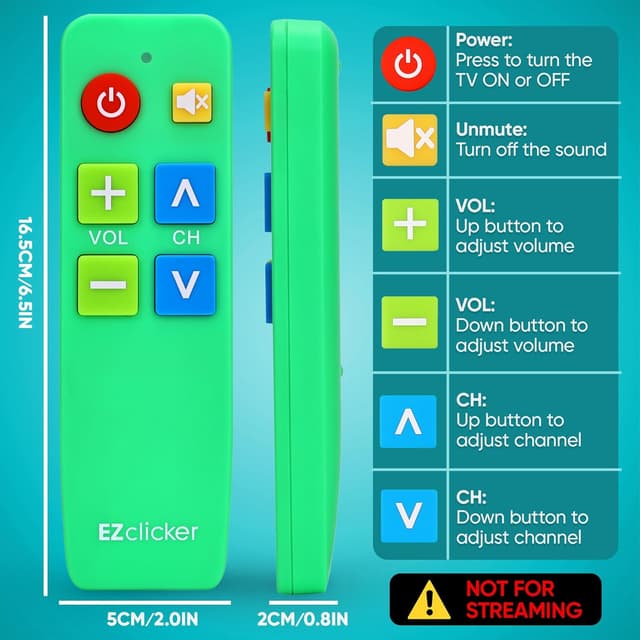
The big-button design is the headline here. The remote specifically calls out a comfort-first layout, plus tactile feedback so the buttons feel distinct in hand. That’s helpful for anyone who struggles with precision, reading small labels, or using a standard remote quickly.
It’s also positioned as something you could keep on the coffee table (rather than in a drawer) because it’s intended to be straightforward. For families buying for a grandparent, someone with dementia, or a visually impaired user, that simplicity can be the difference between “we’ll set it up later” and actually using it daily.
Keep in mind, though: “universal” doesn’t mean “works with everything.” The input notes it won’t cover cable boxes, Firestick/Roku/Sticks, and it’s not meant for streaming. So if your TV experience depends on a separate streaming device remote, you’ll still need that other remote.
Compatibility limits you shouldn’t ignore
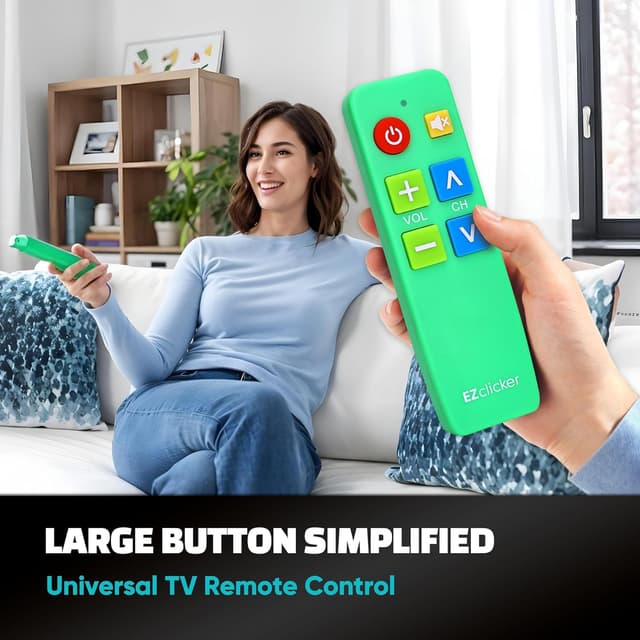
EZclicker states it works with major TV brands, but it also clearly says it’s NOT for cable boxes and NOT for streaming devices (including Firestick, Roku, and similar devices). The listing also says it’s only for TVs, and that you should check the images for the full list of compatible TV models.
This is the main place where buyers can get burned if they assume any “universal TV remote” will replace all remotes. If your setup is TV + cable box + streaming stick, this remote may only cover the TV functions—not the extra boxes that control apps.
How to program it (simple, but timing matters)
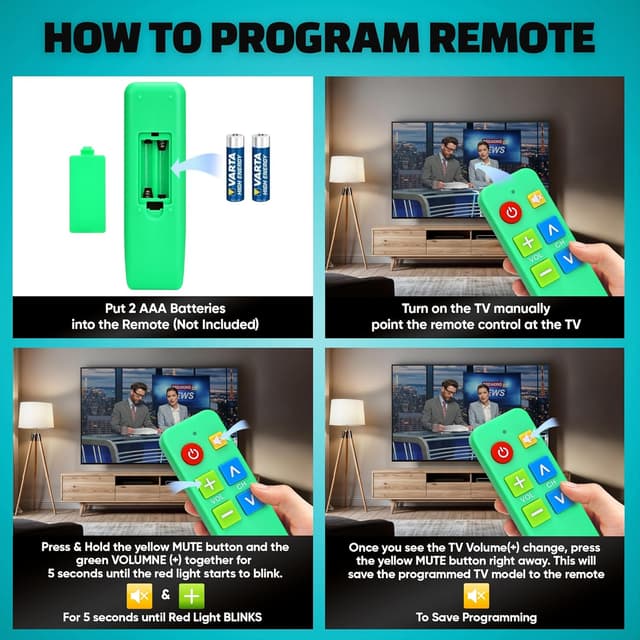
Programming is described as straightforward. You turn on your TV and point the remote at the TV. Then you press and hold the Mute & Volume+ buttons together for up to 60 seconds. When the Volume+ changes, you release the buttons and the remote should be set.

This method is simple, but it depends on getting the timing right (and keeping the remote aimed at the TV while you hold those buttons). If you’re buying for someone else to use immediately, it may be worth testing programming yourself first—just so you don’t hand over a setup step that’s still in progress.
Tech specs at a glance
The remote is compact and lightweight, measuring 6" x 2" x 1" and powered by 2x AAA batteries (not included). The listing doesn’t add more electronics details beyond that, so your decision should rely more on the usability design and the compatibility limitations.
Who it fits well—and who should skip it

It’s a strong match if you want a large-button TV remote designed for day-to-day use by seniors or anyone who prefers tactile, simplified controls. It also makes sense as a gift for grandparents or family members dealing with dementia, vision challenges, or reduced manual dexterity.
It may not be the best choice if you need streaming control. Since the listing explicitly says it’s not for streaming and not for devices like Firestick/Roku, you’ll still need the remote that comes with your streaming hardware (or the device’s control method).
Also, if you can’t confirm the exact TV model is supported (the listing asks you to check the images for the compatible model list), you may want to double-check before you buy, because compatibility is the deciding factor with universal-style remotes.
Quick FAQ
Should I buy this if my TV uses a Firestick or Roku?
If you need controls for the streaming device, this is not the right replacement. The listing says it’s not for streaming devices, so you’d still rely on the Firestick/Roku remote.
Can it replace a cable box remote?
No. The listing says it’s not for cable boxes. It’s meant for TV control only.
Are batteries included?
No—2x AAA batteries are required and not included.
How do I know it will work with my TV?
The listing says it works with major TV brands, but it also says to check the images for the full list of compatible TV models. That model check is important.
Is it hard to set up?
Setup is described as easy: turn on the TV, point at the TV, then hold Mute & Volume+ for up to 60 seconds until Volume+ changes.
When it makes sense
The EZclicker TV Remote for Seniors is worth considering when your main goal is simpler TV control with big buttons, tactile feedback, and fewer “remote gymnastics.” It’s especially practical for seniors and anyone who benefits from large, easy-to-find controls.
It’s not the right buy if you’re trying to eliminate streaming or cable remotes. Since it’s explicitly NOT for those, you could end up with a partially helpful remote that doesn’t cover the part of TV viewing you actually use most.
So the decision comes down to two things: confirm your TV model is supported, and be clear about what you want it to control (TV only vs. streaming devices). If those boxes line up, this is the kind of straightforward remote that can genuinely reduce frustration day to day.