


QYCHHJ Cooling Fan for PS5 (Black) with LED Light and 3.0 USB Ports
Product description
Quick overview
If you’re using a PS5 for longer gaming sessions, the idea behind a cooling add-on is simple: help the console shed heat more easily. This QYCHHJ cooling fan is designed to slide onto a PS5 and run via USB, with blue LED lighting when it’s switched on. On paper, it’s a compact accessory that aims to support faster heat dissipation while keeping day-to-day setup fairly straightforward.
It also brings something a bit more practical than “just a fan”: an extra 3.0 USB port. That’s the kind of detail that can matter if you regularly plug in peripherals like a keyboard or gamepad and don’t want to keep swapping cables.

What it’s for (and what it isn’t)
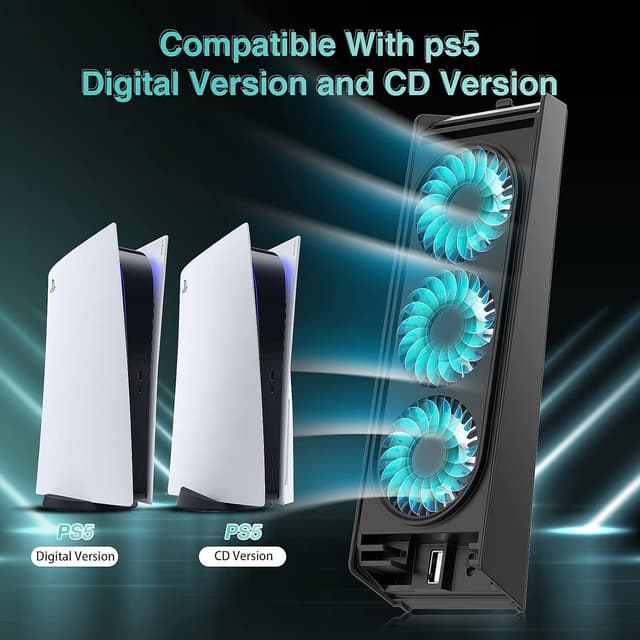
This cooling fan is made for the PS5 host, specifically the digital version or the CD version (as stated in the product description). The way it works is also described clearly: you fit the hook into the top of the console, connect the USB, flip the switch to “on”, and the blue indicator light should come on while the fans start running.
That means it’s a functional accessory rather than a full “console overhaul”. If you’re hoping for dramatic performance improvements, it may leave you a little disappointed. But if your main concern is managing temperature during extended play, a dedicated cooling add-on is exactly the sort of thing that can feel worthwhile.
Key features that actually get used
The appeal here is the combination of cooling and convenience.
- Cooling fans built around 3 high-speed fans: the description mentions “3 efficient high speed cooling fans”, positioned to help cool the PS5 quickly during long sessions.
- LED light for a visible working indicator: the blue lighting isn’t just styling, it’s also described as an indicator light that shows the unit is on.
- Extra 3.0 USB port: this is useful for powering other USB accessories (the description specifically mentions keyboards and gamepads as examples).
- Low-noise positioning: “low noise” is claimed, which is reassuring for people who game in the evening and don’t want extra distraction.

One small limitation to keep in mind: the product description doesn’t specify noise levels (in dB), airflow figures, or thermals. So you’re buying based on the intended effect (faster heat dissipation) rather than hard performance data.
Ease of installation and everyday experience
Installation is described as simple and cable-light: slide the hook into the top of the PS5, insert the USB connector, switch it to “on”, and you’re running. This is the kind of setup that suits people who don’t want to faff about with internal changes.

In real-life terms, you could do something like this: before launching a long co-op session, slide the fan on, connect the USB, switch it on, and then plug your controller charging cable or a small USB keyboard into the extra port. You end up with fewer cable rearrangements, and the blue light gives you an at-a-glance check that it’s active.
Where it shines (and where you should be cautious)
This QYCHHJ cooling fan makes sense if:

- you play for long stretches and want extra help with cooling,
- you like the idea of a visible LED working indicator,
- you need an additional USB port for peripherals,
- you want a straightforward, external accessory rather than something more involved.
You may want to skip it if:
- you’re looking for measured, published cooling performance numbers (the description doesn’t provide those),
- you’re mainly trying to solve a specific overheating warning—an external fan can’t replace proper system troubleshooting,
- you don’t want an extra device mounted on top of your console (even though it’s described as compact).

What to check before you buy
Before committing, it’s worth double-checking a few practical points based on how these accessories tend to vary:
- Compatibility with your PS5 model: the description says it’s compatible with the PS5 digital or CD version, so match that to your console.
- USB port needs: confirm you’ll actually use the added 3.0 USB port for the accessories you care about.
- Space and cable routing: since it mounts via a top hook and uses a USB connection, think about where your current USB cables sit and whether the setup will feel tidy.
If any of those don’t line up, it’s the type of accessory that can end up looking “nice on day one” but annoying in daily use.
Final verdict
A solid pick if you want a simple external cooling fan for PS5 and like the added bonus of a 3.0 USB port plus blue LED indicator. It’s the sort of accessory that can make long gaming sessions feel more comfortable, especially if you also benefit from extra USB connectivity.
It may not be the best choice if you need documented cooling performance or you’d rather not add another top-mounted piece of kit to your setup.