


FASTSNAIL Cooling Fan for PS5 Slim Console — Quiet 3-Speed System with Memory Function, LED Light and USB 3.0 Port
Reviews
Price
Product description
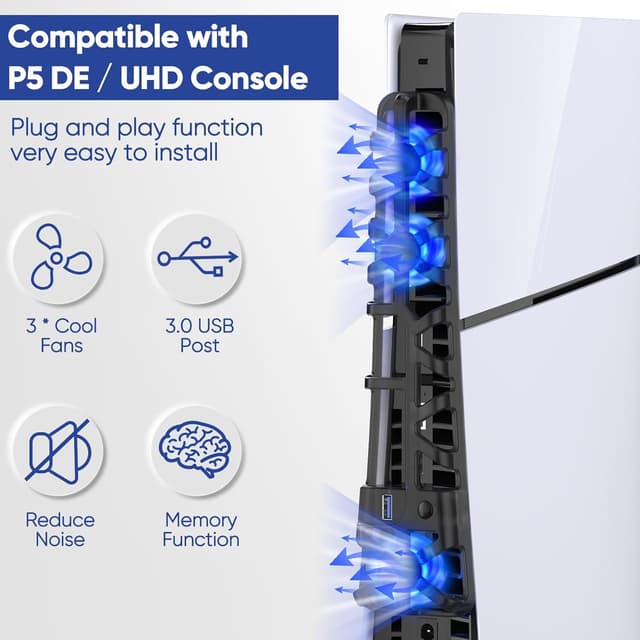
If you’re trying to keep your PS5 Slim running cool and a bit more organised around your USB accessories, the FASTSNAIL cooling fan is built for exactly that. It’s a horizontal cooling fan accessory designed for the PS5 Slim, with three high-speed fans, a simple button control for low/medium/high/off, and a blue LED that shows when it’s doing its thing.
The essentials
On paper, the main appeal is straightforward: it helps move hot air away from your PS5 Slim using a quiet, multi-speed fan setup, and it runs from the console’s USB connection (so you don’t need extra adapters). There’s also a memory function, so it can switch itself on the next time you power up your PS5 Slim, plus an LED light indicator while the fans are operating.
What you’ll notice during setup and use

Installation is described as taking only a few seconds: you attach the cooling fan to the PS5 Slim and insert the USB connector. Because it’s powered via the console’s own USB port, it stays tidy and doesn’t add a separate power brick to your setup. The unit is also said to be designed not to take up extra space, which matters if your console sits in a tight entertainment unit.
In day-to-day use, you’ll mostly interact with one button. Press it to cycle through the fan settings (low, medium, high, and off). The LED light gives a clear visual cue that the fans are running, which is handy if you’re stepping away from the room and want to know at a glance that cooling is active.
A practical example: if you’re planning a long session on a warmer evening, you can set the fan to a higher level before you start. Then, when you wrap up, you can switch the fan off manually to avoid leaving it running unnecessarily.
Cooling performance and where it fits

This isn’t positioned as an overhaul of your console’s internal cooling—rather, it’s an external accessory intended to vent hot air more effectively and keep performance feeling smooth over time. With three fan speeds, you can tailor the airflow to your situation instead of treating every game session the same.
It does come with one limitation to keep in mind: you may need to find the right balance for your setup. If your priority is absolute quietness, higher speeds might be more noticeable, even if the fans are described as quiet. Also, because it’s designed specifically for PS5 Slim, it won’t be a one-size-fits-all solution for other PS5 variants.
LED, memory function and energy saving
The LED light is there mainly for status visibility—blue when the fans are active—so it doesn’t feel like a decorative gimmick. More useful is the memory function: once enabled through the normal operation, it’s intended to automatically turn on the next time you power the console, which is convenient if you tend to forget to switch cooling on.

There’s also manual control to turn the fan on or off. If you’re trying to reduce power draw when you’re not gaming (or if you just don’t want the fan running while streaming), this flexibility helps.
USB 3.0 port: convenient, but check what you’ll plug in
A big functional bonus is the additional USB 3.0 port provided by the cooling fan accessory. The idea is that you can charge or connect extra USB devices without constantly swapping cables—controllers, gamepads, keyboards, phones, tablets, and other USB devices are mentioned.
One thing to consider before you buy: the USB port is an add-on convenience, but you’ll still need to ensure you don’t overestimate how much room you have behind your TV stand or shelf. If you use multiple USB devices at once, cable management can become the real bottleneck, not the port itself.

What to double-check before you commit
Because this accessory is specifically described for PS5 Slim (including references to the 2023 Disc model and the Digital edition), it’s worth confirming your console matches that form factor. It’s also powered by the PS5 Slim USB connection, so your setup should allow the fan to be connected without strain.
Finally, the listing includes a safety note not to put your finger in the cooling fans. It sounds obvious, but it’s the sort of reminder you’ll be glad to see when you’re handling add-ons around vents.
What’s included and customer-service notes
You should receive 1 cooling fan with light for PS5 Slim and a user manual. The manual language isn’t guaranteed to be English, Spanish is mentioned. If any questions come up, the brand states it offers friendly customer service.
Mini FAQ
Does the fan run automatically after turning on the console?
The product description says it has a memory function, so it can automatically turn on the next time after you power the console.

Can you switch it off manually?
Yes. You can turn the fan on or off manually, and you can also cycle through the fan levels.
What do the LED and fan levels do?
The LED light indicates when the fans are running, and the button control lets you move between low, medium, high, and off.
Is it powered by the console?
Yes, it’s powered by the USB port on the PS5 Slim console, with no additional adapters required.
Is it worth it?
It makes sense if you own a PS5 Slim and you want an easy, quick-to-fit cooling accessory with three fan speeds, a visible LED status light, and a memory function so it doesn’t rely on you remembering every time. The added USB 3.0 port is also a practical reason to choose it if your USB connections are already getting crowded.
You may want to skip it if you’re not working with a PS5 Slim form factor, or if you’re extremely sensitive to any extra noise during higher fan settings—even though the fans are described as quiet, it may still not suit every room. If you prioritise only internal cooling and don’t need extra USB connectivity, you could find simpler solutions with less to manage.