


ORGBRO X1 Label Maker with Thermal Tape, Portable Bluetooth Printer for Phone Apps (Green)
Product description
The essentials
The ORGBRO X1 is a portable label maker designed for people who want tidy organisation without getting stuck at a desk with a traditional, bulky labeller. It pairs with a smartphone via Bluetooth and uses thermal printing, so you’re not dealing with ink cartridges or toner. The pitch here is convenience: you set it up in the app, create labels from your phone, and print on the go.
On paper, it’s aimed at everyday labelling tasks: kitchens and pantries (spices, food containers), storage boxes and tool areas, and even school or office basics like name tags and file classification. It also leans into quick customisation, with pre-made templates and options for barcodes and QR codes.
What it’s for (and when it fits best)
If your main goal is organisation that actually sticks—clearly labelled containers, cables, controllers, switch panels, or equipment—this type of handheld thermal printer can make a difference because it removes friction. Instead of writing labels manually, you can design them in the app and print when you need them.
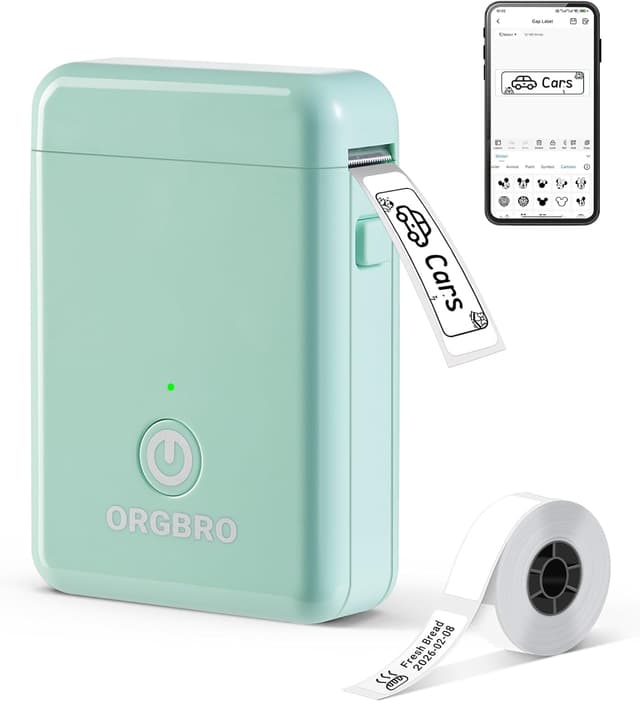
A practical example: imagine you’re sorting a cupboard of spices and empty bottles on a Sunday. You snap in the label text from your phone, pick a template, print, then stick labels directly onto your jars. You’re not hunting for spare ink, and you can adjust wording quickly if you later decide to split categories.
It also makes sense for “non-glam” labelling jobs around the home and small office—things like organising file folders, labelling stationery, or marking storage boxes so other people can find items without asking.
It may be less convincing if you’re expecting a label maker to be your main long-term system for high-volume professional production. This is more of a convenient, phone-led organiser’s tool than a dedicated, heavy-duty workshop labeller.
Key features that matter in real use

This model uses thermal technology, which means you print without ink or toner. That’s a straightforward advantage for hassle-free printing—fewer consumables to manage, and generally less mess. It’s also described as compact, “half the weight and size” of traditional label makers, with one-hand operation, which is handy if you’re applying labels while walking around storage areas.
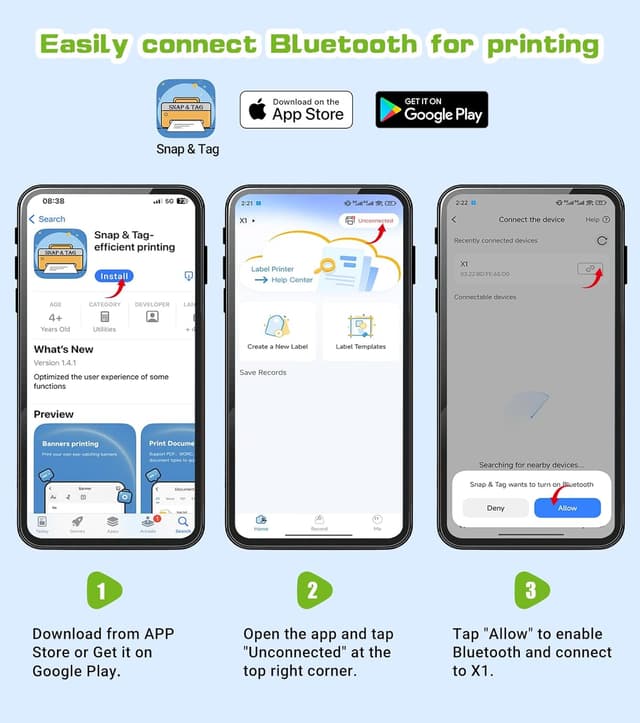
The Bluetooth setup is positioned as quick: connect and set up in under a minute in the app, with “no payment or registration” mentioned. The app side matters because the creative work is done on your phone—adding names, text, barcodes and QR codes, and using pre-made templates.
A point worth noting: the warmer tips say you should fully charge the label printer before first use. If you’re buying as a last-minute organiser gift, that’s one small step not to skip.
Templates, languages and label styles
The ORGBRO X1 comes with a Snap & Tag App offering “over 15 languages”, “95 fonts”, and “550 materials” (all free to use, according to the info provided). You also get access to multiple templates, plus the ability to create labels with text, numbers, graphics, symbols, logos, barcodes and QR codes.
This is the part that makes it feel more flexible than a fixed-label machine. If your labels need to change regularly—seasonal kitchen stock, school year name tags, reorganisation of drawers—having templates and editing options through the phone helps.

That said, the exact outcome will depend on your label design and the tape/label paper you use. The manufacturer recommends ORGBRO thermal label paper for optimal print quality, so if you’re planning to mix brands, it could be a bit hit-and-miss.
Tech specs (practical constraints)
Tech summary

- Type: Thermal portable label printer for smartphone use via Bluetooth
- Printer setup: Connect and set up in under a minute in the Snap & Tag App (no payment or registration mentioned)
- Charging: Built-in 2000mAh rechargeable battery (warm-up note: fully charge before first use)
- Label widths supported: Continuous label paper 14 mm width and fixed-length labels 12 x 40 mm
Where it can feel limited
Because it’s designed around specific label sizes and thermal paper formats, you’ll want to be careful about what tapes/labels you plan to buy separately. If you already have a stash of labels from another system, compatibility isn’t confirmed in the information provided—so it’s safer to stick to the recommended thermal label paper approach.
Caring for labels and choosing where to stick
The labels are described as waterproof, oil-resistant and abrasion-resistant, and they’re said to leave no residue after removal. That matters if labels need to survive kitchen environments (spills, steam, frequent handling) or if you expect to peel them off later when you reorganise.
Also, thermal printing is great for day-to-day practicality, but you’ll still want to think about where the labels go. For example, on cupboards and storage boxes it’s straightforward, on frequently washed or heavily cleaned surfaces, results will depend on the surface and how the label is applied.
Is it worth it?
A solid pick if you want a compact, phone-led thermal label printer for home, school or office organisation—especially if you like editing labels on your mobile and printing quickly without ink or toner.
It might not be a great match if you need guaranteed compatibility with labels from other labeller systems, or if you’re after a big, fully independent labelling setup with lots of physical controls. Also, if your priority is pure speed for large batches, the handheld, app-driven approach may feel more “organiser focused” than “production line”.

If you buy this, do a quick check that the label sizes you plan to use match the supported widths (14 mm continuous paper and 12 x 40 mm fixed-length labels), and remember to fully charge it before your first session.
Mini FAQ
How does the ORGBRO X1 work?
It uses Bluetooth to connect to a smartphone, where you design labels in the Snap & Tag App and then print using thermal technology.
Do you need ink or toner?
No ink or toner is needed, as it prints using thermal technology (based on the information provided).
What types of labels can I create?
You can generate labels with text, numbers, graphics, symbols, logos, barcodes and QR codes, plus edit using the app and templates.
Are the labels waterproof?
They’re described as waterproof, oil-resistant and abrasion-resistant, and said to leave no residue after removal.
What label sizes does it support?
It supports continuous label paper at 14 mm width and fixed-length labels at 12 x 40 mm.