

HDMI Matrix 4x2 MX42PRO (4K 60Hz 4:4:4 HDR) with SPDIF 5.1CH audio breakout, IR remote and HDCP 2.2
Product description
What this HDMI matrix is for
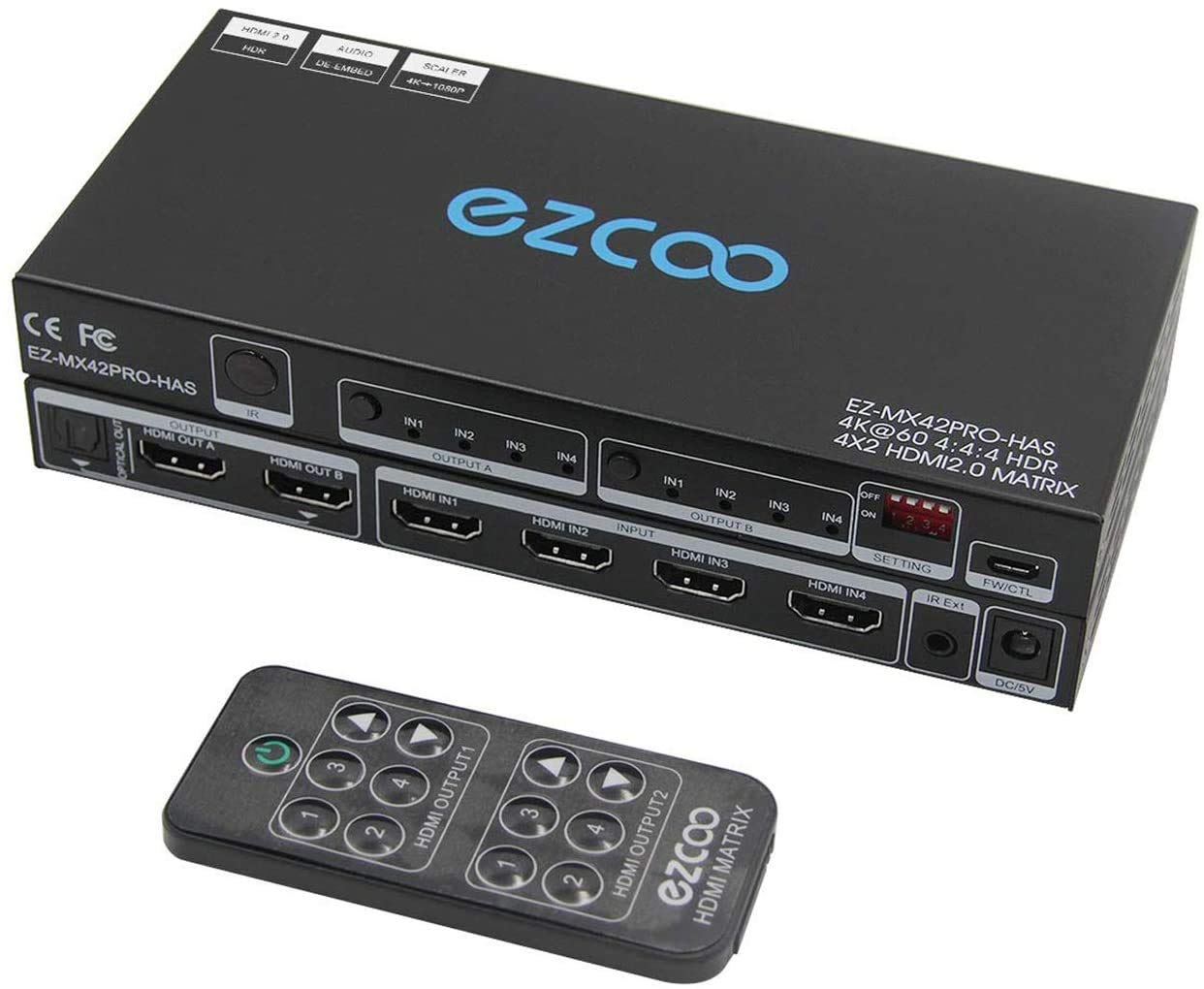
A 4x2 HDMI matrix is the kind of kit you buy when you don’t just want “switching”, but you need more control over which HDMI source goes to which screen. The MX42PRO is designed to route four HDMI sources to two displays, and it can send different signals to each output—or the same one—depending on your setup.
On paper, it’s aimed at people who have multiple devices (console, set-top boxes, players) and want two screens to behave sensibly, rather than constantly unplugging and replugging. It also includes SPDIF Optical 5.1CH audio breakout, so you’re not always relying on your TV for audio.
That said, this isn’t a “works with everything automatically” box. It’s a fairly straightforward device, and the documentation calls out configuration details (like EDID handling). If you’re the type who rushes installation, you may find it frustrating.
Key takeaways: routing, resolution, and audio
The core job is routing: 4 HDMI inputs into 2 HDMI outputs. It supports 4K HDMI handling up to 60Hz with 4:4:4 and HDR formats (including Dolby Vision), and it also supports HDCP 2.2 HDMI2.0 devices.
A notable practical point is how output resolutions can differ at the same time. The unit supports running two output playback modes simultaneously, with 4K on one output and 1080P on the other. There’s also support for down-scaling 4K to 1080P, but the instructions include an important limitation about down-scaling HDR Dolby Vision.
For audio, it offers SPDIF Optical 5.1CH breakout. The description states that SPDIF Optical 5.1CH follows HDMI OUT 2 (B), meaning you may not need to connect the TV for certain audio workflows.
In a typical everyday scenario, you could connect: - a 1080p HDMI display to OUT 1 (A) - a 4K TV/display to OUT 2 (B) - then switch between up to four HDMI sources, keeping the audio extraction tied to OUT 2 (B).
What you’ll notice in real use (and where it can feel fiddly)
Fast switching is one of the selling points here: the unit is described as having around 1–3 seconds of fast input switching and “no signal delay/lag” in that context. If you’re bouncing between a console, a streaming box, and a media source, that’s the kind of responsiveness you’ll appreciate.
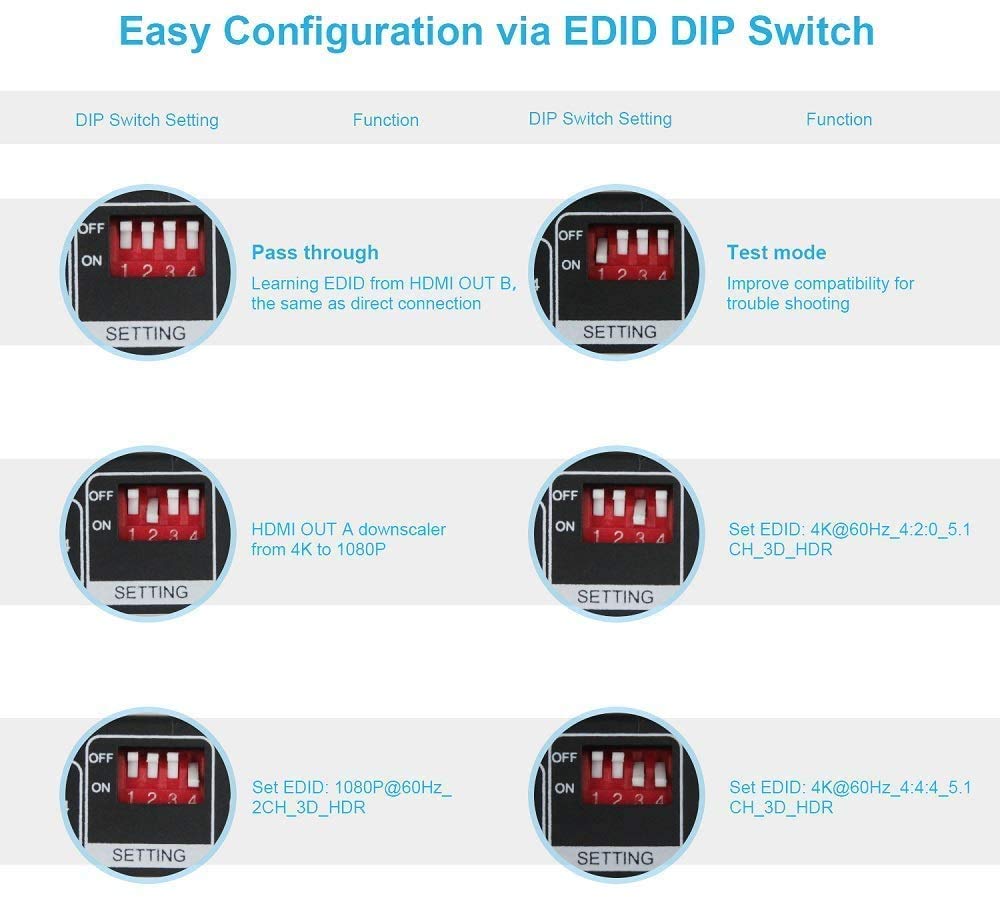
However, the installation details matter more than you might expect. The instructions specifically warn that returns often happen because of wrong operation or using HDMI 2.0 standard cables incorrectly. They also highlight that you should read the EDID DIP switch area carefully and check the installation instructions (including EDID/firmware-related notes).
It’s also worth noting what it isn’t: the description makes a point that it does not extend a screen, it “copies” outputs rather than extending desktop across displays.
Finally, HDMI behaviour isn’t listed as “CEC support”, and the unit is explicitly described as having no CEC. So if your expectation is that devices control each other’s power or input switching through CEC, you may be disappointed.
Tech summary
Specifications
- Type: HDMI matrix switch (4 input, 2 output)
- Resolution support: 4K 60Hz, also 1080P output support
- Chroma: 4:4:4 noted
- HDR support: HDR including Dolby Vision mentioned
- Audio: SPDIF Optical 5.1CH breakout (tied to HDMI OUT 2 (B)), HDMI audio formats referenced include Dolby Digital 7.1CH, Dolby Atmos, DTS:X
- HDCP support: HDCP 2.2
- HDMI standard: HDMI 2.0 referenced
- Control: IR remote and panel control
- Switching behaviour: 1–3 seconds fast input switching (as described)
- Power/format notes: EDID copy and DIP switch setup mentioned in the instructions
Where it shines for buying decisions
This is a sensible purchase if you want a single box to manage four HDMI sources feeding two displays, and you’re happy to do the basic configuration properly (EDID DIP switch setup, and making sure your cables match HDMI 2.0 requirements).
It also makes more sense if you care about audio extraction via optical. Since the SPDIF output follows HDMI OUT 2 (B), it can simplify setups where you want optical 5.1CH audio without routing everything through a TV.
And if you specifically want different display capabilities side-by-side—such as one screen handling 4K while the other stays at 1080P—that simultaneous output behaviour is a key reason to consider this matrix.
When you might want to skip it
It may not be the best match if you need heavy “smart” HDMI control via CEC, because the description states there is no CEC.
You should also be cautious if your setup relies on Dolby Vision HDR down-scaling. The instructions specifically caution that down-scaling 4K to 1080P on OUT 1 (A) is not the same for HDR Dolby Vision (and they mention a configuration detail with HDR Dolby Vision not down-scaling in that way). If your goal is “all outputs always down-scale everything cleanly”, this could disappoint.
Buying verdict
If you’re trying to clean up a multi-device HDMI setup with two displays—and you’re willing to configure EDID properly—this HDMI matrix 4x2 MX42PRO looks like a practical way to avoid constant switching and unplugging. The SPDIF Optical 5.1CH breakout tied to HDMI OUT 2 (B) is also a useful feature for optical audio setups.
But it’s not a set-and-forget box. It depends quite a lot on correct HDMI 2.0 cable choice and on getting the EDID/DIP switch settings right. If you’d rather not tinker, or you need CEC-style convenience, you may be better served by a simpler switching approach.
Mini FAQ
FAQ
Does it extend a screen or copy outputs?
It’s described as not extending the screen, it copies outputs.
Can both outputs run at different resolutions?
Yes, the description says the two output play 4K and 1080P simultaneously, with additional details about how down-scaling is handled between outputs.
Is Dolby Vision HDR handled on both outputs?
Dolby Vision is referenced in the device support, but the instructions include a specific limitation about down-scaling HDR Dolby Vision on one output, so it’s worth reading the EDID/DIP guidance before assuming it will behave the way you want.
Do I need to connect my TV for optical audio?
The description suggests SPDIF Optical 5.1CH follows HDMI OUT 2 (B), so you may not need to connect the TV for that audio path in the intended setup.
What’s the common reason people return this?
According to the description, many returns are linked to wrong operation or not using HDMI 2.0 standard cables.