

Maxfree S6 Laptop Screen Extender (15.6" 1080P, Triple Detachable Displays)
Product description
If your laptop feels cramped when you’re juggling tabs, spreadsheets, or code, a laptop screen extender like the Maxfree S6 is built for that exact “more real estate” moment. It’s a dual 15.6" 1080P setup that’s designed to turn into a bigger, more comfortable workspace—with the option to run up to three screens at once.
That said, it’s not a magic switch. On paper, you’ll still need to match the connection method to your device and power setup, and the “plug & play” experience depends a lot on which ports and chip set your laptop has. So it can be a smart upgrade for productivity, but it pays to check compatibility details before you buy.
The essentials
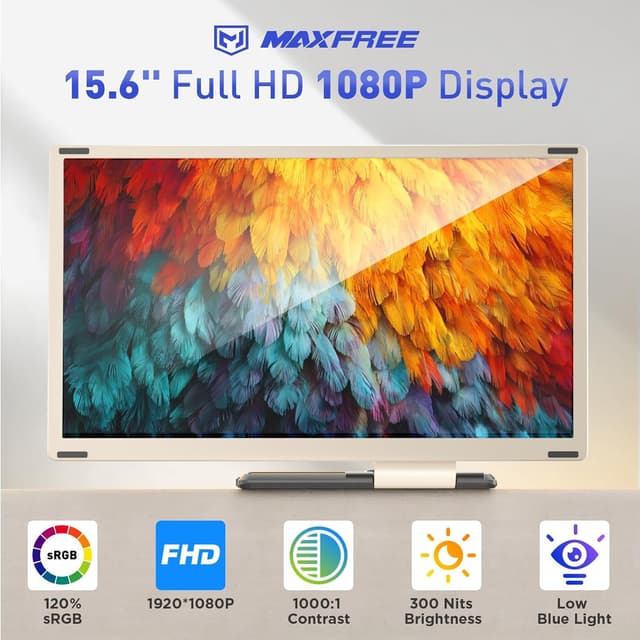
The Maxfree S6 laptop monitor extender uses two 15.6" 1080P FHD displays. You get a wider field of view and a setup intended to support multitasking by letting you work with multiple windows at the same time. The screens are detachable, and the design is meant to be easy to adjust and then store more compactly.
It’s positioned as a practical home office and travel accessory—something you can bring along for work sessions and meetings where a single laptop screen just doesn’t cut it.

Key features you’ll notice day to day
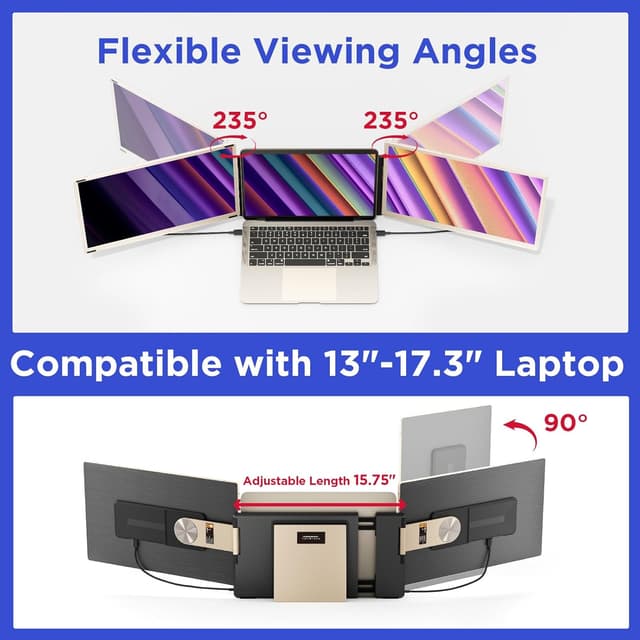
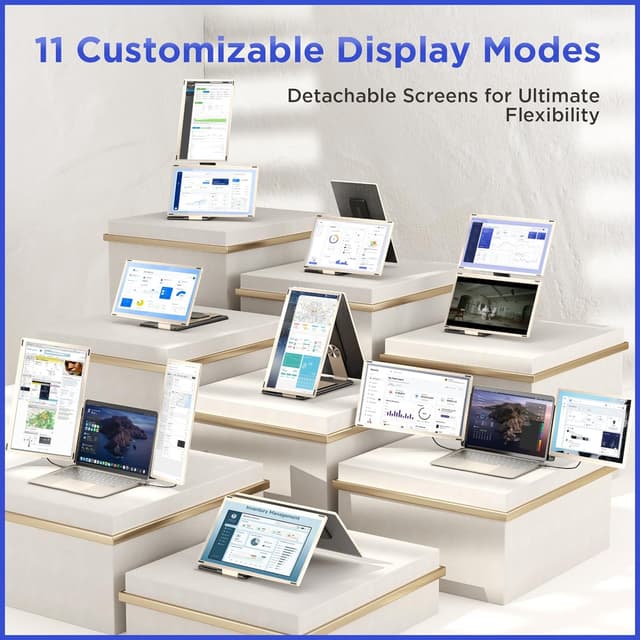
Where the S6 feels most useful is in how you arrange your workflow. The two screens can rotate—90° vertically and 235° horizontally—and you can set them up using a sleeve stand and a single screen stand. The brand also describes “11 DIY combination methods,” which matters if you like arranging your layout instead of forcing everything into one rigid angle.
The displays are also described with an anti-glare approach and low blue light to help reduce eye strain during longer sessions. Color coverage is claimed as 120% sRGB and 72% NTSC, with 300 nits brightness and a 1000:1 contrast ratio. Not every screen will look identical across environments, but these specs suggest it’s aiming for a more realistic, less washed-out look.
One more real-world detail: the magnetic structure is meant to improve stability and make folding/storage easier. If you travel with it, that’s the kind of feature that’s easy to appreciate even if you don’t think about it daily.
Screen modes and flexibility (detachable design)
Because the displays detach and support rotation, the Maxfree S6 can be configured in more than one way—useful when you want one screen as a reference while the other shows your main task. The included stands give you options for upright placement, and the foldable/storage approach is intended to keep it manageable.
Still, it’s worth keeping expectations realistic: the “DIY” flexibility can only go so far depending on your desk space and how you like your setup. If you want a super precise professional monitor arm experience, this is more of a portable extender approach than a fully engineered desk solution.
Connection options and compatibility: the part to double-check
The S6 is described as plug & play, with “no drivers required” for seamless use—however, the connection approach changes based on how you hook up the two screens.
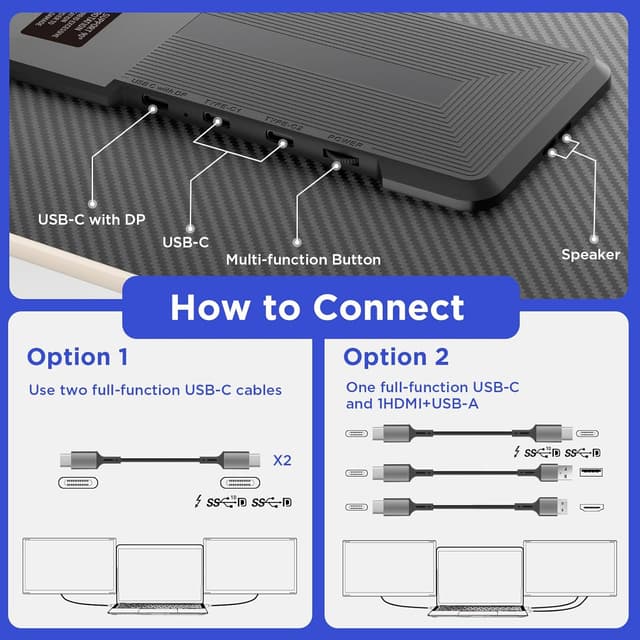
You have three connection paths described: - Use two full-function USB-C cables to connect both screens. - Use one full-function USB-C cable for one screen, and use HDMI plus a USB-A cable for the other screen. The USB-A cable is noted as powering the S6, without power, it may show “No Signal.” - If your laptop is an Apple model with M1, M2, M3, or M2 PRO chips (or if the above methods don’t work), you’ll need a dedicated H5-T cable for both screens. The brand suggests contacting support for help if you hit issues.
In terms of device compatibility, the S6 is stated to work with laptop sizes from 13" to 17.3", and it’s described as compatible with Windows, MacOS, Chrome, Android, Linux, Switch, PS4/5, and iPad (plus more). The broad compatibility is a plus, but the connection method details are the real deciding factor.

It also matters that “11 display modes” here is about DIY combinations and placement, not advanced software presets.
Color comfort and display performance (what the specs imply)
The 300 nits brightness and 1000:1 contrast ratio suggest the panels are tuned for typical indoor office lighting—not necessarily bright outdoor use. Anti-glare and low blue light are aimed at longer work sessions, especially if you’re reading, editing, or staring at spreadsheets for hours.
The 120% sRGB and 72% NTSC color range claims point toward a more accurate everyday workflow (documents, coding, and general productivity). If your work is heavily color-managed for creative production, you may still want to calibrate expectations, since these are stated ranges rather than lab-confirmed results.
Is it worth it?
A Maxfree S6 laptop screen extender is worth considering if you want a portable multi-screen workflow for home office tasks, business travel, or business meetings—and you’re comfortable configuring it based on your laptop’s ports and chip set. You’ll likely appreciate it if your routine involves multitasking with spreadsheets, programming, or financial analysis where extra screen space reduces constant tab switching.
You may want to skip it if you prefer a simpler single-cable setup that always runs both screens the same way across every device, or if you don’t want to deal with power and “No Signal” scenarios when using the HDMI + USB-A method. It might not be a great match if your main priority is ultra-precise monitor arm ergonomics rather than a foldable, travel-friendly extender.
Mini FAQ

Frequently asked questions
What does “triple screen” mean here?
The extender is designed so you can work with three windows at the same time—using your laptop screen plus the two added displays.
Do I need drivers to use it?
The product description states that it supports plug & play with no drivers required.
Will both screens work with one connection method?
Not always. The manufacturer describes multiple connection options, including a special H5-T cable for certain Mac chip setups (M1, M2, M3, or M2 PRO) or when the standard options don’t work.
What happens if I use HDMI without powering it?
The description notes that the USB-A cable powers the S6, and without power the display extender may show “No Signal.”
Where it’s most practical to use it?
It’s presented as ideal for home office use, business travel, and business meetings—situations where adding screens improves productivity without needing a full desk monitor setup.