

USB-C to DisplayPort Cable (6FT/1.8m) with 4K@60Hz for USB-C devices
Product description
What it is and what you use it for
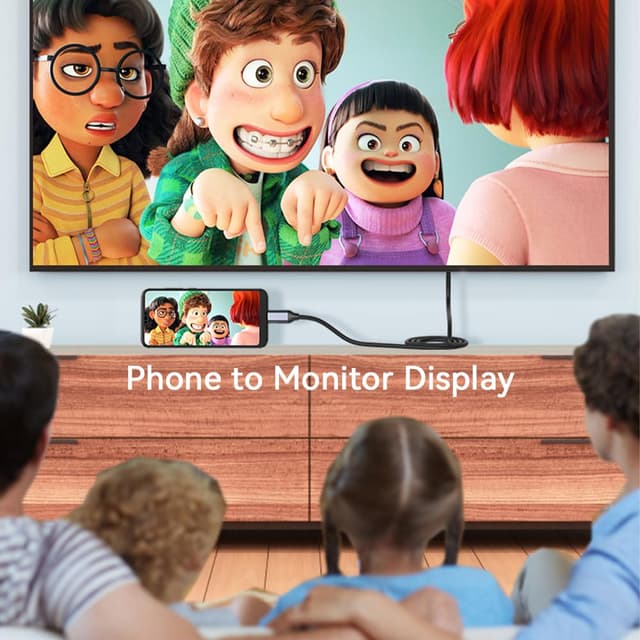
This USB-C to DisplayPort cable is designed to carry video (and audio) from a compatible USB-C or Thunderbolt 3 device straight to a DisplayPort monitor or display. In plain terms, it’s the kind of lead you buy when you want a bigger, sharper screen for a home office setup, a second monitor for work, or a more comfortable view for movies and photos.
On paper, it supports up to 4K at 60Hz and also mentions 2K refresh rates (up to 165Hz and 144Hz). It’s also described as plug-and-play, so there’s no software, drivers or extra adapter called out in the package description. That’s usually what people want: fewer headaches at setup time.
Key takeaways
If your laptop (or tablet) has USB-C with DisplayPort Alternate Mode or Thunderbolt 3, this cable aims to let you run one or two DisplayPort displays without faffing about. The cable length (6ft/1.8m) is typical for getting from a desk to a monitor without pulling your device right next to the screen.

It also leans into real-world comfort: the description calls out mirror mode and extend mode for building a proper workstation, plus “no flickering” and “no audio cutting out” as issues it tries to avoid. Not every cable claims those things, so if you’ve been burned by unreliable leads before, that’s one to note.
That said, the headline performance numbers (like 4K@60Hz) depend heavily on your source device supporting the right output mode. If your USB-C port doesn’t support DisplayPort Alternate Mode (or Thunderbolt 3), this cable may simply not do what you’re hoping.
What stands out in everyday use
The practical appeal here is straightforward: run your device into a DisplayPort monitor using a single cable, rather than chaining adapters. The plug-and-play angle matters too, especially if you’re switching between a work laptop and a home setup.
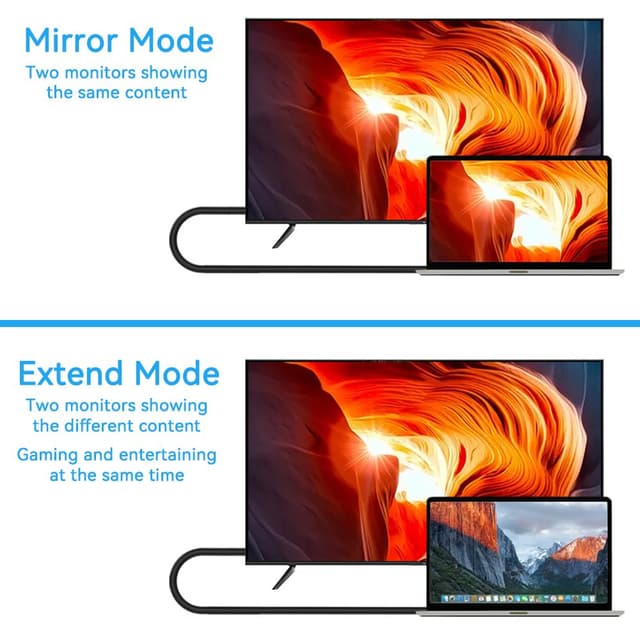
One micro-scenario: imagine you dock your laptop on the desk, then connect the cable from USB-C to a DisplayPort monitor. You choose extend mode, and suddenly you’ve got a second screen for spreadsheets, dashboards, or reference tabs—exactly the “make things more flexible” workflow described.
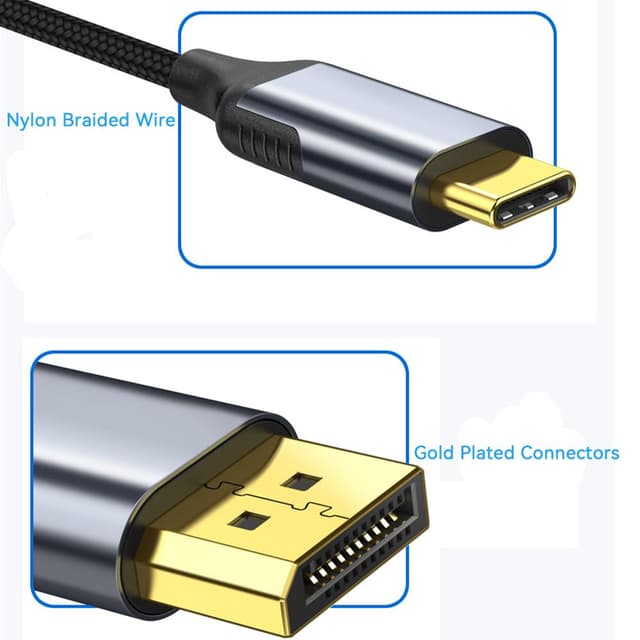
The cable is also described as “braided” and built around durability details like gold-plated connectors and an environmental-protection PVC jacket, plus a premium aluminium shell for heat insulation. Again, you’ll only notice these things over time, but if you route cables often or coil them around a desk, a tougher jacket is a sensible checkbox.
Compatibility and requirements (worth checking first)
This cable is meant for devices with USB-C 3.1 or Thunderbolt 3 ports that support DisplayPort Alternate Mode. The listing gives a fairly wide set of example devices, including 2018/2017/2016 MacBook Pro models, MacBook Air 2018, 2017 iMac, iPad Pro (2018), and Dell XPS 15/13, plus several other Windows laptops and tablets.
For best results, you’ll want to confirm your specific device has DisplayPort Alternate Mode support (or is Thunderbolt 3). The most common purchase mistake with USB-C video cables is assuming every USB-C port behaves the same.
Tech specs
- Type: USB Type-C to DisplayPort cable
- Length: 6FT / 1.8m
- Maximum refresh rate mentioned: 60Hz for 4K
- Additional refresh rates mentioned: 2K@165Hz and 2K@144Hz
- Intended connection: USB-C 3.1 or Thunderbolt 3 with DisplayPort Alternate Mode support
- Features called out: Plug and play, mirror mode and extend mode
- Durability: Gold-plated connectors, braided design, environmental protection PVC jacket, premium aluminium shell
- Warranty: 2 Years free warranty (24 months)
- Warranty period stated: 24 MONTHS
Pros and what you may not like
Why it makes sense: - If your USB-C port supports DisplayPort Alternate Mode (or you’re on Thunderbolt 3), this is a direct, cable-only way to add an external DisplayPort screen. - The stated 4K@60Hz (and higher 2K refresh rates) is strong on paper for both work and media. - The physical build details—gold-plated connectors, reinforced jacket, and aluminium shell—are exactly the sort of durability cues you want for a cable you’ll use daily.
A couple of limits to keep in mind: - Performance claims only hold if your source device actually supports the required video output mode. If not, you could end up with no usable display. - Even with a solid cable, you’ll still rely on your monitor’s DisplayPort input settings and your device’s display output behaviour. This is less a fault of the lead and more how these setups work in practice.
When it makes sense?
A cable like this is a sensible buy if you want to tidy your setup and connect a compatible USB-C laptop or tablet to a DisplayPort monitor without extra adapters. It’s especially relevant for home office use where you’ll likely be switching between mirror mode (for presentations or quick viewing) and extend mode (for productivity).
It’s also a reasonable choice if you’ve experienced flickering or audio dropouts with lesser leads—because the listing specifically calls out avoiding those problems.
Should you buy it?
This one is worth considering if you have a USB-C 3.1 or Thunderbolt 3 device that supports DisplayPort Alternate Mode and you’re aiming for up to 4K@60Hz output to a DisplayPort monitor. The 6ft/1.8m length, plug-and-play approach, and durability focus make it feel well suited to everyday desk use.
You may want to skip it if you’re not sure your USB-C port supports DisplayPort Alternate Mode, or if your goal is very specific high-refresh behaviour and you haven’t confirmed your device can actually deliver those modes.

FAQ
Will this work with any USB-C port?

No—not all USB-C ports support DisplayPort Alternate Mode. The listing specifies USB-C 3.1 or Thunderbolt 3 with DisplayPort Alternate Mode support.
Does it need a driver or adapter?
The description says no additional adapter, driver or software is required, and positions it as plug-and-play.
What resolutions and refresh rates does it support?
The listing mentions up to 4K@60Hz, plus 2K@165Hz and 2K@144Hz.
Is it suitable for mirror and extend modes?
Yes, the cable is described as supporting mirror mode and extend mode.
How long is the cable?
It’s 6FT / 1.8m.