

TopMate C12 Laptop Cooling Pad RGB – 8 Height Levels, 6-Fan Stand for 15.6–17.3 inch Laptops
Product description
If you game on a laptop (or you just keep it running for long stretches), heat management starts to matter more than people expect. The TopMate C12 cooling pad is designed to sit under your notebook and help it run cooler, while also adding RGB lighting around the edges.
On paper it’s a pretty rounded package: 8 adjustable heights, a built-in phone holder, and a control panel that lets you tweak both fan speed and RGB modes. The “nice” bit here is that you’re not only buying a fan platform—you’re also getting a desk/lap-friendly stand with a layout that aims to be usable day to day. That said, cooling pads are rarely magic, so it’s worth thinking of this as support for airflow rather than a guaranteed fix for every high-heat scenario.
What it is and what problem it solves
The TopMate C12 is a laptop cooling pad with multiple built-in fans, meant for 15.6 to 17.3 inch laptops. It can be used on a desk, but the design also makes it suitable for lap use and other non-desk setups like sofa or bed. In practice, the key goal is to improve airflow around the underside of your laptop so it doesn’t trap heat as easily.
It’s also set up for people who like visual extras: RGB light strips run along the sides, and you can switch between lighting modes. If your priority is purely performance, the lighting may feel like an added flourish—but if you’re building a gaming workstation vibe, it’s part of the appeal.

Key features at a glance
The headline features are straightforward and, importantly, directly tied to comfort and usability:
- Six fans (described as 3 small + 3 large) aimed at boosting airflow
- 8 adjustable height settings so you can change the viewing angle
- RGB lighting strips on all sides, with 10 lighting modes and options for different breathing styles
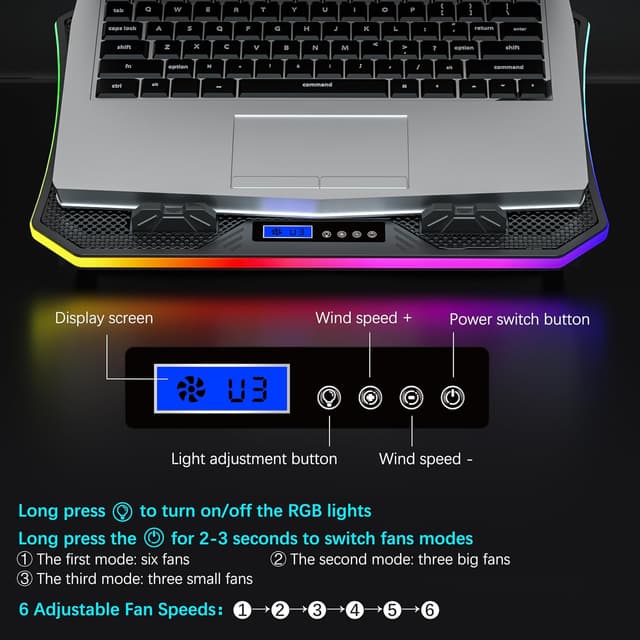
- A control screen/panel that lets you control 6 fan speed levels and fan modes, plus RGB light modes
- A hideable phone holder on the left side, extendable for placing a phone for easier viewing
- Non-slip baffles on the RGB panel to help grip larger/heavier laptops
There’s also mention of quieter operation: the fans use capacitor components to reduce noise, and the manufacturer states it’s “almost no sound” when used with a computer on the pad. Real-world noise can vary depending on your laptop’s own fan profile and your environment, so it’s sensible to treat it as a “should be quieter than basic models” claim rather than a promise.
Cooling and noise: what to realistically expect

The C12’s approach is to push air under the laptop using a bank of fans, with a described switch for 3 fan operation modes (set via a long press on the power switch for 2–3 seconds). That gives you a way to dial behaviour depending on what you’re doing—light browsing versus longer gaming sessions.
It also has an on-device display/control panel for selecting fan speed and modes. For everyday use, that matters because you don’t want to rely on guesswork or constant manual adjustments through software.
Still, it’s worth bearing in mind that laptop cooling pads can only influence airflow around the chassis. If your laptop already runs very hot due to internal design, dusty vents, or demanding sustained loads, a cooling pad can help, but it may not fully “solve” temperatures on its own.
Adjusting the height and reducing strain
One of the more practical things here is the adjustable height system. The pad offers 8 height levels, letting you pick a more comfortable angle. The stated intent is to relieve fatigue in the back and neck, which is the kind of benefit you’ll notice over time—especially if you’re stuck at a desk for gaming sessions or long work blocks.

If you mainly work at a laptop keyboard for hours, raising the screen slightly and improving airflow can be a small but noticeable upgrade. If you use the laptop mostly on a bed or sofa, height adjustment can still help create a more stable viewing angle, though you’ll want to make sure the base sits flat where you place it.
RGB lighting and the phone holder: more than just “gamer bits”
The RGB setup uses light strips on all sides and offers 10 lighting modes. You can select breathing light styles (including monochrome breathing) depending on preference. For some people, that’s a deal-maker, for others, it’s just something you’ll switch off or leave on low.
The included phone holder is the feature that could genuinely get used. It sits on the left side and can be hidden when not needed. When extended, you can place your phone to view messages, guides, or notifications without holding it in your hand. It’s a small addition, but it supports the kind of “second screen” behaviour many people fall into during gaming, streaming, or even coursework.
Where it fits best (and where it may not)

It makes sense if:
- You have a 15.6 to 17.3 inch laptop and want compatibility within that range.
- You want a cooling pad that’s intended for both desk use and lap use.
- You care about adjustable height and not just airflow.
- You like RGB lighting and want the option to change modes.
You may want to skip it if:
- You mainly want raw cooling performance and don’t care about lighting, height adjustment, or a phone holder (you might prefer a more performance-focused, simpler design).
- Your desk setup already provides strong airflow and an ergonomic stance—this could feel like “extra” rather than essential.
- You expect a cooling pad to replace proper ventilation maintenance inside the laptop (cleaning vents and keeping the chassis clear still matters).
There’s also the simple limitation that fan noise and effectiveness can depend on your laptop’s own thermals and fan behaviour. So even with “silent” intent, your experience may vary.
Tech summary (key specifications)
- Type: Laptop cooling pad / laptop fan stand
- Compatible laptop size: for 15.6 to 17.3 inch laptops
- Fan arrangement: 3 small fans and 3 large fans (6 fans total)
- Height adjustment: 8 adjustable heights
- RGB lights: light strips on all sides, 10 lighting modes
- Control: LCD display screen for 6 fan speed & fan modes and 10 RGB light modes
- Power connections: two USB ports with braided USB cable (reinforced)
- Noise reduction approach: capacitor components to reduce noise
Is it worth it?
The TopMate C12 is worth considering if you want a desk-and-lap cooling pad that does more than just blow air: adjustable heights, built-in RGB with multiple modes, and a phone holder give it a practical “workstation accessory” feel.
It’s probably not the best choice if you only care about cooling and would rather keep things simple and non-light-up, or if your laptop’s heating is mainly driven by internal dust or airflow issues that need cleaning. For most people who want an easy daily improvement—especially when gaming or using a laptop for long sessions—it’s a solid, well-rounded bet.

Mini FAQ
Can I use the TopMate C12 on my lap?
Yes—it's described as suitable for lap use as well as desk use, and also for other places like sofa or bed.
How many height levels does it offer?
It provides 8 adjustable heights.
Does it have adjustable fan speed?
Yes. The panel/display is described as letting you control 6 fan speed levels and fan modes.
What’s the laptop size range it supports?
It’s stated to be compatible with 15.6 up to 17.3 inch laptops.
Is the RGB lighting controllable?
Yes. It has RGB light strips on all sides and the display is described as controlling 10 RGB lighting modes.