


Fasgear USB C to USB-C 3.2 Gen 2x2 Cable (3ft) with 90-Degree Connector, 20Gbps, 100W Charging & 4K 60Hz Video (White)
Product description
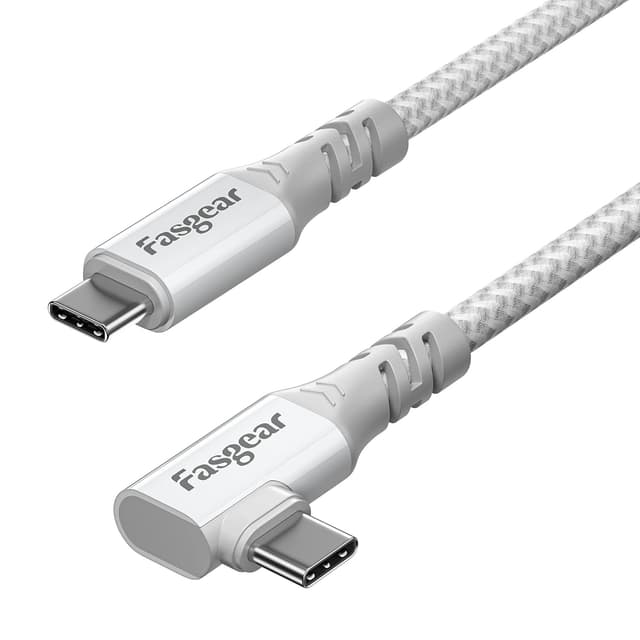
If you’ve ever needed a USB-C cable that doesn’t fight your desk setup, a right-angle design can feel like a small upgrade with big day-to-day impact. The Fasgear USB C to USB-C 3.2 Gen 2x2 cable is built around that idea: a 90-degree USB-C plug on one end, paired with claims of high-speed data, USB PD charging up to 100W, and video output up to 4K@60Hz.
That sounds like a lot on paper, and it mostly makes sense for people running USB-C laptops, tablets, and USB-C monitors where one cable has to do power plus data (and sometimes video). Still, it’s worth keeping expectations realistic: the maximum speeds and features depend on whether your device and setup can actually use them.
Key takeaways
This is a USB-C to USB-C cable aimed at users who want one lead that can charge, sync data, and (when supported) carry display video. The headline elements are the 90-degree connector, SuperSpeed+ / USB 3.2 Gen 2x2 positioning for up to 20Gbps (with specific requirements), and USB Power Delivery up to 100W (20V 5A).
Where it stands out is the practical connector choice. An L-shaped plug can reduce strain on ports and help avoid awkward cable bends—especially on laptops where the USB-C port sits close to the body. For monitor setups, a right angle can also help keep cables tidy.
It’s not the best match if you only need a basic charging lead for occasional top-ups, because you’ll be paying for capabilities you may never use. Also, if you want guaranteed 20Gbps video/data performance across all devices and drives, the fine print matters: Fasgear notes that the 20Gbps transfer needs USB 3.2 support on the connected device.
What you’ll notice in everyday use
Plugging in is the point here. The 90-degree USB-C connector is designed so it “plugs smoothly” in tight spaces, which is exactly the scenario for MacBook Pro-style ports and wall-to-desk setups. You can picture it: your laptop sits on a stand, the USB-C port faces sideways, and a straight cable can end up pulling at the connector or forcing a sharp bend. With a right-angle plug, the cable path is more natural.
On the performance side, it’s positioned for fast charging and high-speed syncing. The cable is described as using an E-marker IC to support up to 5 Amps / 100 watts charging under USB PD. That’s useful if you’re using USB-C power delivery rather than a separate barrel charger.

For media use, the cable also claims video output up to 4K@60Hz with audio, via DisplayPort Alternate Mode (DP Alt Mode). If your USB-C monitor supports this, the cable is meant to enable streaming without blur or distortion—though, as always, the final picture depends on both the laptop and the display’s capabilities.
Where it shines
- Right-angle convenience: the L-shaped USB-C plug is designed to fit more comfortably in tight port positions and reduce awkward bending.
- Charging + data + video in one: it’s presented as a single-cable solution for USB-C setups where you want more than just power.
- High-end spec support (with conditions): 20Gbps USB 3.2 Gen 2x2 positioning, 4K@60Hz video, and USB PD up to 100W.
- Durability angle: it’s stated to withstand at least 10,000 cycles of 90-degree bend testing, which supports the use-case of frequent plugging/unplugging or repeated cable movement.
Key specifications
- Type: USB-C to USB-C cable
- Length: 3ft
- Data sync: SuperSpeed+ USB 3.2 Gen 2x2 with up to 20Gbps (requires USB 3.2 function on the connected device)
- Charging: USB Power Delivery up to 100W (20V 5A), supported via built-in E-Marker IC
- Video support: up to 4K@60Hz with audio output
- Video standard: DisplayPort Alternate Mode (DP Alt Mode)
- Construction detail: reinforced/strengthened USB-C connector base (as described)
- Compatibility note: backward compatible with USB 3.1, 3.0 and 2.0
Who it’s for (and who should skip it)

It makes sense if you’re building a tidy USB-C workstation: laptop + external SSD or dock-style storage + a USB-C monitor, and you’d rather manage one cable that can do charge and display.
It’s also a reasonable fit if you’re tired of straight cables fighting for space around your laptop’s ports. The 90-degree connector is the feature you’ll feel immediately, not just “later” when you check a spec sheet.
It may not suit you if you only need a basic charger, or if your devices don’t support DP Alt Mode / USB 3.2 / the charging profile you’re hoping to hit. Charging speeds in particular are explicitly noted to vary by device and wall adapter, so this isn’t the type of cable that guarantees the top-end numbers in every home setup.

Getting the most from it
A few practical checks before you buy (or before you judge it by first impressions) help a lot. First, make sure the device on the other end supports the features you care about: for the 20Gbps claim, Fasgear says the connected device needs USB 3.2 function. For 4K@60Hz video, you need a USB-C display/monitor that supports DP Alt Mode.
Second, consider power delivery: even with a cable rated up to 100W, charging speed depends on your device and the wall power adapter you use.
Finally, think about cable routing. The right-angle connector is designed for tight bends and easier placement—so if you mainly use the cable in an unrestricted, straight run, you may not benefit as much from that design choice.
Is it worth it?
This Fasgear USB C to USB-C 3.2 Gen 2x2 cable is a strong “do-more with one lead” option if your setup includes USB-C charging and you want the same cable to potentially handle fast data syncing and 4K@60Hz video. The 90-degree connector is the standout practical detail, and the bend-test claim supports the idea that it’s meant for real-life use rather than being a delicate novelty.
It’s not the best pick if you only need basic power or if your devices don’t match the cable’s capability targets—because the headline speeds/features are conditional. If you’re checking compatibility for USB 3.2 transfer and DP Alt Mode video, then it can be a sensible buy for a clean, modern desk or portable travel bag setup.

Quick check FAQ
Does the 20Gbps speed work with any USB-C device?
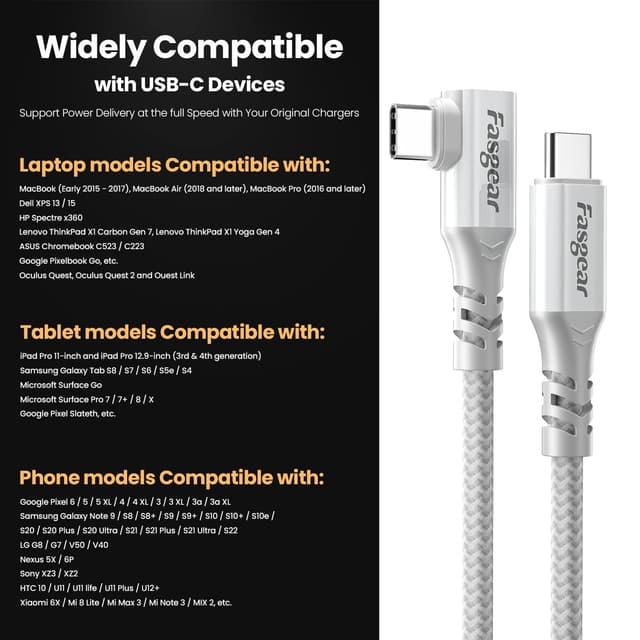
Not necessarily. Fasgear notes that the device needs USB 3.2 function when using the 20Gbps transfer speed.
Will it charge at the full 100W?
It supports up to 100W via USB PD, but charging speed will vary depending on your device and wall power adapter.
Can it output 4K at 60Hz to a monitor?
It’s designed to support 4K@60Hz with audio output, but it relies on the monitor/laptop supporting USB-C video via DP Alt Mode.
Is it backward compatible?
Yes—Fasgear states it’s backward compatible with USB 3.1, 3.0 and 2.0.
Why choose the 90-degree connector?
It’s meant to fit better in tight spaces and help with cable routing, particularly where a straight cable would create an awkward bend at the port.