

Uniwork compatible ink cartridges (4-pack) for HP 950XL/951XL — black, cyan, magenta & yellow
Product description
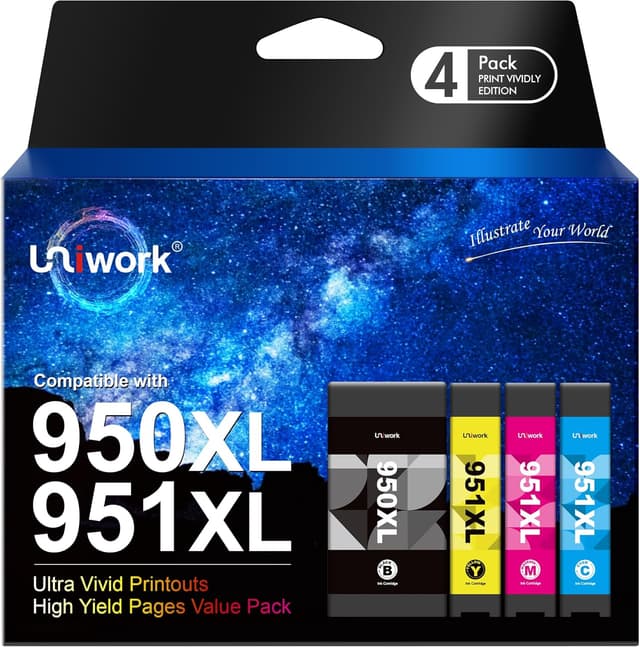
If you’re looking at the HP 950XL/951XL range and want a cheaper way to keep printing, this Uniwork compatible ink cartridge 4-pack is aimed squarely at that job. It includes 1 black, 1 cyan, 1 magenta and 1 yellow cartridge (the box says packaging may vary), made to replace cartridges used in a set of Officejet Pro models.
On paper, the appeal is simple: you get a full set of four colours, plus the black cartridge, rather than buying one at a time. The stated page yields are also helpful for budgeting.
That said, “compatible” cartridges depend on correct installation and the printer’s recognition. This isn’t the kind of product where you can completely ignore the setup steps and still expect everything to go smoothly.
Key takeaways
This 4-pack is designed to replace HP 950XL/951XL cartridges for certain Officejet Pro printers.
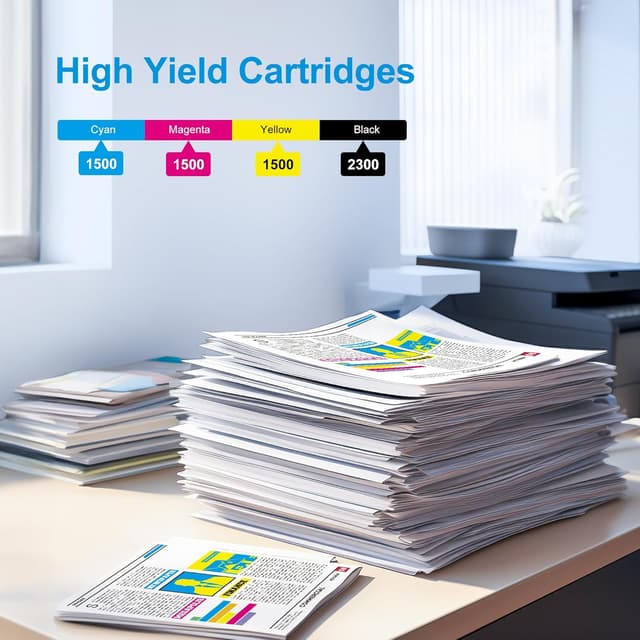
The main draw is cost-conscious replacement with a full CMYK set (including black). The stated yields are 2300 pages for the black cartridge and 1500 pages for each colour cartridge, based on letter/A4 at 5% coverage.
It’s not positioned as OEM-original, if you’re the kind of buyer who needs minimal fuss, you may find it a bit more hands-on than original cartridges.
Where it shines
The most convincing use case is straightforward: keeping an Officejet Pro printer running for day-to-day business printing (documents, reports, forms, and general colour work) without paying for original cartridges every time.
A practical example: if you’re printing a batch of A4 letters and a few brand-coloured pages, having the four colours together means you can replace everything in one go. It also helps when you want consistent colour output rather than mixing old and new cartridges.
A noticeable advantage of buying a full set is that you’re not forced into ordering individual cartridges later when another colour runs low.
What you’ll notice day to day
Recognition and compatibility are the real “lived experience” factors with compatible cartridges.
The instructions included here are clear: if you see an error such as “Not Recognized” or “Please replace cartridges”, you’re advised to remove the cartridges, reinsert them, then reset the printer.
There’s also guidance for the chip: you can gently clean it using an eraser or a lint-free cloth, and you should not remove the clear film tape. That detail matters—miss it and you could end up with avoidable problems.
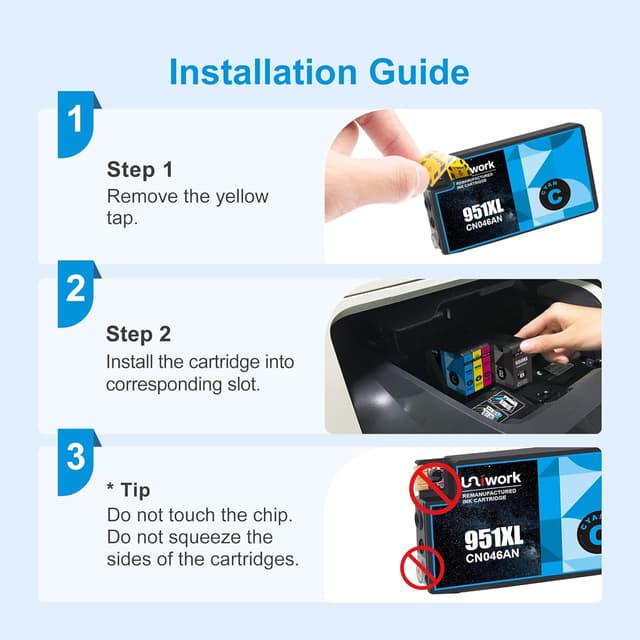
Finally, the install steps mention removing the yellow label from the cartridge and inserting each cartridge into the corresponding slot. This is the sort of step that can make the difference between a quick install and a frustrating re-do.
Tech specs
- Name: Uniwork compatible ink cartridge 4-pack (black, cyan, magenta & yellow)
- Type: Compatible ink cartridges (not original)
- Format: Cartridge set for HP 950XL / 951XL replacement
- Capacity: Stated page yields are 2300 pages for black and 1500 pages for each colour cartridge (letter/A4, 5% coverage)
- Box contents: 1 black, 1 cyan, 1 magenta, 1 yellow (pack of 4)
- Notes: Packaging may vary
Who it suits (and who should think twice)
It makes sense if you want replacement cartridges for an Officejet Pro printer in the listed series and you’re comfortable following installation guidance.
It’s also a sensible choice if you’re budgeting for regular document printing and you prefer buying a set when you’re planning a wider refresh of your ink.
It may not suit you if you want the lowest-effort, plug-and-print experience every time. Compatible cartridges can occasionally trigger a recognition message on some setups, and this product’s included troubleshooting suggests that you may need to act if the printer doesn’t immediately accept them.
You may want to skip it if you’re printing in a way where downtime is very costly and you don’t have the time to remove/reinsert cartridges and reset the printer.
Getting the most from it
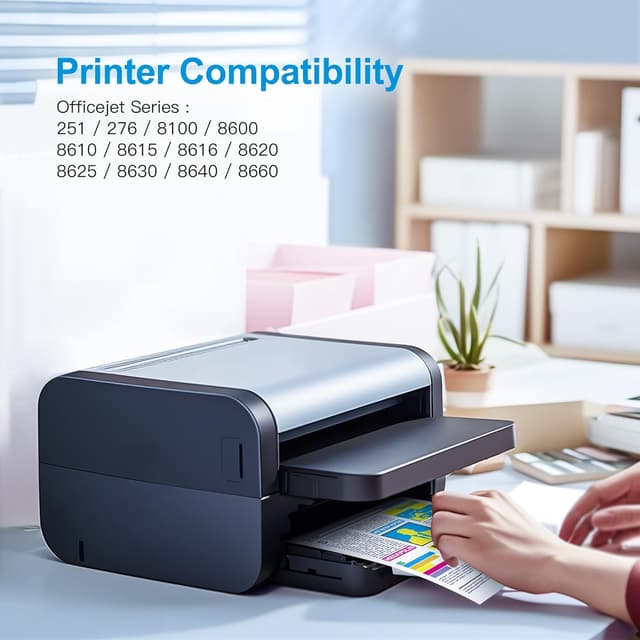
Before you buy, you’ll want to double-check that your printer model is one of the listed Officejet Pro models: 251dw, 276dw, 8100, 8600, 8610, 8615, 8620, or 8640.
When you install, follow the steps rather than rushing: remove the yellow label, insert each cartridge into the correct slot, and do not remove the clear film tape.
If the printer shows “Not Recognized” or “Please replace cartridges”, the suggested approach here is practical: take the cartridges out, put them back in, and reset the printer. If recognition still misbehaves, you can gently clean the chip with an eraser or a lint-free cloth.
Is it worth it?
This Uniwork compatible ink cartridge 4-pack is worth considering if you’re trying to replace HP 950XL/951XL cartridges for the compatible Officejet Pro printer series and you’re happy to take a couple of extra minutes during setup.
It’s a particularly good fit if you want the full CMYK set in one purchase and you’d like page-yield figures to help plan when to restock.


However, it’s not the best match if you need a guaranteed, minimal-interaction installation experience. The included “Not Recognized” troubleshooting and chip-cleaning guidance suggest you should be prepared to do basic troubleshooting if your printer doesn’t instantly accept the cartridges.
Mini FAQ
Will these cartridges be recognised straight away?
The instructions mention what to do if the printer displays “Not Recognized” or “Please replace cartridges”, which suggests recognition may not always be instant. The recommended fix is to remove and reinsert the cartridges, then reset the printer.
What’s in the box?
The pack includes 1 black, 1 cyan, 1 magenta and 1 yellow cartridge.
Are these original HP cartridges?
No. The description states they are compatible and “not original”.
What yields should I expect?
The page yield information provided is 2300 pages for black and 1500 pages for each colour cartridge, based on letter/A4 at 5% coverage.
Do I need to remove any film before installing?
You’re told not to remove the clear film tape, and to remove the yellow label before installing, then insert the cartridge into the correct slot.