


LEEDOW 15.6-inch laptop with Celeron N5095, 16GB RAM and 512GB SSD, touch ID
Product description
What it is and what it’s for
This LEEDOW laptop is built around an entry-level Intel Celeron N5095 CPU paired with 16GB of LPDDR4 RAM and a 512GB SSD. On paper, that combo aims to cover everyday work and entertainment without making you jump through hoops. If you mainly use a browser, spreadsheets, documents, streaming, and general office-type apps, this sort of spec can feel more “comfortable” than you’d expect from a budget processor.
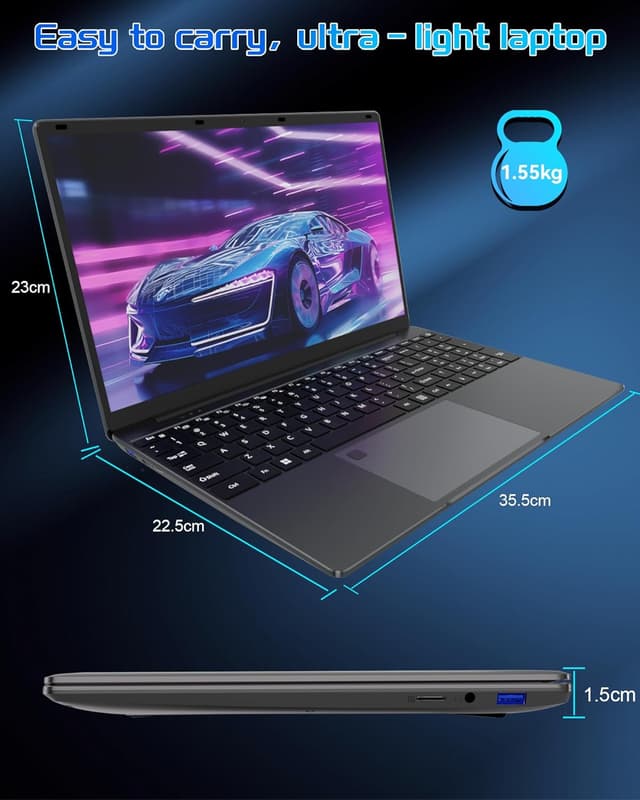
It’s also designed to be easy to live with physically: it’s listed as 15.6-inch, around 2 cm thick, and about 1.5 kg, which is the kind of weight that doesn’t feel punishing for a daily commute or a desk-and-sofa setup. There’s a built-in 5000mAh battery claimed to last around 4 hours of continuous use, though real life will depend heavily on brightness, what you’re doing, and Wi‑Fi activity.
Key takeaways (why the purchase makes sense)
The most “decision-relevant” bits here are the storage and memory. 512GB SSD plus 16GB RAM is the type of baseline that helps with multitasking and smoother day-to-day use, especially if you keep multiple tabs and apps open.

The second big deal is security and convenience. It includes fingerprint recognition (Touch ID). That’s not just a gimmick if you share the device, or if you simply prefer unlocking with a finger rather than repeatedly typing a password.
Then there’s the connectivity side: WiFi 5 and Bluetooth 4.2 are included. WiFi 5 is noted as faster than WiFi 4 on a theoretical maximum basis, and Bluetooth 4.2 is mentioned as supporting lower-energy usage—useful if you connect things like compatible accessories.
Where it stands out in everyday use
This laptop is positioned as a straightforward work-and-entertainment machine rather than a performance powerhouse. The Celeron N5095 is described with base and burst frequencies (2.0 and up to 2.9), which suggests it can handle typical tasks, but you should temper expectations if you’re trying to run heavier creative workloads or demanding games.
A micro example: imagine you’re writing a report while streaming a video in another tab. With 16GB RAM and a 512GB SSD, the workflow should feel more responsive than a machine with lower memory, and the SSD helps with quicker app and file access. Still, if you regularly edit large video files or run more demanding software, this may feel like the wrong tool.
What you might find limiting (the sensible cautions)
The touch-and-feel of performance depends quite a lot on what you do, and Celeron-class chips can get sluggish when pushed. In practice, that means it can be a decent choice for everyday tasks, but it might not be the best match if you’re expecting laptop-like power for heavy multitasking, big projects, or sustained performance under load.
Also, battery life is quoted at about 4 hours continuously. That’s useful to know, but it may not match your routine—especially if you keep the screen bright, use video constantly, or stay on Wi‑Fi for long stretches.
Finally, there’s a mention that you can add an additional 1TB SSD (M.2 2280 B-key SATA SSD). The idea is good if you think you’ll fill the 512GB, but you’ll want to double-check whether this fits your planned upgrade approach before committing.
Tech details to factor into your decision
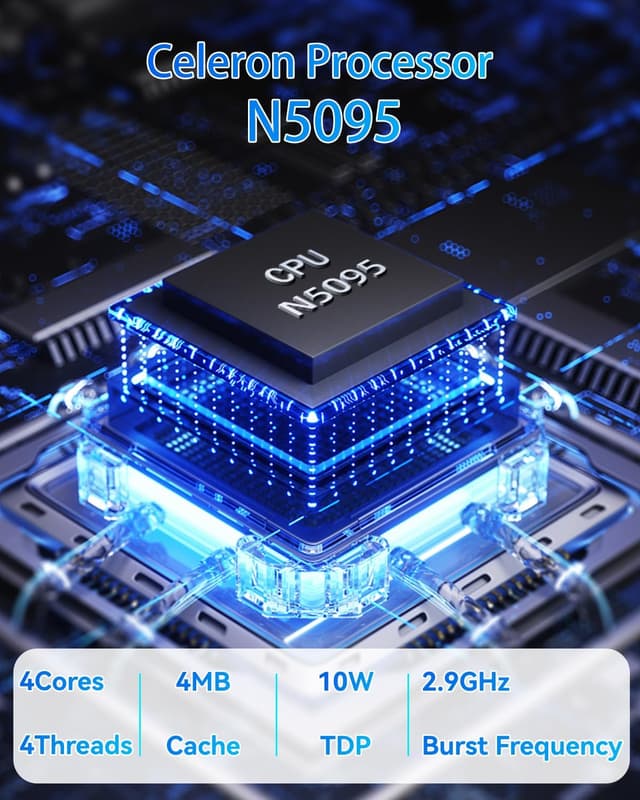
The listed configuration is:
- Processor: Celeron N5095 (base frequency 2.0, burst up to 2.9)
- RAM: 16GB LPDDR4
- Storage: 512GB SSD
- Display: 15.6 inch, UHD
- Security: fingerprint unlock (Touch ID)
- Wireless: WiFi 5, Bluetooth 4.2
- Ports (stated): USB 3.0 (and it mentions “USB 3.0” in the product name)
- Battery claim: built-in 5000mAh, up to about 4 hours continuous
- Weight / size: about 1.5 kg, around 2 cm thick, 35.7 x 22.5 cm
If you’re comparing alternatives, this spec set is more about practical daily usability than raw horsepower.

Who it suits, and who should look elsewhere
It’s a good fit if you want a compact 15.6-inch laptop for work and entertainment, and you value 16GB RAM plus a 512GB SSD for smoother day-to-day use. It also suits you if fingerprint unlocking matters to you and you’re happy staying within typical browser, office, and media workloads.
It may not suit you if you’re planning to do demanding creative work, heavy multitasking under pressure, or anything that regularly needs more CPU grunt than a Celeron-class processor is designed to deliver.
Should you buy it?
A solid pick if you’re after a portable, budget-leaning laptop with 16GB RAM, a 512GB SSD, and fingerprint unlock for everyday work and entertainment. It makes most sense when your performance needs are fairly standard and you’d rather have comfortable multitasking than chase high-end power.
You may want to skip it if your use cases lean heavily on resource-intensive software or you expect strong sustained performance. And if you’re sensitive to battery life in real use, the quoted “up to 4 hours” is something to treat as a best-case estimate rather than a guarantee.
Quick checklist before buying: confirm the operating system expectations from the listing details, check what ports you actually need (the name mentions USB 3.0, but you’ll want to verify the rest), and think about whether you’ll outgrow the 512GB—especially since an extra SSD upgrade is only mentioned in a specific format.

Mini FAQ
Does it support fingerprint unlocking?

Yes, the product description mentions fingerprint recognition technology with Touch ID for easier and faster access than passwords.
Is the storage enough for everyday use?
512GB SSD is a decent starting point for documents, apps, and media. If you expect large files or lots of downloads, it could be worth considering the mentioned SSD expansion route.
What kind of tasks is the Celeron N5095 suited to?
On the description’s own framing, it’s aimed at work and entertainment. That typically means browser-based tasks, office work, and streaming—rather than demanding creative or heavy computing.
How good is WiFi 5 and Bluetooth 4.2?
WiFi 5 is described as faster than WiFi 4 in general terms, and Bluetooth 4.2 is positioned as lower-energy. Real-world performance will still depend on your network and devices.
How long will the battery last?
It’s claimed to run continuously for around 4 hours, but actual battery life will vary with brightness, workload, and connectivity use.