

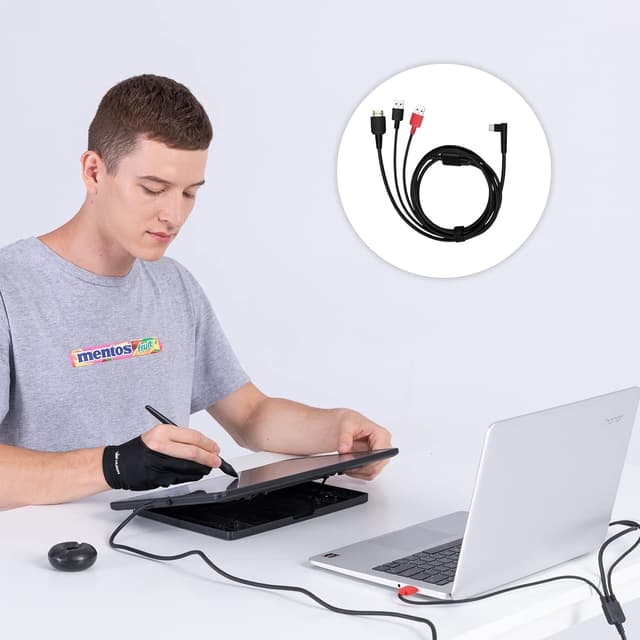
HUION CB05A 3-in-1 Cable Accessories for Kamvas 12/13/16 (2021)
Product description
What this cable is for
The HUION CB05A is a 3-in-1 accessory cable made for specific HUION graphics drawing monitors from the Kamvas 12/13/16 line with a 2021 model year. In day-to-day terms, it’s the kind of cable you’d want when you’re setting up your pen display and you’d rather keep the desk tidy than manage a bundle of separate HDMI, data USB and power leads.
If you already own one of the compatible 2021 Kamvas models and you’re replacing a cable or rebuilding a cleaner setup, this is designed to reduce clutter while keeping the connections in one integrated lead. It’s a straightforward swap rather than a “universal” accessory, so checking model compatibility before buying really matters.
Compatibility you should double-check
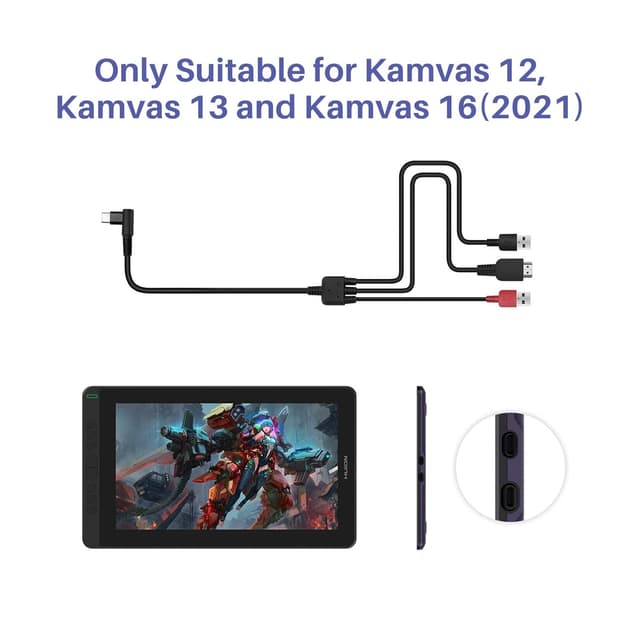
On paper, the CB05A cable is only designed for HUION Kamvas 12 (2021), Kamvas 13 (2021) and Kamvas 16 (2021) graphics drawing monitors. The listing also references model codes (GS1161 / GS1331 / GS1561).

It may sound obvious, but this is the main limitation: if your Kamvas model isn’t in that 2021 group, this cable isn’t the safe bet. Many buyers end up disappointed when a cable “looks the same” but the underlying model generation is different.
Three connections, one cleaner setup
Where this cable stands out is the integrated approach. Instead of running separate cables for video (HDMI), USB connection, and power, the CB05A is set up with multiple ports so you can handle everything together.
From the description: - It supports HDMI, USB and power connection at the same time. - Using an integrated cable can reduce wire bundles and make it easier to organise your workspace.

In practical use, that usually means fewer items to route around your monitor arm or desk edge. For example: you can plug in HDMI and the black USB connection to your computer in one go, rather than juggling a separate power lead that’s easy to misplace.
Power supply: the detail that affects convenience
Power is where the CB05A has a real-world “it depends” factor.
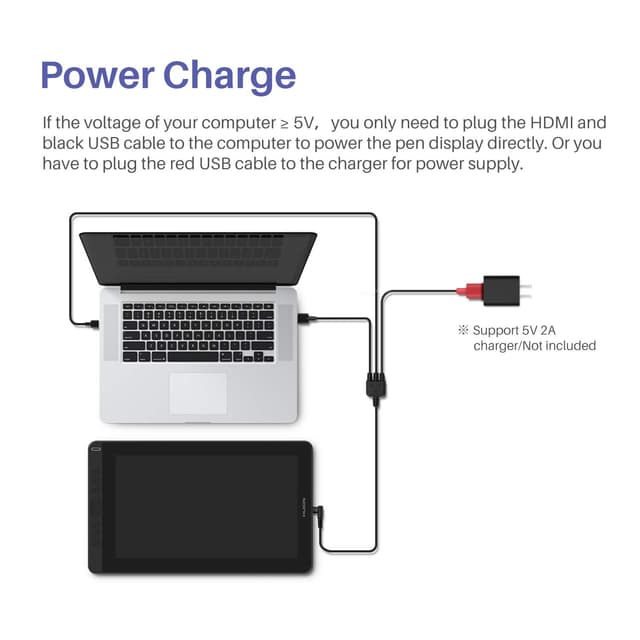
If your computer’s voltage is greater than or equal to 5V, the Kamvas 12 (2021) / Kamvas 13 / Kamvas 16 (2021) can be powered directly by your computer by plugging in only the HDMI and the black USB cable to your computer interfaces.
Otherwise, you’ll need to plug the red USB port into a charger (not included) for power.
So, it’s not perfect convenience for every setup. If your computer doesn’t provide the expected power via the USB interface, you should be prepared to use a separate charger.
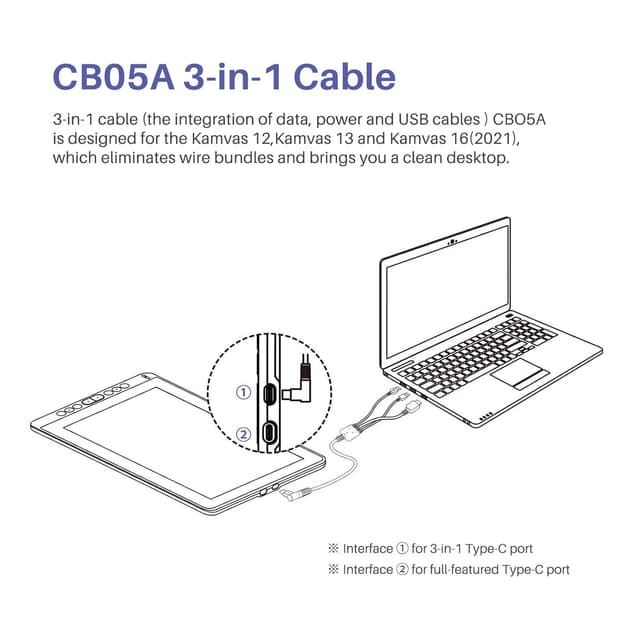
Connection guidance (so you don’t plug it wrong)
The port mapping is clearly described, and it’s worth following exactly: - The black USB port connects to the computer USB interface. - The red USB port connects to the charger. - The HDMI port connects to the computer’s HDMI interface. - The USB-C port connects to the pen display.
Because there are multiple ports with different roles, it’s one of those accessories where getting the red/black USB distinction right matters. If you’re using it as a replacement cable, take a moment to compare against your existing lead so you’re not guessing.
Who it suits, and who should avoid it
It suits buyers who: - Own a HUION Kamvas 12/13/16 (2021) and want an easier, cleaner cable arrangement. - Are replacing a lost/damaged cable and prefer a purpose-made lead rather than cobbling together separate cables. - Want one integrated solution that covers video, connection and (depending on power availability) power.
It may not suit you if: - Your Kamvas is not from the 2021 range mentioned above. - You don’t want the extra step of using a charger for power when your computer can’t supply it via USB.
If you’re shopping as a “generic desk upgrade” for any pen display, you may find this type of cable too specific. A more universal cable approach can make more sense when compatibility isn’t locked down—just don’t expect it to match the same purpose-made integration.
Is it worth it?
A solid buy if you’ve got a Kamvas 12 (2021), Kamvas 13 (2021) or Kamvas 16 (2021) and you want a tidy desk with HDMI + USB + power handled through one integrated cable. It’s also a sensible replacement if your current cable is the weak link in your setup.
Skip it if your pen display isn’t one of the 2021 models listed, because this cable is not positioned as broadly compatible. And if you know you’ll need external charging for your setup, factor in that a charger is not included.

Mini FAQ
FAQ
Will this cable work with any Kamvas model?
Not according to the provided compatibility details. It’s designed for Kamvas 12 (2021), Kamvas 13 (2021) and Kamvas 16 (2021).
Does it power the tablet through the computer?
It can, provided your computer’s voltage is greater than or equal to 5V. If not, you’ll need to use the red USB port with a charger (not included).
What connects to the pen display?
The USB-C port is intended to connect to the pen display.
What’s the difference between the black and red USB ports?
The black USB port connects to the computer. The red USB port connects to the charger for power (when required).
What’s included in the box?
The description only notes that the charger is not included. No other bundle contents are specified.