


BIGASUO 21.5" Digital Calendar with Full HD Touchscreen, Smart Family Planner & LED Reminder Light
Product description
The essentials
If family life feels like a constant jigsaw—school runs here, appointments there—this BIGASUO 21.5" digital calendar is designed to make planning visible and hard to miss. On paper, it’s an all-in-one “scheduling hub” that lets multiple people add or edit events, then shows the shared calendar on a wall or desk display.
Where it gets interesting is the colour-coding idea: each family member can choose a colour, with their avatar displayed alongside their events. That makes the schedule easier to scan at a glance (daily, weekly, and monthly views), and the LED reminder light is there to add an extra layer of “notice me” when something important is coming up.
That said, it’s not a traditional paper calendar replacement for everyone. It relies on app setup and WiFi connectivity, so if you want something that works instantly without devices involved, it may feel a bit more involved than expected.
Where it shines for everyday planning
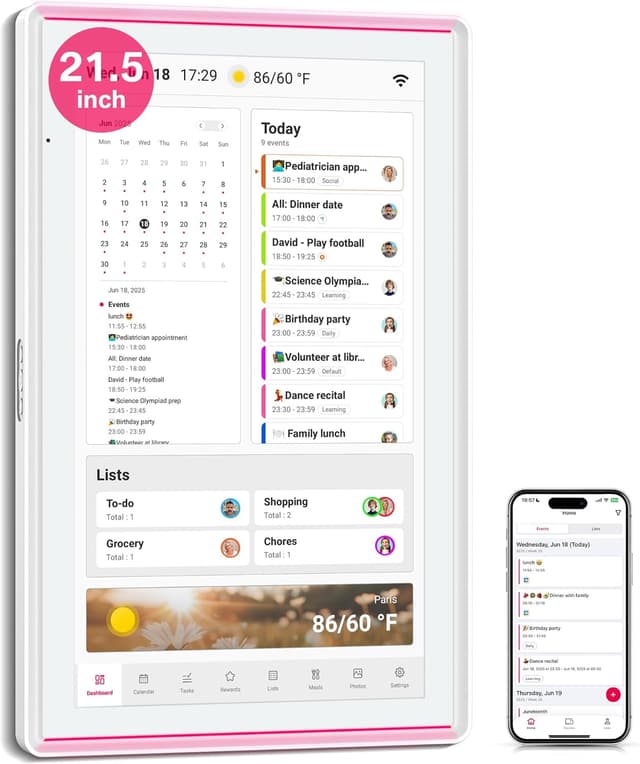
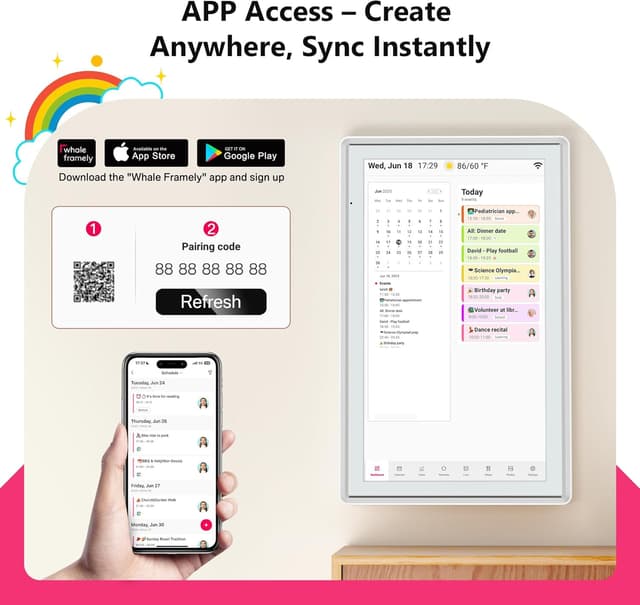
The big promise here is “real-time family planning”, not just a read-only screen. Based on the provided info, you plug it in, connect to WiFi, and add members through the “Whale Framely” app. Events can be created or edited either directly on the digital touchscreen calendar or in the app, and changes are set to sync between the display and the app.
A practical example: imagine you’re booking a dinner reservation or updating a doctor’s appointment time. Once you update it, the wall calendar changes so everyone can see the latest plan. Instead of one person quietly changing the plan and hoping it gets communicated, the shared display becomes the source of truth.
There’s also an organisational side beyond dates. The calendar can be used to: - add events such as reminders and appointments - manage lists for meals, shopping, or household tasks - set tasks per family member, with a task/reward concept to encourage completion - show a weekly meal plan so “what are we eating today?” doesn’t turn into a daily debate
If you’re the sort of household where reminders get lost in a sea of messaging apps, a single shared screen can genuinely reduce that friction.
Key features you’ll notice day to day
This isn’t just a large touchscreen, it’s built around family organisation and visibility. The display supports multiple calendar views (daily/weekly/monthly) and uses member colours plus avatars to make it easier to identify whose plan you’re looking at.
Another part worth noting is the approach to privacy. The description claims the smart calendar display shows full family schedules, while the app shows only your own plans. That’s a sensible idea for shared households, though it’s still worth you checking how “your own plans” behaves in practice once you set it up.
On the “future-proof convenience” side, it also offers third-party calendar sync support through the Whale Framely app. The info mentions two-way sync with Google Calendar, plus one-way sync with iCloud, Outlook, Cozi, Yahoo, and SnapTeam. That’s helpful if your household already lives in one of those calendars and you’d rather not duplicate everything.
Finally, it includes a smart photo frame / live screensaver element. You can share photos and videos from your phone via the free app, which can make the display feel less like a “planner machine” and more like part of the home.
What to watch out for before buying

A few limitations are worth considering. Firstly, the setup depends on connecting WiFi and using the Whale Framely app to add members. If your aim is a simple plug-and-play wall calendar with no app involvement, this may feel slightly too technology-led.
Secondly, while the touchscreen and on-device planning are mentioned, some actions appear to work through the app as well. So if you’re buying this for someone who won’t comfortably interact with a smartphone/tablet workflow, you may want to plan for who will manage the app side.
Also, it mentions desk mounting with a stand, but the “desktop stand (do not included)” line suggests you might need to check what’s actually included in the box versus what’s optional.

Who it suits (and who should skip it)
It makes sense if you’re trying to keep a family schedule visible in one place—especially if you’ve got multiple people making plans and you want them to be reflected instantly on a shared display.
It may not be a great match if you only need a basic household calendar for a couple of dates, or if you prefer purely offline planning. It also could be overkill if your priority is quick, minimal-effort reminders without syncing or member management.
It’s a solid fit if you like the idea of colour-coded events, member avatars, and an LED reminder light that adds a bit more attention than a standard calendar screen.
Final verdict
Is it worth it?
The BIGASUO 21.5" digital calendar looks like it’s built for families who need a single, shared scheduling view with colour-coded clarity and reminder visibility. With touchscreen planning, app-based member setup, and calendar sync support (including two-way Google Calendar sync), it’s the kind of device that can genuinely cut down “I didn’t know” moments.

However, it’s not the best choice if you want a low-tech, no-app wall calendar, or if the app workflow and WiFi dependence would be a hassle in your household. If you’re comfortable setting up a shared planner system and coordinating members through the app, it should fit your day-to-day planning needs better than a plain digital display.
FAQ

How does the family setup work?
You plug it in, connect to WiFi, and add members through the Whale Framely app. Events can then be created or edited either on the touchscreen or through the app, with updates syncing between the device and the app.
Can it sync with other calendars?
Yes, the description states you can link preferred calendars in the app. It mentions two-way sync with Google Calendar, and one-way sync with iCloud, Outlook, Cozi, Yahoo, and SnapTeam.
Does the app show everyone’s schedule?
The information provided says the smart calendar display shows full family schedules, while the app shows only your own plans. It’s worth double-checking how that feels once you’ve added your household members.
Can it be used like a photo frame?
The product description says it supports a smart photo frame / live screensaver. You can share photos and videos from your phone via the free app.
Can it be placed on a desk?
It can be wall-mounted with the included stand, and it can also be placed on a countertop with a desk stand, though the desktop stand is noted as not included—so it’s worth checking what comes in the box.