

IO Crest SY-ACC24084 SFP dust blocker with keys 🔌
Reviews
Price
Product description
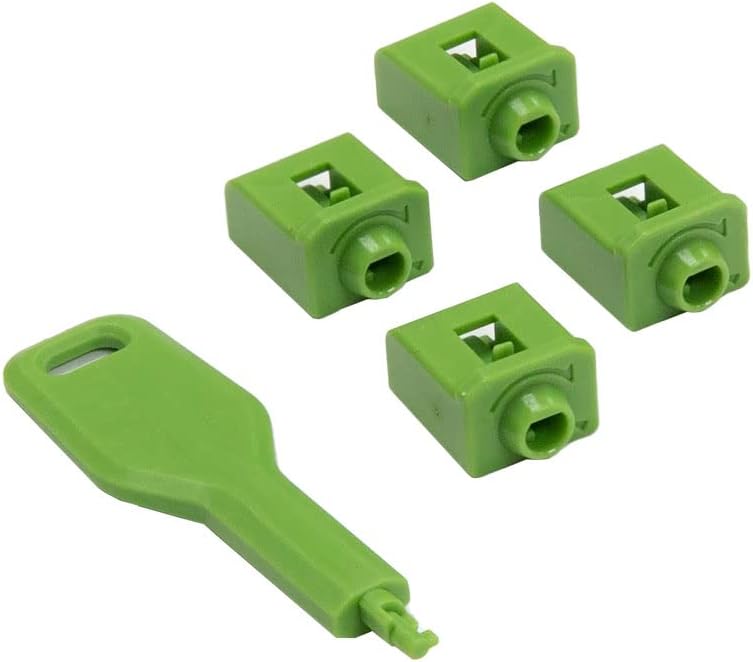
This locking SFP port dust blocker prevents unauthorized access to unused SFP ports while keeping them free from dust and debris. It fits flush into SFP openings and comes with removal keys, offering a straightforward physical security layer for network switches and servers.
Key Points
The device uses a patented, flush-mounted design that avoids the one-size-fits-all key approach and instead provides four unique locks with matching removal keys. This reduces the risk of a single compromised key opening multiple ports. It is intended to block and protect vacant SFP ports against tampering and accidental contamination, helping maintain port integrity and network uptime. 🔐
The compact plugs sit level with the port face to minimize snagging or interference with rack cabling. According to the manufacturer, the set tackles common security gaps in data centers and network closets where open ports could be exploited or left vulnerable. 🧰
Technical Specifications
- Name: IO Crest SY-ACC24084 Locking SFP Port Dust Blocker
- Compatible port type: SFP
- Includes: four locking plugs and four unique removal keys
- Mounting style: flush-mounted design
- Purpose: physical port security and dust protection
Advantages
The modular approach of supplying unique keys for each lock reduces shared-key risk and adds a clear auditable layer of security to physical infrastructure. It also serves as a simple dust barrier, which can lower the chance of contact-related faults and the need for maintenance cleaning. The small footprint means it does not obstruct adjacent ports or cable management paths. 🛡️
Consider that this accessory addresses physical access and contamination only. It does not replace network-level security controls. For environments that require strict hardware control, using plug locks alongside access controls can enhance overall protection.
Usage Recommendations
Install the plugs into unused SFP slots by pushing them flush into the opening and securing them with the provided keys to lock. Keep the removal keys stored in a restricted location and document key assignments if you deploy multiple sets across racks. For maintenance, remove plugs with the matching removal key before inserting transceivers or fiber modules, and re-seat the plugs when ports return to unused status.
When managing a larger installation, label ports and track which ports are blocked to avoid accidental removal during servicing. Regular visual inspections can confirm plugs remain seated and free from damage, helping to ensure ongoing protection and dust prevention.