







Insta360 Link 2 4K PTZ Webcam for Streaming 📷

Reviews
Product description
Go to offerDescription:
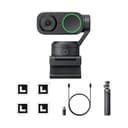
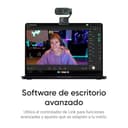
This PTZ 4K webcam from Insta360 brings motorized pan, tilt and AI tracking to desktop video calls and streaming, delivering sharp HDR images from a 1/2" sensor and clearer audio with AI noise-canceling mic for meetings, content creation and live streaming. It’s designed to keep you framed while moving around a room, and the tripod bundle adds flexible placement for small studio setups.
Key Points
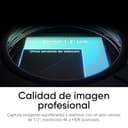
The camera captures 4K HDR video with a 1/2" sensor for improved low-light performance and realistic color rendering. True Focus with PDAF keeps subjects sharp and reduces hunting during movement. AI-driven tracking lets the unit physically pan and tilt to follow one person or a group, and gesture control or smartphone remote makes switching modes quick and intuitive. Audio is handled by an AI noise-canceling microphone system that filters background noise for clearer voice pickup. Specialized modes include desktop, whiteboard, and portrait shooting in 4K, while a privacy mode automatically stows the lens after a period of inactivity.
Technical Specifications
- Name: Insta360 Link 2 Tripod Bundle
- Sensor: 1/2" CMOS
- Video resolution: 4K with HDR
- Autofocus: PDAF True Focus
- Microphone: AI noise-canceling mic
The Best of This Model
The physical PTZ mechanism separates this webcam from fixed cameras by enabling smooth framing of moving subjects, which helps when presenting across a whiteboard or pacing during a talk. The built-in bokeh emulation produces a natural shallow depth-of-field effect without additional hardware, giving a more professional look for streams and recorded videos. Compatibility with mainstream platforms such as Zoom, Microsoft Teams and Twitch is built into the firmware, so it integrates into common workflows without extra converters or complex setup.
Usage Recommendations
Position the included tripod so the camera’s sweep covers your usual movement area, and use the desktop mode for seated video calls to keep eye lines natural. For presentations involving a whiteboard, enable the whiteboard mode to optimize clarity and contrast. Consider using the smartphone remote for quick reframing while recording, and remember that according to the manufacturer the privacy mode will automatically lower the camera after a short idle period which is handy when you step away from your desk.
