

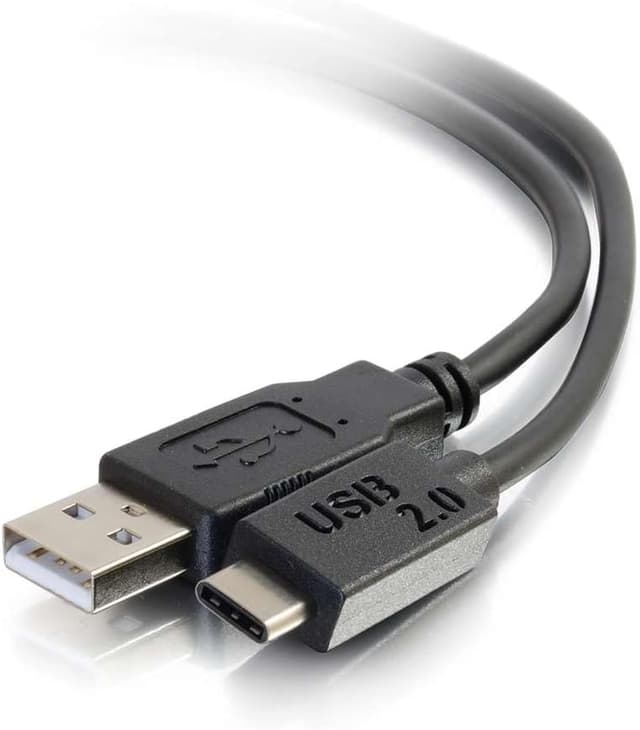
C2G Legrand USB 2.0 USB-C to A Cable (C2G 28871), Black 6 ft Data Transfer Cable
Product description
The essentials
If you need a straightforward way to connect a USB-C device to a USB-A port, this C2G Legrand USB 2.0 cable is built for that job. It’s a black, 6-foot cable designed for data transfer and power delivery to USB peripherals—think USB-C accessories going into a USB-A hub, a PC port, or even a Mac setup.
On paper, it’s a solid “everyday workhorse” cable. The pitch here isn’t flashy specs—it’s the combination of USB 2.0 support, durable connector construction, and the extra confidence you want when a cable will be plugged in often.
Key points
This cable is meant to keep your connection stable for USB 2.0 speeds and common device use. It supports USB 2.0 (up to 480 Mbps) and is backwards compatible with older USB standards like USB 1.1, USB 1.0, so you’re not locked into a single ecosystem. The connectors use 24k gold-plated data transfer terminals, which is the kind of detail that can matter when you’re trying to reduce corrosion risk at the plug.
What matters most in use
In real terms, this is the kind of cable you pick when you want a reliable link between a USB-C device and a USB-A port without overthinking it. A practical example: if you have a USB-C docking accessory or a USB-C peripheral that you usually plug into a hub, this cable gives you the length and the right end types (USB-C to USB-A) to avoid awkward positioning.
That said, it’s not trying to be a high-bandwidth USB-C cable for fast transfers. Because it’s USB 2.0, your maximum transfer ceiling is 480 Mbps—fine for many peripherals, but it can feel limiting if your goal is speeding up large file transfers compared with newer USB standards.
Where it shines (and where it may fall short)
Why it’s a good buy for the right setup: - You need USB-C (device side) to USB-A (port side) connectivity. - Your devices are USB 2.0 class or you’re working in an environment where USB 2.0 performance is the practical target. - You want connectors engineered for durability, with gold-plated terminals for corrosion resistance.
A limitation to keep in mind: - If you’re buying specifically to maximize speed for big file transfers or you expect USB-C to behave like a modern high-speed link, this may feel like it stays in the mid-range. It’s doing USB 2.0 the way it’s supposed to, but it won’t outrun higher-spec alternatives.
Tech specs
- Type: USB 2.0 data transfer cable
- Name: C2G Legrand USB 2.0 Cable (C2G 28871)
- Format: USB-C to USB-A
- Length/Size: 1.82 meters (6 feet)
- Color: Black
- Data transfer support: USB 2.0 up to 480 Mbps
- Backwards compatible with: USB 1.1 (12 Mbps), USB 1.0 (1.5 Mbps)
- Connector detail: 24k gold-plated data transfer connectors
- Count: 1 cable
Compatibility & requirements
This is intended for connecting a USB-C device to a USB-A port. The description also states compatibility with PC or Mac, which is helpful if you’re setting up a mixed workspace. Still, remember that real-world results depend on the USB version supported by your specific device and port—this cable supports USB 2.0 performance, so it won’t magically boost a slower USB pathway.
In the box
- 1x black USB-C to USB-A cable (USB 2.0)
Is it worth it?
Buy it if you want a dependable USB 2.0 cable for everyday device connections—especially when your USB-C equipment needs to plug into USB-A ports on a hub, PC, or Mac. The connector build (24k gold-plated terminals) and corrosion-resistance angle are sensible details if the cable will get frequent plug/unplug cycles.
Skip it if your main priority is high-speed USB-C data transfer beyond USB 2.0, or if you know you’ll be pushing large files where faster standards matter. In that case, you may be happier choosing a cable designed for higher-speed USB performance.
Quick mini FAQ - What is this cable used for? Connecting a USB-C device to a USB-A port for USB 2.0 data transfer and compatible power delivery to supported USB devices. - How fast is it? It supports USB 2.0 up to 480 Mbps, and it’s backwards compatible with USB 1.1 and USB 1.0. - Will it work with a PC or Mac? The description says it’s compatible with PC or Mac, as long as your ports and devices fit the USB-C to USB-A connection. - Is this cable good for frequent use? It’s positioned as durable, with 24k gold-plated connector terminals intended to help with corrosion resistance. - Does it replace a charging cable? It’s described for connecting USB devices to USB ports, but its primary spec focus is data transfer as a USB 2.0 cable—so match it to what your device expects.