





USB C Docking Station 8-in-1 with 100W PD 💻

Description:
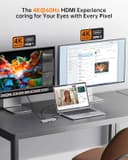
This USB C docking station brings expanded display and charging options to a compact desktop setup, combining multiple video outputs with fast power delivery for heavier workflows and multimedia use. If you need an USB C docking station quad display to run several monitors and charge a laptop while connecting peripherals, this hub aims to simplify a cluttered desk and speed up multitasking.
Key Points
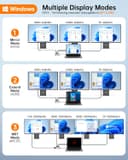
The hub supports up to four displays through a mix of DisplayPort, two HDMI ports and VGA, allowing different monitor arrangements for work, streaming or light content creation. It includes a dedicated power delivery port rated at 100W PD for charging compatible laptops while in use. For Windows laptops that show a slow-charge warning, check that your laptop adapter supplies sufficient wattage as the dock relies on an adequate input to deliver full charging performance. macOS users should note that desktop extension via MST is limited by the operating system, so mirroring or single-extension configurations may be the norm rather than multi-display extension.
This dock provides three additional USB ports for keyboards, mice and storage devices, reducing the need for separate hubs. The mix of ports aims to suit common setups for Dell, HP, Lenovo and ASUS laptops, keeping cables organised and readily accessible. ⚡️🖥️
Technical Specifications
- Name: USB C Docking Station Quad Display
- Video outputs: DP 8K@30Hz, 2× HDMI 4K@60Hz, VGA (resolutions depend on host capabilities)
- USB ports: 3 × USB (type unspecified in source)
- Power Delivery: 100W PD
- Functionality: MST multi-display support (Windows); macOS supports mirroring or single extension only.
Usage Recommendations
Connect the dock to a laptop via the USB-C upstream port and then attach displays to the DP and HDMI outputs according to the resolution and refresh rate you require. For the best multi-monitor experience when using triple or quad displays, use a host system that explicitly supports MST. When charging while driving multiple high-resolution screens, use a high-wattage power adapter to avoid slow charging notifications on some Windows laptops. For presentations or switching between workstations, the docking station makes it straightforward to detach and reattach a single cable to resume work quickly. 🎯
Positive Aspects
The combination of an 8-in-1 port layout and high-resolution video support makes this docking station practical for users who need to expand a laptop into a desktop-like environment. It reduces peripheral clutter and keeps power and display connections centralised. Bear in mind that some advanced refresh-rate features and multi-monitor extension modes are subject to the capabilities of your laptop and its operating system, according to the manufacturer. 🔌.
