


TiMOVO USB charger dock with cable for Garmin Vivoactive, Fenix & Forerunner (portable charging dock, black)
Product description
If you’re fed up with a charger cable that constantly tangles or feels a bit awkward to plug in every time, a dock-style setup can make day-to-day charging much simpler. The TiMOVO Charger Dock is designed to work with a range of Garmin watches across the Vivoactive, Fenix, Forerunner, Venu, Instinct and some sport/activity lines, using a dedicated dock and USB cable approach.
The essentials
On paper, this is a portable charging dock and cable intended to keep charging tidy and more consistent than a loose lead. TiMOVO positions it as a flexible replacement cable to help with tangle-free use, plus a compact form factor that’s easier to carry for commuting, office use or travel.
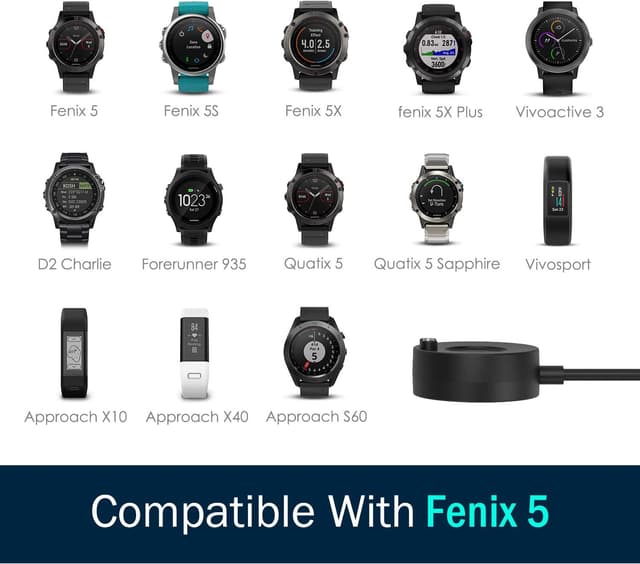
The compatibility list is broad, covering models such as Garmin Venu 4/3/2 and Garmin Fenix E/8/7/6 variants, plus Forerunner models including 970 and 570, and several Instinct lines. That breadth is useful if you’ve got multiple Garmin watches in the household, or if you’re upgrading and want a spare.

What matters most day to day
The biggest “real life” reasons people look at docks and cable replacements are usually friction and reliability. A dock-style charging setup reduces the fiddling that can happen when you line up a cable and connect repeatedly.
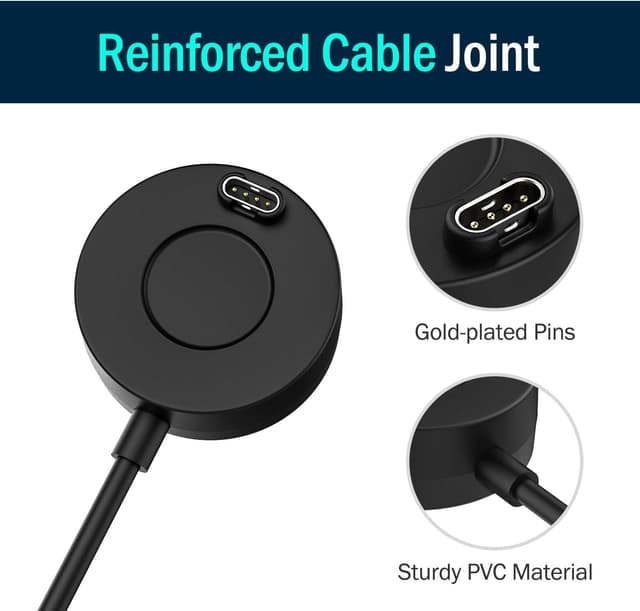
TiMOVO also mentions safety protections like short-circuit and current overload protection. While you should always charge responsibly, having that extra layer of protection is the kind of feature that can be reassuring in a home office or when you’re charging near a bag or desk.
One practical limitation to keep in mind: TiMOVO states it takes about 2.5 hours to fully charge. If you’re used to quick top-ups from other chargers, you may find this doesn’t match that expectation.
Compatibility you should double-check
TiMOVO lists compatibility with many Garmin watches, including (among others) Venu 4/3/2 series, Vivoactive 6/5/4/3 lines, Fenix E/8/7/6/5 variants, and Forerunner models such as 970 and 570, plus certain Approach, D2 Charlie, Quatix and Instinct models.
Because there are so many names in the list (and because Garmin model names can be easy to misread), it’s worth double-checking your exact model number before buying. If you’re unsure whether your specific variant is included, that’s exactly the sort of scenario where a “compatible with…” list can still leave room for doubt.
Charging approach and power limits

TiMOVO advises that using a laptop USB port or computer USB port is more stable than charging directly from other sources. They also ask you not to use a fast charging adapter.
They give a specific guideline if you connect to an adapter: the electric current must not exceed 1A and the voltage must not exceed 5V. So if your charging setup relies on higher-output USB adapters, you’ll need to either use a compatible port or rethink your charging approach.
What’s good, and where it may fall short
What stands out: - Built as a replacement charging dock with a flexible cable, aimed at more tidy, easier charging. - Broad Garmin compatibility coverage across multiple watch families. - Mentions safety protections (short circuit protection and current overload protection). - Compact design for carrying.
Where you should be careful: - Charging time is stated as taking around 2.5 hours for a full charge, which may not suit anyone who expects faster charging. - It explicitly discourages fast charging adapters and sets power limits (1A max, 5V max). If you don’t want to think about charging power, this might be a bit of a hassle. - Smart watch is not included, so you’re buying the charger dock/cable only.
Who it suits (and who should avoid it)
It makes sense if you own one of the listed Garmin watches and you want a portable, dock-style charger for everyday use—home, office, or travel. It’s also a sensible choice for keeping a spare charger at work, especially if you like the idea of fewer cable tangles.
It might not be the best match if you rely on fast charging adapters, or if your priority is minimising time to charge rather than using a standard USB charging approach. And if you’re not confident your exact watch model is on TiMOVO’s compatibility list, you may want to avoid guessing.
Is it worth it?
Buy the TiMOVO charger dock if you want a compact Garmin-compatible dock and cable setup for models listed by TiMOVO, and you’re happy to charge via laptop/PC USB ports or a properly limited 5V/1A supply. It’s the sort of practical replacement that can make charging feel less fiddly day after day.
Skip it if you expect “fast charging” behaviour, or if you regularly use high-output charging adapters and don’t want to manage power limits. Also, because it’s a replacement charger (not the watch), it’s worth confirming your model is truly included before committing.
Quick FAQ

Will I need my Garmin watch to use this charger?
Yes. The watch is not included—this is a charger dock/cable replacement for compatible Garmin smartwatches.
Can I use any USB charger adapter?
TiMOVO advises against fast charging adapters. If using an adapter, they state current should not exceed 1A and voltage should not exceed 5V.
How long does it take to fully charge?
TiMOVO notes it takes about 2.5 hours to fully charge.
Is it designed for travel?
It’s described as compact and suitable to carry for office or in your bag.
Does it include data sync?
The product name mentions USB data sync, but no further details are provided in the information here—so it’s best to treat it as part of the intended purpose and confirm with the listing specifics if you need more certainty.