

Sehawei PS5 / PS5 Slim Stand and Cooling Station with RGB Lighting and 3-Speed Fan
Reviews
Price
Product description
What this is for (and why people buy it)
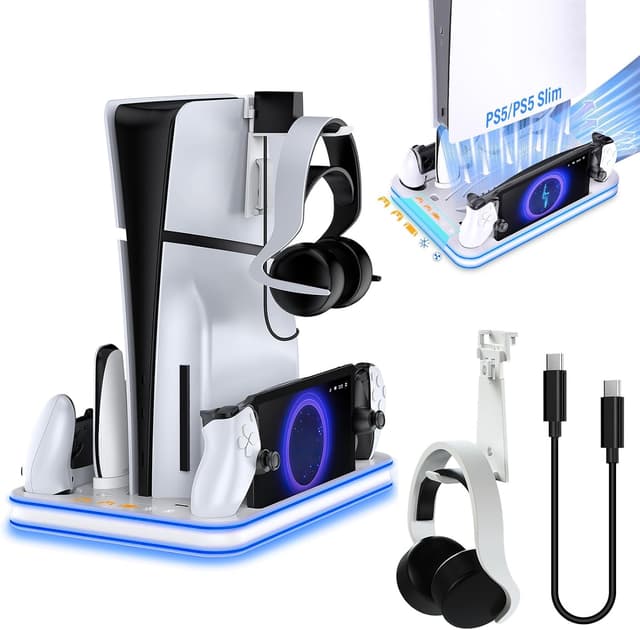
A PS5 stand that does more than just hold your console is one of those desk upgrades that sounds minor… until you live with it. The Sehawei PS5 / PS5 Slim Stand and Cooling Station is designed to combine a vertical stand, active cooling, and a charging setup for PS5 accessories. On paper it targets two practical headaches at once: managing console heat while gaming, and keeping controllers (plus PS Portal and a few add-ons) organised in one place.
The cooling part comes from a 3-level fan with selectable speeds and modes. The station also includes charging options intended for PS5 DualSense controllers, PS5 Edge (controller / edge controller as described), and a magnetic charging port for PS Portal. There’s even an RGB ambient light switch with multiple light modes, so the station won’t look like an afterthought in your setup.
Key points (how it works day to day)
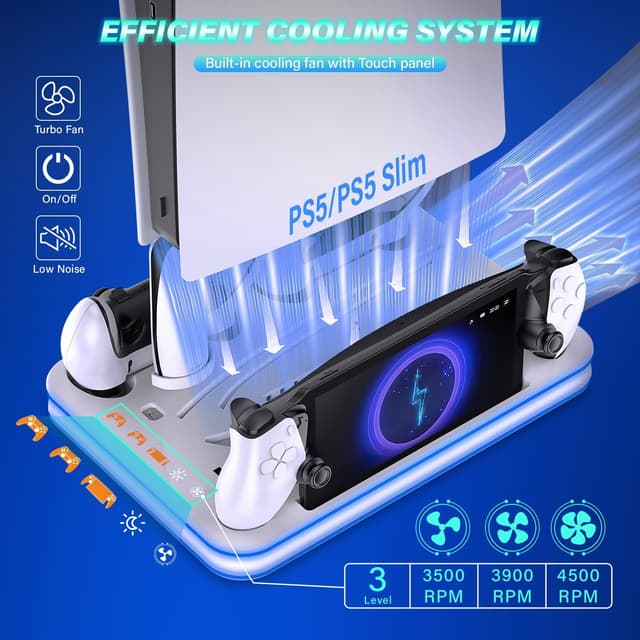
The stand is built around vertical placement for PS5 / PS5 Slim (including the Slim 2023 mentioned in the description). Hot air is intended to be expelled via the bottom area of the cooling stand, which is the sort of airflow routing you want if your goal is “keep things calmer while I play”.
For cooling control, you get 3 fan speeds (low, medium, high) and the ability to change the speed as needed. That makes it easier to avoid running maximum airflow all the time, though it’s still worth noting that fan noise and comfort are very subjective—what feels fine to one person can be annoying to another.
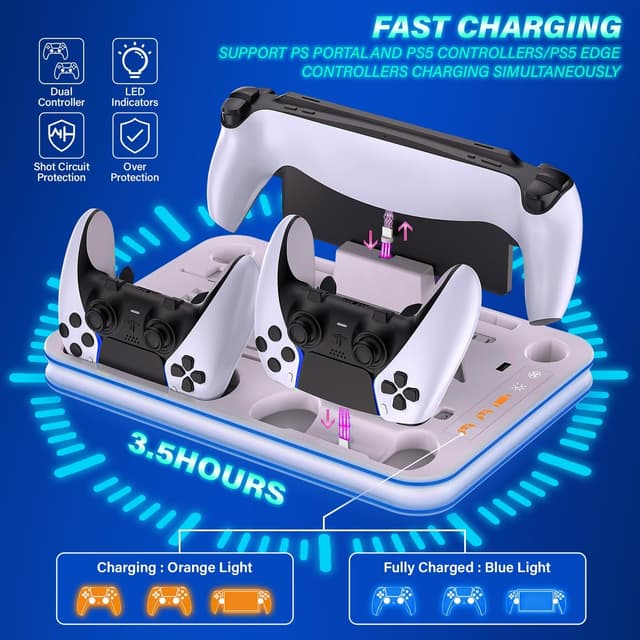
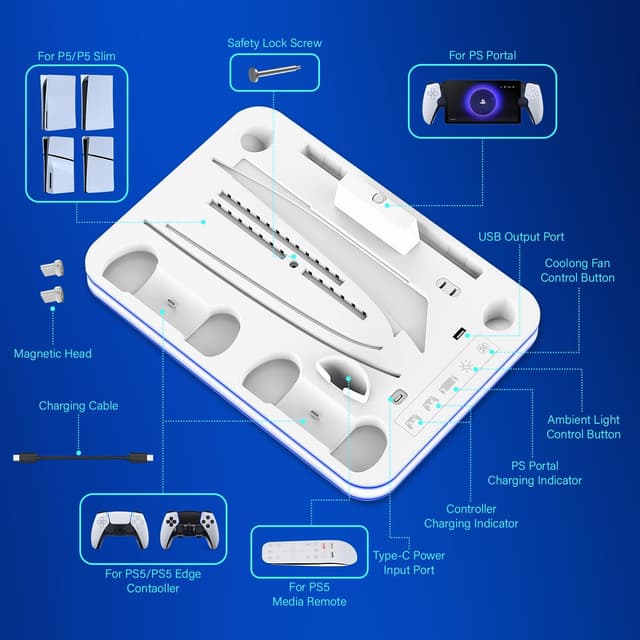
On the charging side, there are two controller charging ports and a magnetic charging port for PS Portal. Indicator lights are included to show charging status: the description says the orange light indicates charging, and the blue light indicates fully charged. As for time, it states the controller charging can be fully charged in around 3.5 hours.
Where it shines
1) Cooler, cleaner setup
If you like a tidy desk, a vertical station that also stores accessories helps reduce clutter. The description also mentions storage for a remote control and a headset via holders on the stand, so you’re not just gaining cooling—you’re also getting a home for smaller items.
2) Simple charging routine
Having charging ports on the stand means you can top up controllers without having to locate separate cables and docks. A magnetic port for PS Portal is a particularly convenient detail if you typically keep the Portal nearby rather than elsewhere.
3) Lighting that’s easy to control
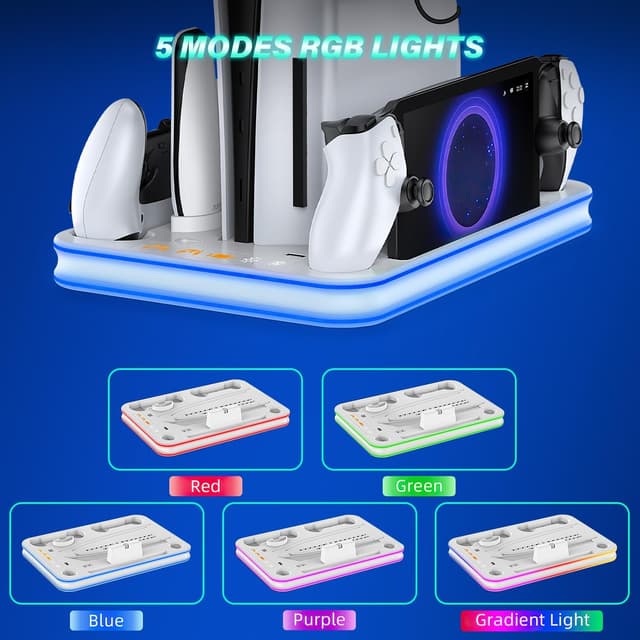
RGB ambient lighting is controlled via a touch switch. The description says you can press and hold the ambient light control button for two seconds to turn it on or off, and it includes 5 lighting modes (red, green, blue, purple, and a degraded gradient lighting effect). It’s not essential for performance, but it does make the station feel more “part of the setup” rather than hidden under everything else.
What to watch before you buy
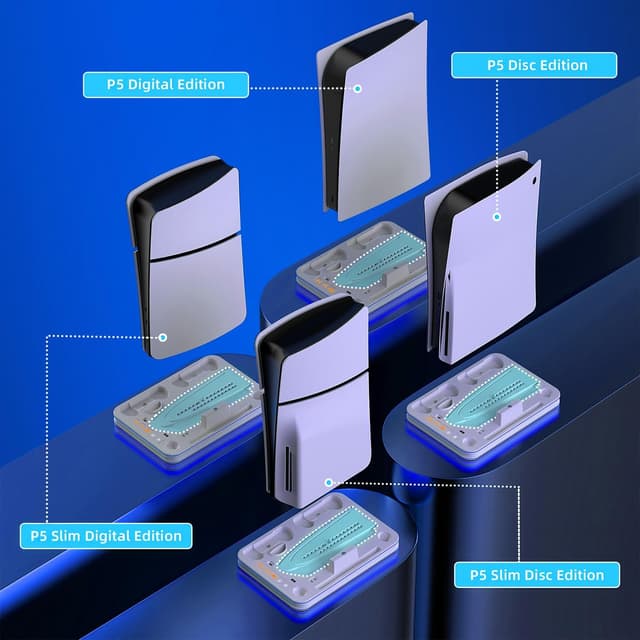
This one is aimed specifically at certain PS5 hardware categories mentioned in the description: PS5 digital and disc editions, PS5 Slim digital and disc editions (including the 2023 Slim), plus PS5 Edge controller, PS5 controller, and PS Portal.
That said, there are a couple of practical things to keep in mind. First, the cooling benefit is “intended” through bottom airflow and a 3-speed fan, but the description doesn’t provide noise levels or measured temperature reductions. If you’re buying for heavy-duty cooling (long sessions, hot rooms), you may want to consider whether you expect hard performance claims or just a helpful improvement.
Second, while the station includes chargers and holders, it’s still a dock-style accessory. Space on your desk and how your cables run will matter, particularly if you’re trying to keep everything minimal.
Tech specs
- Type: PS5 / PS5 Slim stand and cooling station with charging dock
- Cooling fan: 3 levels (low, medium, high)
- Charging: two controller charging ports plus a magnetic charging port for PS Portal
- RGB lighting: ambient light touch switch with 5 modes
- Charging indicators: orange for charging, blue for fully charged
- Charging time (stated): around 3.5 hours to fully charge
Who it suits best (and who should skip it)
It’s a good fit if you want a single vertical station that both supports your PS5 / PS5 Slim and makes it easier to charge controllers and PS Portal while keeping desk clutter down. It suits you if you also like having a little ambient RGB control without complicated setup.
It may not be a great match if you only need a basic stand and you don’t care about charging docks, holders, or RGB lighting—then you might find you’re paying for features you won’t use.
It might not suit you if you’re sensitive to fan noise, because the description confirms multiple fan speeds but doesn’t tell you how loud it gets at the higher settings.
Final verdict
Worth considering if you’re after an all-in-one PS5 / PS5 Slim stand that adds active 3-speed cooling, a practical charging setup for controllers plus a magnetic PS Portal option, and tidy storage for small accessories. It’s more of a “daily driver” desk upgrade than a standalone cooling solution.
You may want to skip it if your priority is pure cooling performance you can quantify, or if you’d rather keep things simple with a minimal stand and separate charging elsewhere.