

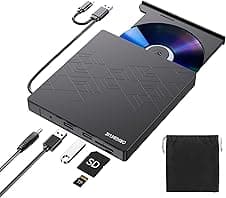
ORIGBELIE External DVD Drive USB 3.0 CD/DVD ROM 📀

Description:
This slim external DVD drive connects via USB 3.0 and Type-C to add optical disc functionality to laptops and desktops, useful for installing software, playing DVDs or burning CDs. It is portable and powered through the USB connection, making the ORIGBELIE unit a practical accessory when your computer lacks a built-in optical drive. If you need an external DVD drive USB Type-C for occasional media or backup work, this model covers common reading and writing tasks while keeping a compact footprint.
Key Points
The drive supports plug and play operation, so there is no driver installation required on most systems and it is powered directly from the USB port. Built-in cable storage helps keep the unit neat when carried in a bag, and a slightly textured finish gives a firmer grip during handling. The device includes an extra USB port on the housing that can help stabilise operation when the host system has limited power, and there are TF and SD card reader ports for additional media access. 📀
Compatibility is broad across desktop and laptop platforms, with support for Windows versions from XP through Windows 11, macOS and many Linux distributions. Note that some functions on Windows 11 require the system media player and a network connection, and according to the manufacturer this drive does not support Blu-ray discs. It is not compatible with Chromebooks, most tablets, mobile phones or car multimedia units. 🔌
Technical Specifications
- Name: ORIGBELIE External DVD Drive
- Interface: USB 3.0 and Type-C
- Maximum speeds: DVD read/write up to 8x, CD read/write up to 24x
- Supported disc formats: CD±R/RW, CD-ROM, DVD±R/RW, DVD-RAM, VCD, SVCD
- Extra ports: additional USB port, TF and SD card reader slots
Usage Recommendations
For media playback, connect directly to a laptop or desktop USB port and allow the system to detect the drive automatically. When burning discs or performing sustained read/write sessions, a host with ample power is preferable, or use the additional USB port on the unit to reduce the risk of unstable operation. When travelling, store the drive in a protective sleeve to avoid scratches to the tray and keep the built-in cable tucked in to prevent snagging. 💾
Consider that the drive relies on the connected device for power and will not function with devices that do not provide a full USB host connection, such as most smartphones and some tablet models. Also, if you require Blu-ray playback or authoring, this unit will not meet that need.
