


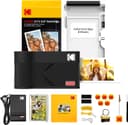




KODAK Mini 2 ERA portable photo printer 2.1x3.4 in 📷

Description:
This compact portable photo printer lets you turn smartphone moments into physical keepsakes quickly and with vivid colour. The KODAK Mini 2 ERA uses 4PASS printing to deliver laminated 2.1 x 3.4 inch photos that resist fingerprints and light splashes, making it a handy travel companion for parties, holidays and everyday snapshots. If you want a low-cost way to share tangible photos after social events or on the go, this model aims to simplify the process while improving colour saturation according to the manufacturer. 📸
Key Points
The Mini 2 ERA is designed for portability and ease of use, pairing with devices via Bluetooth for instant printing. It supports two finish options so you can produce prints with or without borders depending on how you plan to display them. The included starter pack contains eight sheets plus a 30-sheet refill bundle and a small accessory set, helping you get started straight away. Colour output works in 24-bit mode, which the manufacturer states reproduces around 16.7 million colours for richer tones and improved saturation. The laminated layers make each print more durable for casual handling.
Technical Specifications
- Name: KODAK Mini 2 ERA
- Print size: 2.1 x 3.4 inches
- Printing technology: 4PASS laminated prints
- Colour depth: 24-bit / 16.7 million colours
- Included media: 8 initial sheets + 30 sheets pack
Benefits
Printing is fast and intuitive, aimed at people who prefer immediate physical photos rather than only digital copies. The laminated multi-layer finish not only increases resistance to smudges and light moisture but also gives a slightly glossy effect to help colours pop. Because the device is small and pocketable, it can be taken to events and used for instant mementos or quick craft projects. The combination of a low per-photo cost and refillable packs may reduce running costs for casual users according to the product positioning.
Usage Recommendations
Pair the printer with your smartphone using the companion app to access layout options, filters and border choices. For best results, use clean hands when handling fresh prints and allow the lamination a few seconds to settle before stacking images. Keep spare sheets in a cool, dry place to avoid humidity affecting adhesive layers. Consider that the compact print size is excellent for albums and scrapbooks but may not suit needs when larger prints are required.
Notes on limitations: the small format is meant for instant snaps rather than archival large-format images. Also, while laminated prints are water resistant and finger-print resistant, they are not fully waterproof or immune to heavy abrasion. 🎞️
