


iFuntec Charger Dock for Fitbit Sense / Sense 2 / Versa 3 / Versa 4 (magnetic stand with charging cable) – White
Product description
Quick overview
If you’ve misplaced your original charger or you just want a neat, always-ready setup for desk and travel, the iFuntec charger dock is designed to replace the charging stand for compatible Fitbit models. It’s a magnetic dock stand where you bring the back of the watch close to the pins and it “adsorbs” into place.
On paper, it leans into convenience as much as charging: a stable magnetic hold, a cable included, and a viewing angle so you can glance at notifications while the watch is on charge. That’s the sort of thing that sounds small, but day to day it can make charging feel less like a chore.
Worth noting, though: this is a replacement accessory, so your experience will still depend on getting the watch aligned properly with the charging pins.
What it does (and the everyday use case)

This dock stand is meant to charge specific Fitbit watches using the included charging cable (USB A to C is stated). The core idea is simple: power the dock, then position your watch by bringing it close to the 4-pin area. The magnetic strength is part of the design, aiming to keep the watch firmly fixed while charging.
A practical example: imagine you’re working at a desk and need to top up while replying to messages. With the base angled for viewing, you can check notifications without picking the watch up every time—useful when you’re juggling a calendar and don’t want to miss alerts.
The essentials: what to pay attention to
This charger dock is positioned as a “plug and play” replacement. That matters if you’re after something straightforward rather than a fiddly cable-and-port routine. The design also protects the watch and strap from friction with the table or ground, which helps keep things cleaner where your watch sits.
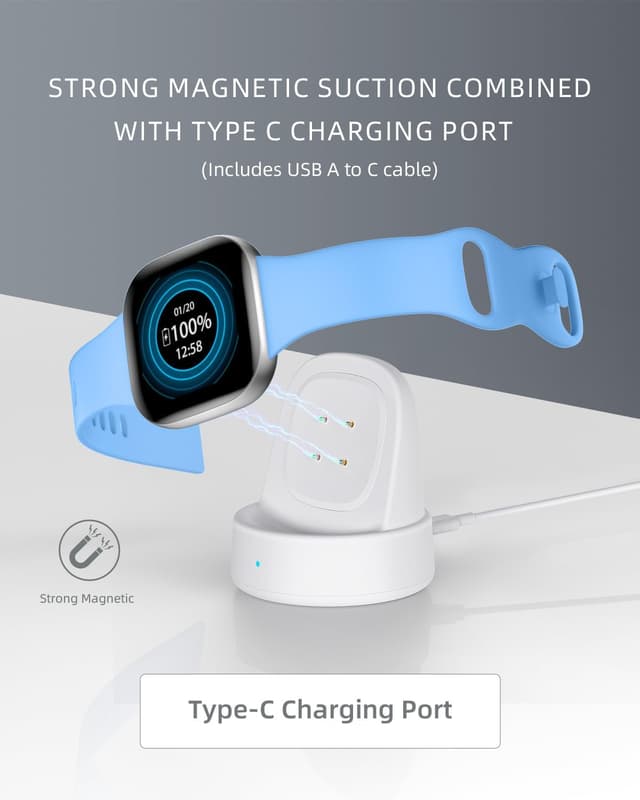
You also get a small indicator: the blue LED lights up for 3–5 seconds when the charger is powered on, letting you know it’s working. It’s a minor touch, but for replacement chargers it’s exactly the sort of reassurance people want.
Key features that stand out
One part of the design is the magnetic alignment. The description highlights upgraded magnetism intended to keep the watch steady on the dock, which should reduce the “wobble” feeling you sometimes get with less secure stands.
Another noticeable element is the 105° viewing angle. If you like to see messages while the watch is on charge, this is the kind of detail that makes the stand feel more intentional than a basic holder.
Where it may fall short for some buyers: because it’s a magnetic dock that relies on positioning against the pins, if you prefer to set the watch down in a perfectly fixed, no-thought way every time, you might find alignment takes a little getting used to.
Who it suits (and who should skip it)

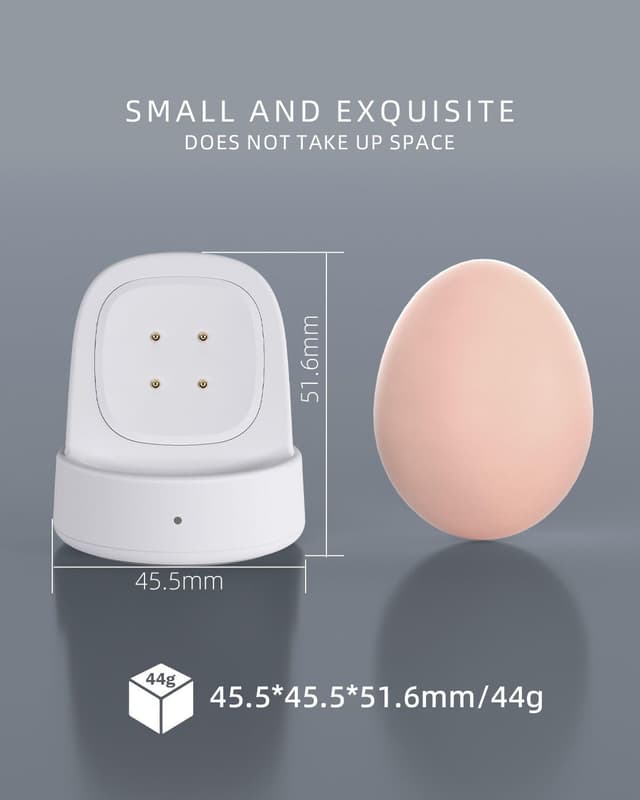
It’s a good fit if you want a compact, portable charging stand for home, office, or travel, and you value the convenience of docking the watch by touch. At 44g (as stated), it’s the sort of accessory you can keep in a bag without it feeling bulky.
It might not be the best choice if you’re buying specifically for a “hands-off” charging experience where you never want to adjust alignment, or if you need a charger for a Fitbit model outside the listed compatibility.
It’s also best considered as a practical replacement accessory rather than a premium charging setup with lots of extra functionality—there’s no mention of screens, advanced controls, or multi-device features here.

Care, cable and setup considerations
The dock uses an included cable (USB A to C). Before you commit, it’s worth checking your setup has the right power source available (for example, a USB port or compatible adapter on your side).
For charging to be smooth, placement matters: the watch needs to be close to the dock’s 4 pins so the magnetic connection engages properly. If the watch isn’t sitting right, you may find charging isn’t as reliable as you’d expect—so it’s worth taking an extra second the first time to align it.
As with any replacement charger, it’s also sensible to treat it gently: avoid repeatedly knocking the pins or forcing the watch into position, even though the stand is designed to keep things stable.
Mini FAQ
Is this dock really plug and play?
The description says it’s designed for plug and play: bring the back of the watch close to the dock’s 4 pins and it should attach immediately.
Does it include a cable?
Yes, a USB A to C charging cable is included (as stated).

Will I see notifications while it charges?
The stand is designed with a 105° viewing angle so you can view information in time while charging.
How do I know it’s working?
There’s a blue LED indicator that lights up for 3–5 seconds when powered on.
Is it safe for the watch?
The description claims stable output current and voltage to support safe charging and avoid damage, but as with any charger replacement, it’s still wise to ensure your watch is properly aligned on the pins.
Is it worth it?
Buy it if you need a replacement iFuntec charging dock for a compatible Fitbit watch, and you prefer magnetic, tidy charging with a viewing angle and a small portable footprint. The included cable and the quick LED confirmation make it feel practical for everyday use.
Skip it if you’re buying for a Fitbit model not listed in the compatibility range, or if you strongly dislike magnetic alignment and want a charger that behaves perfectly without any adjustment. In that case, the dock’s “touch it onto the pins” approach may end up being more hassle than you want.