

HELLCOOL Mobile Gaming Controller for iPhone & Android with Hall Effect Joystick and RGB
Product description
If you play games on your phone via cloud streaming or controller-friendly apps, a dedicated mobile gamepad can make a noticeable difference. The HELLCOOL Mobile Gaming Controller is built around that idea: wireless connection, Hall Effect joysticks for finer control, and extras like turbo and dual-motor vibration to make it feel less “touchscreen-only”.
That said, it’s not a magic wand. The controller only works with games/platforms that natively support controllers on mobile, so compatibility depends a lot on what you actually play.
What it is and what you use it for
This is a wireless phone game controller designed for iPhone and Android. The intent is clear: use physical buttons and thumbsticks for games and services that already allow controller input on mobile devices.

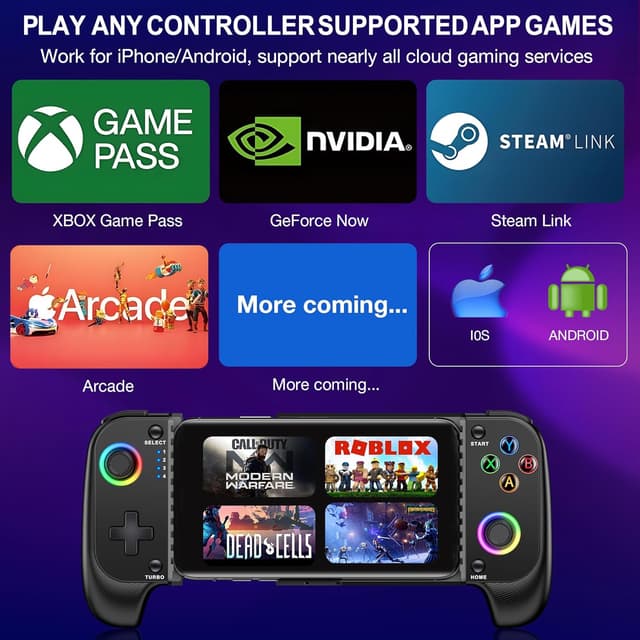
The base description calls out examples such as Xbox Cloud, Steam Link, GeForce Now, MFi Apple Arcade, and Roblox. If your library includes titles that support controllers on phone, the HELLCOOL setup is meant to remove the “tapping everything” feeling and give you more direct control—especially in action and movement-heavy games.
A practical way this might play out: imagine you’re launching a cloud game on your phone, then you connect the gamepad via Bluetooth. Once paired, you can keep both thumbs on the sticks and face buttons, instead of balancing the phone and tapping screen controls. In the moment, it’s the sort of change that can make games feel more familiar.
How the wireless connection works (and where people get stuck)
On paper, pairing is straightforward. You press and hold the “B + HOME” button, wait for the LED4 light to flash, then select the matching Bluetooth pairing name on your phone. After that, when Bluetooth is on, you press the controller’s HOME button to reconnect.
Two details are worth noting if you’re deciding whether to buy: - If your phone’s Bluetooth is off (or you press and hold HOME for 5 seconds), the gamepad automatically switches off. So it’s worth keeping an eye on your Bluetooth setting before assuming something’s broken. - The description doesn’t mention an app—so setup is basically manual Bluetooth pairing and reconnection.
If you often hop between devices or restart your phone, the controller’s “press HOME to connect back” behaviour should be handy, but you’ll want to make sure your phone is actually exposing the gamepad as a selectable Bluetooth device.
Hall Effect joystick: drift-free claim, what to expect in real play
The headline tech here is the Hall Effect joystick. The description states Hall joysticks help with drift-free performance, wear resistance, and “no dead space”. In plain terms, it’s aimed at avoiding the frustrating thumbstick creep that can gradually appear on some controllers over time.

Whether you’ll feel the difference depends on your current controller experience (and on the game’s own input handling), but it’s a sensible choice if you’re tired of inaccurate aiming or inconsistent movement. It’s also positioned for responsive control and “instant response”, which matters most in shooters, racers, and any game where you’re constantly micro-adjusting.
Turbo, dual-motor vibration and the “feel” extras
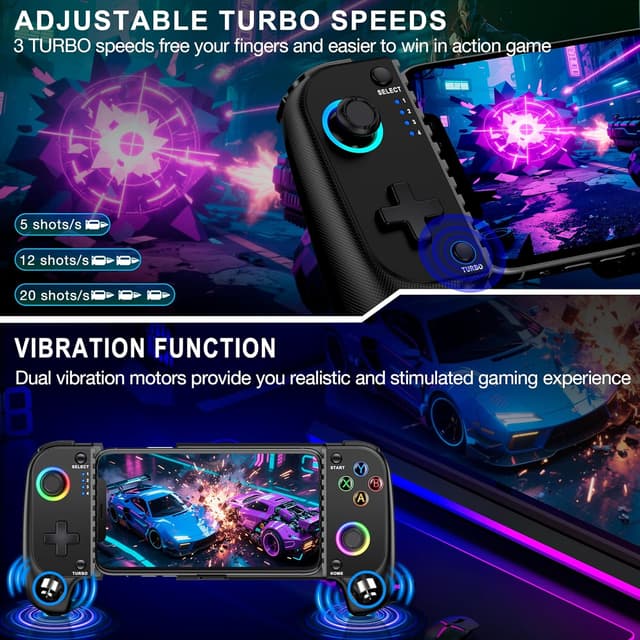
This model includes a turbo function and dual motor vibration.
Turbo is enabled by pressing the turbo button together with the button that needs a burst. The burst speed is split into three levels: 5/sec, 12/sec, and 20/sec. If your games involve repeated actions (things like rapid attacks or constant output mechanics), having a built-in burst can reduce strain and repeat-tapping.
Dual motor vibration is there to add feedback and immersion, which can be more than cosmetic in games that use rumble to communicate hits, impacts, or status.
One limitation to keep in mind: the description doesn’t say which games support vibration over controller input, so in practice it may work better with controller-friendly titles than with games that only partially map inputs.
Grip and phone fit: usable, but check your handset size
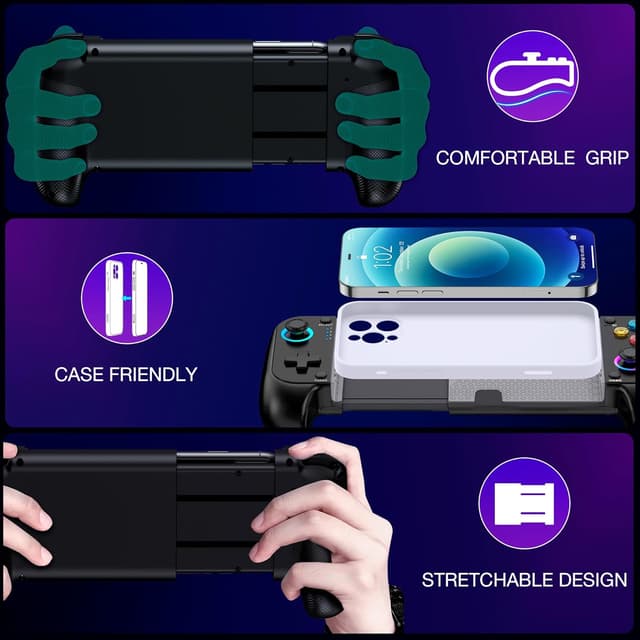
The controller uses a stretchable handle designed to support mobile phones from 10cm to 17.5cm in length. It’s also described as solid, with the phone not falling off easily, and you can play with a protective case.

The grip is textured and is described as anti-slip and anti-sweat, plus it has a comfortable, firm hold. There’s also 7 kinds of lights and RGB styling.

This is one of those “works great if it fits” situations. If your phone is significantly outside the stated length range, you may end up with a loose feel or an awkward fit. With a case, it still says you can play while wearing it, but the best approach is to measure your phone length and be realistic about how thick your case is.
What stands out, and what’s slightly less convincing
What’s likely to impress you: - Hall Effect joysticks aimed at reducing drift and improving long-term accuracy. - Wireless Bluetooth connection with a simple pairing and reconnect method. - Extra features (turbo, dual vibration, RGB) that can make controller play feel more “complete” than basic gamepads.
Where you may want to be cautious: - Compatibility is limited to games/platforms that natively support controller input on mobile. If your favourite titles don’t, the controller may be disappointing even if the hardware itself is solid. - The setup relies on Bluetooth pairing and reconnection habits (including automatic off if HOME is held for 5 seconds), so it may not feel as plug-and-play as a controller that always auto-connects.
Who it’s for (and who should probably skip it)
It makes sense if you mainly play controller-friendly mobile games via platforms listed in the description (or similar services) and you want more precise thumbstick control than touchscreen gestures.
It may not suit you if: - Your games are mostly touchscreen-only and don’t natively support controllers on mobile. - You want guaranteed vibration/turbo functionality across every title—because the description doesn’t confirm game-by-game support. - Your phone’s length (with or without case) sits uncomfortably outside the 10cm–17.5cm range.
If you’re browsing for a controller purely for casual browsing or very occasional play, you might find it’s more effort than it’s worth. But if you’re actually building regular sessions around controller-friendly titles, the hardware choices here do point in the right direction.