


FLEXISPOT Q3 Electric Standing Desk (Maple, 140 × 70 cm) with Drawer & USB charging
Product description
What it is and why people buy it
The FLEXISPOT Q3 is an electric sit-stand desk aimed at home office use, with a built-in drawer and integrated USB charging. On paper, it ticks a few boxes that matter day to day: you can move between seated and standing positions quickly, keep small work items close by, and charge devices without hunting for adapters.
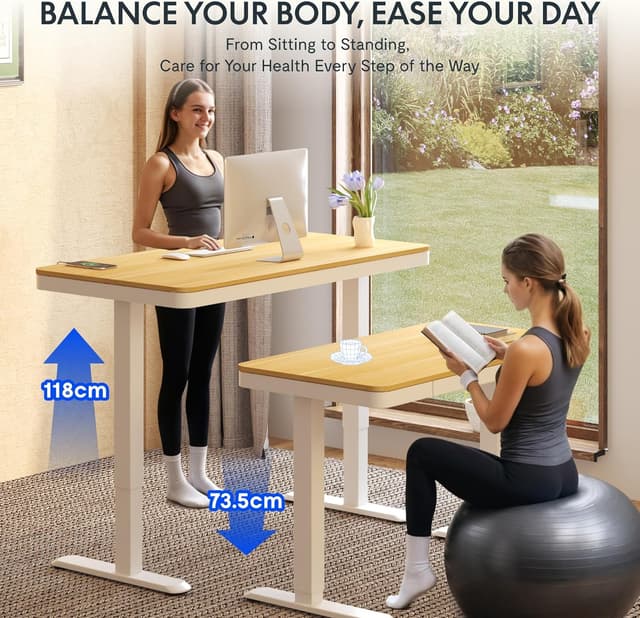
The design also reads as family-friendly. The adjustable range (73.5 to 118 cm) suggests it’s intended to suit different heights, rather than being a “one height fits all” setup. If you’re trying to build a healthier routine—alternating posture through the day—this kind of desk is usually more about consistency than dramatic ergonomic claims.
Key features that actually affect everyday use
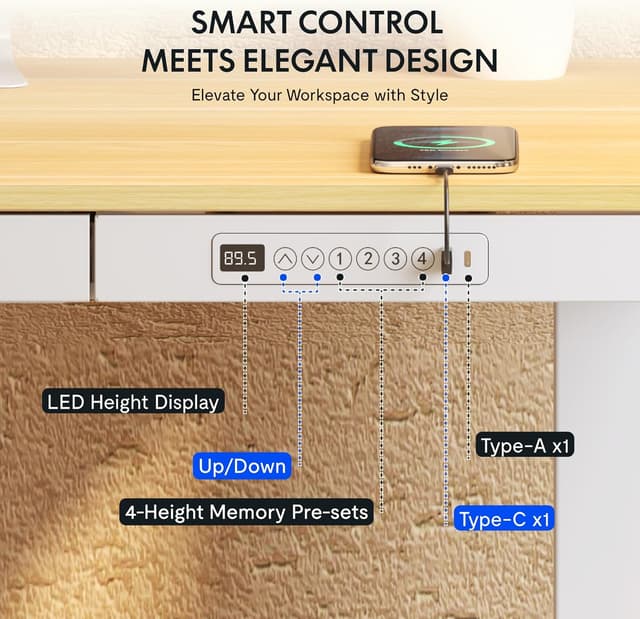
The biggest practical advantage here is the electric height adjustment with four programmable positions. Having preset heights can save you from repeating manual adjustments, especially if more than one person uses the same desk. It’s the sort of detail that becomes “normal” quickly, like choosing your preferred desk height and not thinking about it again.
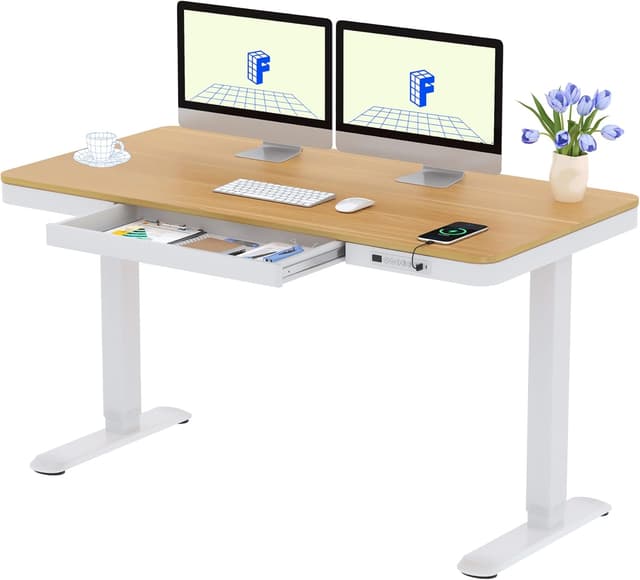
There’s also a smart control panel with integrated charging: USB Type-C and USB Type-A ports. That’s useful if you work with a laptop plus a phone/tablet, or if you want to keep cables tidier. Not everyone uses desk charging, but when you do, it reduces desk clutter and makes the desk feel more self-contained.
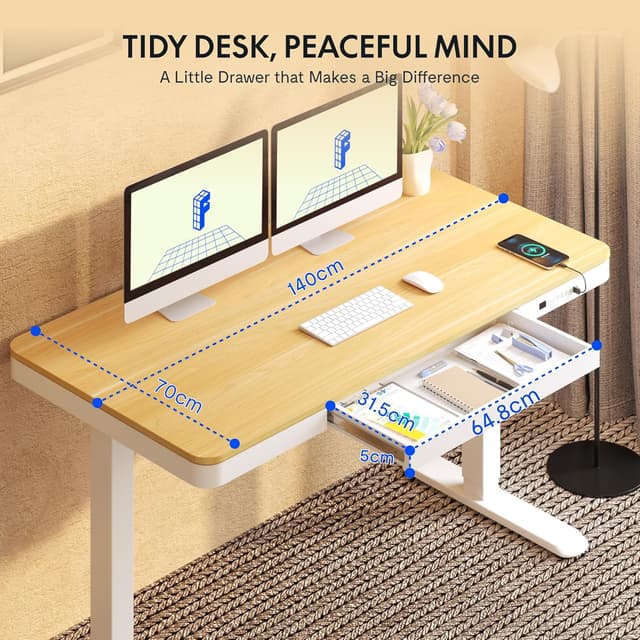
Storage is handled via an integrated drawer. It’s a sensible addition for keeping stationery, documents, or small devices organised. It won’t replace a proper filing cabinet, but it can keep the desktop clearer—particularly if your work involves paper or frequent hand tools.
The essentials: size, adjustment range, and setup
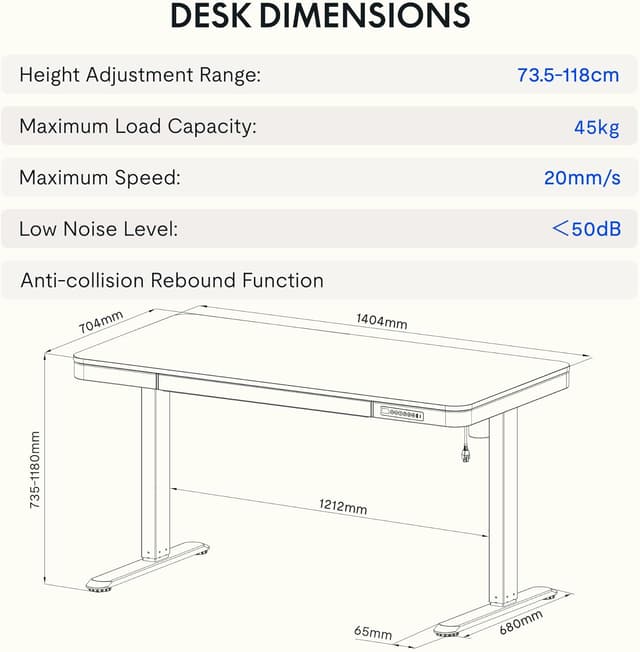
This model comes in a 140 × 70 cm top size, which should give you decent room for typical home office layouts (laptop, monitor stand, keyboard, and a bit of workspace). It’s not trying to be a tiny desk, but it also isn’t a huge workstation footprint.
The height adjustment range is listed as 73.5 to 118 cm with continuous, non-step adjustment. That means fine-tuning is possible rather than being limited to a handful of discrete stops.
On assembly, the brand claims it can be put together in just 10–15 minutes. That’s fast—so if you’re comfortable with basic flat-pack builds, this may be a smooth purchase. If you’re expecting something effortless with zero fiddly bits, it might still feel like a typical furniture build, speed depends a lot on your setup and experience.
Who it suits (and the kinds of buyers it matches)
It makes sense if you want an electric sit-stand desk for home office work and you’ll benefit from changing posture across the day. The programmable heights lean towards households where two people share the same workspace, or anyone who regularly moves between sitting and standing.
It also suits you if desktop charging is part of your workflow. For example, you might set your laptop at your standing height, keep your phone within reach, and top up via the Type-C/Type-A ports while you work.
And if you like having your “mess” in one controlled place, the drawer should help. Think spare pens, chargers, notepads, or small tech accessories you don’t want loose on the desk surface.
Where it may not be the best choice
It’s not necessarily the right pick if you’re only interested in occasional standing. If you’re likely to adjust once and then leave it alone for weeks, a simpler fixed-height desk could do the job with less complexity.
Also, while the adjustable range is broad, it depends on your exact height and how you like to position your keyboard and monitor. The 73.5–118 cm range covers a lot of people, but it still helps to check whether it will comfortably match your preferred working posture.
Finally, if you want more advanced desk features beyond programmable heights and charging—something like cable management systems beyond the drawer, or other upgrades—this model may feel more mid-range in what it includes.
Tech specs
- Type: Electric height adjustable sit-stand desk
- Name: FLEXISPOT Q3 Standing Desk
- Colour: Maple
- Dimensions: 140 × 70 cm
- Height adjustment range: 73.5–118 cm
- Control panel: Smart panel with four programmable height settings
- Charging ports: USB Type-C and USB Type-A
Mini FAQ
Is it easy to move between sitting and standing?
Yes, the desk is electric and you can use the control panel to adjust height. The four programmable settings are designed to make frequent switching simpler.
Does it charge devices while you work?
It includes USB Type-C and USB Type-A ports on the control panel, so you can charge multiple devices at the same time.
Will the drawer help keep a tidy desktop?
For small items like stationery and documents, yes. It’s practical storage, though it’s still a single drawer rather than a full storage system.
Is the height range suitable for multiple people?
The listed range (73.5–118 cm) is broad enough to suit different heights, and the preset positions make it easier when more than one person uses the desk.
Is it worth considering if you’re new to sit-stand desks?
It can be, because it covers the essentials: smooth height adjustment, presets, and basic organisation. Just make sure the range matches your preferred working posture before committing.
Final verdict
If you want an electric sit-stand desk with simple daily convenience—programmable heights, onboard USB charging, and a built-in drawer—the FLEXISPOT Q3 is a solid, practical option to consider for a home office. It’s especially compelling if the desk will be shared or if you like having charging and storage close to hand.
But if you only plan to stand occasionally, or you need very specific ergonomic setup support beyond height range and presets, you may find a simpler desk—or one with extra management features—better fits your priorities.