



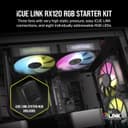


Corsair iCUE LINK RX120 RGB 120mm PWM fans, 3-pack 🎧

Reviews
Product description
Go to offerDescription:
This triple pack of 120mm PWM fans from Corsair brings focused airflow and vivid RGB lighting to compact or full-size PC builds, helping keep radiators and densely packed components cooler while adding visual flair. The iCUE LINK system lets you chain the fans together and connect them to the included system hub for centralised control, making fan management simpler in systems with multiple cooling elements.
Key Points
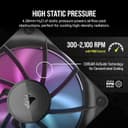
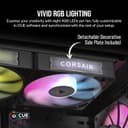
These fans reach up to 2,100 rpm under PWM control, supplying high airflow and static pressure for pushes through radiators and tight case layouts. According to the manufacturer, the series produces up to 74.2 CFM and 4.38 mm-H2O static pressure, which helps maintain performance in obstructed airflow scenarios. The integrated window in the frame showcases the RGB effects, while AirGuide anti-vortex blades concentrate airflow onto hot components for more effective cooling. 🔧
Technical Specifications
Name: Corsair iCUE LINK RX120 RGB
- Speed: up to 2,100 rpm
- Airflow: up to 74.2 CFM
- Static pressure: 4.38 mm-H2O
- Bearing: Magnetic Dome Bearing
- Dimensions: 120 mm fan size
Usage Recommendations
For radiator mounting, align the fans so the AirGuide blades push air through the fin stack to take advantage of the reported static pressure. When installing multiple fans, use the iCUE LINK bridges to connect them in sequence and plug the single cable into the iCUE LINK System Hub for consolidated lighting and speed control. Keep in mind that high RPM operation increases noise levels, so PWM control is useful to balance acoustics and cooling based on workload. 🎛️
Advantages
The set combines mechanical performance with lighting customisation, letting users adjust fan curves and RGB scenes from Corsair’s iCUE software when the system hub is in place. Magnetic dome bearings are specified to reduce friction and improve longevity compared with basic sleeve bearings, and the compact windowed frame helps spread RGB illumination laterally for cases with side panels. Note that full software control requires connection to the iCUE LINK System Hub and the Corsair iCUE application, according to the manufacturer. 🌈.
