






BLANBOK+ MFi USB Stick 512GB for iPhone 📱

Description:
This compact USB stick for iPhone makes it simple to back up photos, videos and contacts on the move, with a high-capacity 512 GB option that frees up internal storage and speeds up file transfers. It is useful for people who need extra photo storage for travel, events or everyday use and works across iPhone, iPad, Android and PC platforms with the appropriate adapters.
Key Points
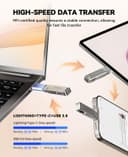
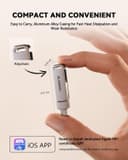
The drive connects to devices via Lightning, USB Type C and standard USB with supplied adapters, allowing direct file transfer without a cable or cloud service. According to the manufacturer, the unit uses high-quality flash memory chips and a high-speed transfer port to handle large files and HD video with reduced wait times. The product includes a keychain design for portability and claims enhanced resistance to heat, water, dust, drops and magnetic interference, which increases durability for everyday carry. For iPhone and iPad use you will need to download the Luxsync Pro app from the App Store, while many Android devices will work via OTG with no extra app required. 📷
Technical Specifications
- Name: BLANBOK+ MFi Certified USB Stick 512GB
- Capacity: 512 GB
- Interfaces: - Lightning, Type C, USB (adapters included)
- Compatibility: - iOS 7.1.2 or later for iPhone/iPad, OTG-enabled Android phones, Windows and macOS computers
- App required for iOS: - Luxsync Pro (available on the App Store)
Benefits
This memory stick helps clear phone storage quickly by moving large photo and video files off the device, which can improve performance and create space for new apps and media. The MFi certification means the Lightning connection meets Apple’s accessory requirements according to the manufacturer, which can reduce compatibility issues compared with non-certified alternatives. The option to encrypt the whole app or particular files adds a layer of privacy control for sensitive content. ⚙️
Usage Recommendations
Install the Luxsync Pro app on iPhone or iPad before first use to access backup and file management functions. For Android phones, ensure OTG is enabled in the settings if transfers do not start automatically. Consider the physical protection claimed by the manufacturer when carrying the stick on a keyring, and be aware that encryption and app-based management may affect transfer speed depending on file size and device performance.
